As Amazon Associates, we earn from qualifying purchases. This means we may receive a small commission at no extra cost to you if you click through and make a purchase.
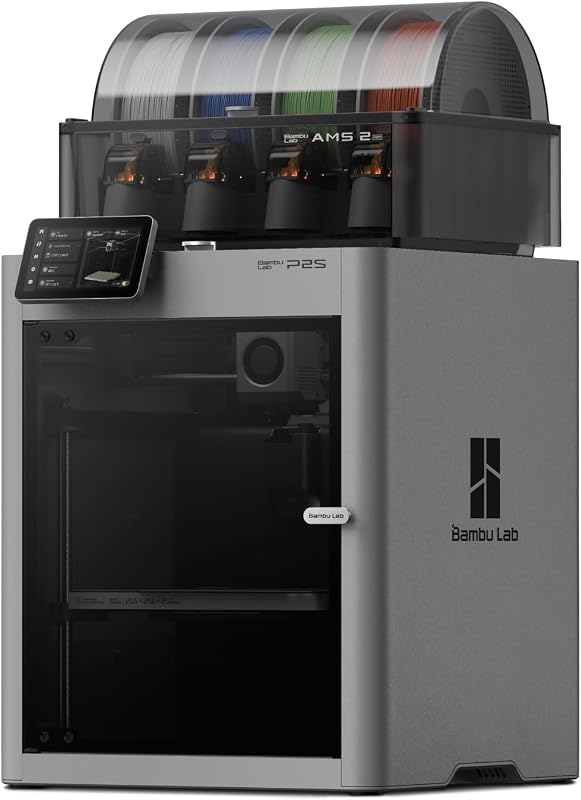
Maker studios and digital creators frequently encounter a major bottleneck when transitioning concepts into physical objects. Conventional desktop 3D printers often require endless bed leveling adjustments, manual flow rate tuning, and separate dry boxes that crowd limited workspace counters. When tight project deadlines loom, creators need an automated production tool that delivers reliable parts without consuming valuable hours on hardware maintenance.
The Bambu Lab P2S resolves these frustrations by combining an enclosed build environment, rapid automated calibration, and intelligent material management. Engineered specifically for high-tempo maker workflows, this FDM platform blends high operating speeds with heated filament conditioning. The short verdict is that the P2S stands out as an exceptionally capable production workhorse for designers who want dependable mechanical prototypes and clean multi-material prints without routine troubleshooting delays.
Quick Verdict
The Bambu Lab P2S delivers an exceptional balance of production speed, surface precision, and hands-off usability. Designed to streamline rapid prototyping and multi-color production, it eliminates the tedious mechanical calibration steps that typically slow down creative projects.
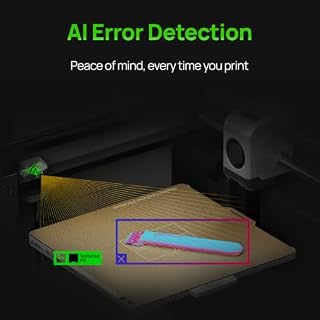
- Fast 15-minute out-of-the-box setup with automated calibration and AI failure detection
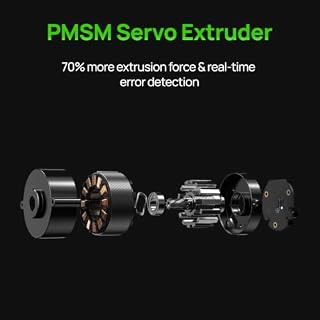
- PMSM servo extruder and active flowrate compensation ensure crisp corners and uniform layers
- Enclosed chamber with adaptive airflow supports both standard and technical filaments up to 50 °C
- AMS 2 Pro integration enables multi-color fabrication alongside 65 °C active filament drying
Bambu Lab P2S Features Explained
PMSM Servo Extruder and Active Flowrate Compensation
At the mechanical core of the machine is a permanent magnet synchronous motor (PMSM) servo extruder. Unlike standard open-loop stepper motors that can lose steps under heavy acceleration, servo motors provide closed-loop position and torque feedback. This immediate feedback loop allows the drive gears to modulate material delivery with incredible precision, ensuring consistent extrusion pressure across rapid speed transitions and complex geometry paths.
Working alongside this servo drive is the advanced Bambu Lab P2S active flowrate compensation algorithm. Instead of applying static pressure advance assumptions, the firmware actively monitors nozzle resistance and adjusts extrusion rates dynamically. This keeps sharp perimeters, delicate lettering, and functional mechanical tolerances perfectly crisp, preventing the unsightly corner bulging and seam gaps that commonly occur during high-acceleration runs.
High-Speed Mechanical Architecture and Bambu Lab P2 Print Speed
High turnaround speed defines studio productivity, and the Bambu Lab P2 print speed tops out at an impressive 600 mm/s. Reaching such velocity without introducing ghosting or layer shifting requires an exceptionally rigid motion structure. The enclosed chassis dampens mechanical vibrations during rapid directional changes, preserving surface quality even when accelerating aggressively across dense infill patterns and outer perimeters.
For creators iterating on custom camera mounts or mechanical enclosures, this high throughput fundamentally reshapes daily production. Rather than running a single draft overnight, design revisions can be evaluated and refined multiple times in a single afternoon. When compared against open-frame bedslingers like the Bambu Lab A1, the rigid kinematics of the P2S provide the stability necessary to maintain top-end speeds consistently on taller builds.
Rapid 15-Minute Deployment and Bambu Lab P2 Setup Time
Traditional 3D printer kits often consume entire weekends with frame squaring, wiring routing, and endless manual bed leveling routines. In contrast, the Bambu Lab P2 setup time is engineered for immediate productivity, allowing makers to unbox the unit and launch their first test print in just 15 minutes. The physical assembly requires minimal tool work, making advanced additive manufacturing approachable even for newcomers.
Unlike open-gantry designs such as the A1 Mini 3D printer, this enclosed system features fully automated sensor-driven bed leveling, vibration resonance testing, and integrated quick-swap nozzles that let you change nozzle sizes in seconds. Built-in AI failure detection continuously monitors the print volume, automatically alerting you to extrusion errors or layer anomalies before material is wasted.
AMS 2 Pro Integration and Multi-Color Capabilities
Multi-material printing frequently challenges creators due to moisture absorption and messy color changeovers. The Bambu Lab P2S ams 2 pro combo tackles this operational headache by housing an integrated active drying system that operates at temperatures up to 65 °C. By driving ambient humidity out of filament spools during storage and mid-print pauses, the AMS 2 Pro prevents moisture-induced bubbling, stringing, and brittle extrusion paths.
This consistent conditioning is essential for reliable Bambu Lab P2S multi color printing across complex decorative props and presentation prototypes. Makers can blend up to four distinct material channels or utilize dedicated breakaway support filaments for effortless overhang removal. Note that standalone P2S units cannot execute multi-spool transitions independently; multi-color capability requires the dedicated AMS 2 Pro hardware provided in the combo package.
Adaptive Airflow and Enclosed Chamber Regulation
Balancing the thermal environment is critical when handling different polymer classes. The Adaptive Airflow System on the P2S automatically regulates internal cooling and heat retention based on the filament in use. When fabricating fine overhangs with standard PLA, dedicated cooling ducts direct chilled air onto the molten plastic to solidify complex bridges instantly.
When processing engineering-grade filaments prone to warping and layer separation, the system seals and maintains an internal chamber temperature up to 50 °C. This stable thermal envelope shields prints from studio drafts and encourages uniform cooling. An integrated activated carbon filter scrubs exhaust air before it exits into your room, keeping studio air clean during long production cycles.
Integrated Software and the Bambu Lab P2S Workflow
A seamless production pipeline bridges the gap between digital modeling and physical fabrication. The Bambu Lab P2S workflow relies on Bambu Studio for detailed desktop slicing alongside the Bambu Handy smartphone application for mobile management. Designers can slice geometry, queue jobs over local wireless connections, and monitor build status remotely using live camera feeds.
Direct integration with the MakerWorld platform grants access to more than one million ready-to-print models, complete with pre-configured slicing profiles that take the guesswork out of print settings. With a single tap, verified parameters are sent straight to the printer, saving significant preparation time. This unified software ecosystem makes the Bambu Lab P2S for creators an efficient tool for turning digital concepts into finished products.
Specs
Reviewing the official Bambu Lab P2S specs outlines the hardware capabilities and physical requirements of this enclosed system.
| Feature Specification | Manufacturer Detail |
|---|---|
| Maximum Print Speed | Up to 600 mm/s |
| Extrusion Technology | PMSM Servo Extruder with Active Flowrate Compensation |
| Initial Setup Time | Ready to print in 15 minutes |
| Multi-Color Hardware | AMS 2 Pro integration (Combo version required) |
| Filament Drying Capability | Active drying up to 65 °C in AMS 2 Pro |
| Chamber Temperature | Up to 50 °C with Adaptive Airflow System |
| Air Filtration | Integrated activated carbon filter |
| Product Dimensions | 18 inches D x 22 inches W x 18 inches H |
| Item Weight | 46.3 pounds |
| Operating System Compatibility | Windows 10 |
Figures quoted from the product listing. Nothing here was measured.
Bambu Lab P2S Pros and Cons
Pros
- Up to 600 mm/s print speed
- Active flowrate compensation with PMSM servo extruder
- Ready to print in 15 minutes
- AMS 2 Pro filament drying up to 65 °C
- Enclosed build chamber heating up to 50 °C
Cons
- Multi-color printing requires Combo version
- Supported operating system listed only for Windows 10
- Chassis weight is heavy at 46.3 pounds
Best Use Cases
- Rapid functional prototyping where high print velocity and dimensional precision accelerate product development cycles.
- Multi-material display models that demand clean color transitions without the need for manual post-print painting.
- Engineering-grade component fabrication that benefits from an enclosed 50 °C chamber to mitigate warping risks.
- Creator studio production runs where automated AI failure detection prevents unmonitored material waste.
- Technical nylon and hygroscopic polymer printing supported by the integrated 65 °C filament drying chamber in the AMS 2 Pro.
Before You Buy
Before adding this machine to your studio, consider your workspace layout and physical bench support. With outer dimensions measuring 18 inches deep, 22 inches wide, and 18 inches high, and an overall weight of 46.3 pounds, the P2S demands a sturdy, vibration-dampened workbench. In terms of software connectivity, the listing explicitly notes Windows 10 support alongside smartphone integration, so studios running alternative desktop platforms should keep these system details in mind.
You should also verify your material requirements prior to purchase. While open-format solutions like the Bambu Lab A1 Combo provide accessible multi-color printing, the P2S platform offers an enclosed environment suited for technical filaments. However, multi-material printing requires the Combo version with the AMS 2 Pro, as the base printer does not support multi-color printing independently. Additionally, the listing does not specify internal build volume dimensions, maximum hotend temperatures, or bundled filament spools.
Bottom Line
The Bambu Lab P2S bridges the gap between consumer accessibility and industrial-grade reliability. By pairing a 600 mm/s top print speed with active flowrate compensation and an enclosed 50 °C thermal chamber, it eliminates the calibration headaches that historically plagued desktop 3D printing. Digital creators and busy makers can focus on physical design iterations rather than endless machine maintenance.
When equipped with the AMS 2 Pro, the platform becomes a comprehensive multi-color fabrication station backed by active 65 °C filament drying. For maker workshops seeking fast turnaround times, dependable automation, and clean surface finishes, the P2S represents an outstanding production upgrade.
FAQ
Is the Bambu Lab P2 worth it for maker studios?
For creators and prototyping studios that require high throughput without constant manual adjustments, the platform is well worth the investment. The combination of a 15-minute setup, active flowrate compensation, and rapid 600 mm/s printing delivers reliable parts quickly. Adding the AMS 2 Pro brings active filament drying up to 65 °C and automated multi-color switching, streamlining complex studio production runs.
Can the Bambu Lab P2S print multi-color models without the AMS 2 Pro?
No, the standalone P2S 3D printer does not support multi-color printing on its own. Multi-color and multi-material functionality requires the AMS 2 Pro unit included in the Combo version, which manages automatic filament retraction, feeding, and spool drying.
How does active flowrate compensation enhance print quality?
Active flowrate compensation works alongside the PMSM servo extruder to dynamically adjust extrusion rates according to real-time nozzle backpressure. This real-time regulation prevents excessive plastic buildup at sharp directional changes and avoids under-extrusion along long straightaways, resulting in crisp corners, uniform wall thickness, and clean cosmetic seams.
What materials can you run inside the enclosed chamber?
The enclosed build chamber can reach temperatures up to 50 °C while utilizing an Adaptive Airflow System and carbon air filtration. This setup allows makers to print standard filaments like PLA with ample cooling, as well as engineering-grade materials that require higher ambient heat to prevent warping and layer delamination.
What software and operating systems does the P2S support?
The machine integrates directly with Bambu Studio for desktop slicing and the Bambu Handy application for smartphone control. The manufacturer specifications explicitly list Windows 10 as the supported operating system, with remote monitoring and one-click printing supported through the MakerWorld model repository.