As Amazon Associates, we earn from qualifying purchases. This means we may receive a small commission at no extra cost to you if you click through and make a purchase.

Creative workspaces, photography studios, and editing suites accumulate a deceptive amount of daily debris. Cardboard shavings from unboxing video gear, stray gaffer tape backing, fine dust motes from light modifiers, and tracked-in workshop dirt constantly settle across floorboards and low-pile carpets. When your workday revolves around shooting content, tinkering with hardware, or editing footage, interrupting a creative flow to push a manual stick vacuum around C-stands and equipment cases is frustrating. The iRobot Roomba 105 addresses this exact friction point by bringing dedicated laser-guided mapping and automated floor maintenance into demanding environments. Instead of bouncing randomly off gear cases or getting tangled in obvious open floor hazards, this platform focuses on systematic row-by-row coverage that cleans workspaces without requiring continuous supervision.
Our initial evaluation reveals that the machine successfully combines high-performance vacuuming mechanics with advanced navigation software, making it a reliable solution for creators seeking tidy floors with minimal personal intervention. With intensive suction power rated far above older legacy platforms, clear boundary customization through digital keep-out zones, and a dedicated local spot treatment mode, the automated vacuum performs reliably across mixed surfaces. For creators who want a clean studio floor for low-angle gimbal tracking shots or simply prefer an orderly work environment, this floor cleaner proves to be a capable, autonomous utility. In this comprehensive i robot roomba 105 review, we break down how its features translate to real-world performance, workspace utility, and daily maintenance.
Quick Verdict
The robotic cleaner delivers an exceptional balance of precise LiDAR guidance, structured row cleaning, and dependable suction power tailored for mixed-surface workspaces. It systematically navigates around bulky equipment and furniture, tackles persistent floor dust with its multi-stage agitation system, and offers flexible scheduling to keep active studios clean outside of production hours.
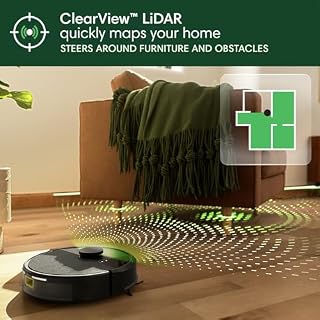
- ClearView LiDAR system creates accurate spatial floor maps and cleans in organized, efficient parallel rows.
- Three-stage cleaning architecture provides seventy times more power-lifting suction than legacy 600 series models.
- Targeted five-minute spot cleaning and app-based keep-out zones safeguard sensitive gear while addressing isolated messes.
- Automatic recharge-and-resume capability ensures complete coverage across multi-room studio layouts without human intervention.
iRobot Roomba 105 Features Explained
ClearView LiDAR Navigation and Intelligent Spatial Mapping
The foundation of the Roomba 105 LiDAR navigation system is its top-mounted ClearView LiDAR module, which continuously scans the surrounding perimeter to generate detailed visual representations of your floor plan. For creative studios packed with tripods, lighting stands, roll-away workstations, and gear bags, standard bump-and-turn navigation robots often cause chaos by repeatedly colliding with fragile equipment. This model eliminates erratic pathing by establishing a structured cleaning strategy, moving in neat, predictable parallel lines that ensure every open inch of flooring is covered without redundant passes over previously cleaned territory.
In addition to room mapping, the navigation sensor suite includes specialized downward-facing anti-fall cliff sensors designed to prevent falls down open steps or steep studio loft stairs. As the robot traverses open hard floors and rugs, the navigation algorithms make dynamic micro-adjustments around stationary obstacles, gliding cleanly along baseboards and large furniture footings. Because the machine builds a persistent layout in its software, users can monitor where the robot operates and predict its trajectory, preventing the unexpected equipment collisions that frequently plague less sophisticated vacuum systems.
Three-Stage Cleaning System and Elevated Suction Capability
Floor cleanliness in a production environment directly affects your camera equipment and fine mechanical gear, as airborne dust and carpet grit easily migrate into lens barrels and cooling fans. The iRobot Roomba 105 suction power addresses this challenge through an engineered 3-stage cleaning system that pairs an edge-sweeping side brush with a specialized multi-surface brush roll. The mechanical architecture achieves seventy times more power-lifting suction compared to standard Roomba 600 series robots, dislodging deep debris, pet fur, and embedded lint from carpet fibers while sweeping fine particulate off hard wood and laminate boards.
This coordinated cleaning mechanism allows for seamless Roomba 105 multi surface cleaning as the drive chassis transitions smoothly between polished studio concrete, engineered hardwood, and low-pile utility carpets. The edge-sweeping brush reaches along wall lines and gear shelf kickplates, flicking scattered debris inward toward the high-speed main brush and vacuum channel. For quieter operation during recording sessions or when handling light daily dust, the machine also features a built-in Eco Mode, which dials back power consumption while maintaining consistent debris capture across standard hard surfaces.
Roomba Home App Customization and Digital Keep-Out Zones
The digital management of your cleaning tasks takes place entirely within the Roomba Home App, which serves as the central command post for routine floor care. During the initial Roomba 105 app setup, the robot travels across the workspace to compile an initial footprint, which users can then break down into labeled rooms, zones, and schedules. For creators operating in dynamic spaces, the application provides live time estimates for specific cleaning runs, displays remaining filter life, and allows users to increase or decrease the number of cleaning passes per room depending on seasonal foot traffic.
One of the most practical software tools for studio environments is the ability to draw custom keep-out zones directly on the interactive floor map. If you have permanent cable raceways, low-hanging backdrop paper rolls, or delicate audio patch bays set up on the floor, you can define virtual boundaries that the robot will completely avoid. This software precision eliminates the necessity of physically barricading off sensitive parts of your room before launching a cleaning cycle. Creators evaluating specialized equipment configurations might also compare these layout features to alternatives like the irobot roomba 205 dustcompactor when planning their smart studio ecosystem.
Dedicated Spot Cleaning and Integrated Dirt Detection
Accidental spills are routine when working on set, whether dealing with dropped foam core cuttings, scattered dried potting soil from an indoor set shoot, or dry craft materials. Rather than deploying an entire whole-floor clean, users can trigger the Roomba 105 spot cleaning function to handle localized debris fields instantly. Once positioned or directed to a high-traffic mess, the robot repeatedly focuses on that isolated spot for up to five minutes, thoroughly agitating and vacuuming the concentrated area until the mess is resolved.
Complementing this manual trigger is an integrated Dirt Detection Sensor built directly into the vacuum channel. When operating on standard automated passes, this sensor actively identifies areas containing higher concentrations of dirt particles and automatically prompts the robot to make deeper, more deliberate scrubbing movements over that specific patch of floor. Once the dirt levels decrease to normal baselines, the robot resumes its regular grid pattern, ensuring that high-traffic entryways or editing desk zones receive proportional attention without unnecessary manual intervention.
Multi-Method Controls and Autonomous Recharge and Resume
Controlling the robot integrates cleanly into busy daily routines thanks to three distinct operational interfaces. Users can manage floor runs through voice commands using Alexa, Siri, or Google Assistant-enabled devices, initiate custom runs via the smartphone application, or simply tap the physical push buttons located directly on the robot chassis for quick start-and-stop commands. This flexibility allows you to trigger a cleaning sequence completely hands-free while your hands are busy swapping camera lenses or soldering electronic components.
To support larger multi-room layouts or extended studio spaces, the unit incorporates an intelligent recharge-and-resume workflow. If the battery depletes midway through a comprehensive cleaning cycle, the vacuum navigates itself back to its charging base, replenishes its power reserves, and promptly returns to the exact coordinates where cleaning was paused. This eliminates incomplete cleaning jobs and ensures large production areas are completely serviced without requiring user reminders or repositioning.
Specs
A comprehensive examination of the i robot roomba 105 specs provides a clear look at the hardware components and technological features driving this robotic cleaning platform.
| Attribute | Detail |
|---|---|
| Brand | iRobot |
| Model Name | Roomba 105 Vac |
| Color | Black |
| Navigation Technology | ClearView LiDAR Navigation |
| Cleaning Architecture | 3-Stage Cleaning System |
| Suction Level | 70X more power-lifting suction than Roomba 600 series |
| Brush System | Multi-Surface Brush and Edge-Sweeping Brush |
| Surface Compatibility | Carpet and Hard Floor |
| Wireless Connectivity | 2.4 GHz Wi-Fi Network Required |
| Voice Platform Support | Alexa, Siri, and Google Assistant-enabled devices |
| Special Operational Features | Anti-Fall Sensors, Dirt Detection, Eco Mode, Spot Cleaning, Bagless |
Figures quoted from the product listing. Nothing here was measured.
iRobot Roomba 105 Pros and Cons
Pros
- Precise ClearView LiDAR navigation and mapping
- 70X suction boost over 600 series
- Dedicated five-minute spot cleaning mode
- Customizable keep-out zones via app
- Automatic recharge and resume capability
Cons
- Requires 2.4 GHz Wi-Fi network
- Listing omits exact dustbin capacity
- Lacks integrated wet mopping hardware
Best Use Cases
- Maintaining dust-free hardwood or laminate flooring in photography and videography studios to keep camera equipment clean.
- Automating scheduled overnight floor care across home offices, hobby maker spaces, and editing suites.
- Handling high-traffic craft workshops where dried debris, cardboard remnants, and dust gather around workbenches.
- Managing multi-room domestic layouts with a mix of area rugs, low-pile carpets, and bare floors using intelligent room targeting.
- Clearing up concentrated dry messes quickly using the localized five-minute spot cleaning function.
Before You Buy
Before integrating this robotic vacuum into your creative setup, you should evaluate your current home or studio networking environment. The Roomba 105 requires an active 2.4 GHz Wi-Fi connection for initial setup and ongoing cloud communication. While your smartphone can return to a standard 5 GHz network band after setup is complete, the vacuum itself relies strictly on 2.4 GHz signals. Furthermore, the unit is engineered exclusively as a dry vacuuming solution; it does not incorporate mopping functionality or a self-emptying base station. Creators looking for hybrid wet-dry solutions or extensive self-emptying docks might consider multi-function alternatives such as the irobot roomba 415x robot vacuum & mop combo, 20,000pa suction, 90 days self-emptying, multifunction, which targets wet mopping workflows alongside standard dry suction.
Additionally, prospective buyers should note that the official listing does not specify several technical parameters, including the exact dustbin volume in milliliters, battery capacity in milliampere-hours, overall runtime per charge, or decibel ratings. Because the robot features a bagless design, manual dustbin dumping is required after heavy cleaning cycles, especially in spaces generating large volumes of packaging fibers or workshop scrap. For studios with heavy cable runs, users must proactively configure virtual keep-out zones within the app, as the listing does not specify low-profile cable-snag avoidance hardware beyond standard LiDAR obstacle navigation and downward cliff detection.
Bottom Line
Determining whether the machine fits your setup comes down to your space requirements and how much you value automated, precise navigation. In answering the question of whether the machine is worth it, the combination of ClearView LiDAR guidance, neat parallel rows, and seventy times more suction power than older entry-level vacuums makes it a very compelling tool for creators who need clean floors with zero manual effort. The ability to isolate sensitive studio equipment with digital keep-out zones and handle sudden workshop spills via spot cleaning delivers tangible workflow improvements for busy professionals.
While creators working in large commercial studios might eventually consider premium self-draining systems such as the roomba® j9+ & braava jet® m6 bundle, this stand-alone vacuum provides all the essential core mechanics needed for reliable daily maintenance. With disciplined scheduling, straightforward smartphone controls, and reliable multi-surface agitation, it keeps dust, grit, and packaging remnants off your workspace floor so you can focus entirely on your creative output.
FAQ
How does Roomba 105 LiDAR navigation handle studio clutter?
The ClearView LiDAR system actively scans room geometry to construct a digital map, allowing the robot to steer around large gear cases, furniture legs, and light stands in organized rows. While it detects and avoids bulky stationary obstacles, users should clear loose power cables and camera straps off the floor or designate virtual keep-out zones in the app to prevent mechanical tangles.
What network is required for Roomba 105 app setup?
The robot requires a standard 2.4 GHz Wi-Fi network for its initial connection and daily operational commands. During the setup process, your smartphone must connect to the 2.4 GHz band, but once configuration is finalized in the Roomba Home App, your phone can safely return to a 5 GHz wireless network without interrupting robot communication.
How does Roomba 105 spot cleaning work during production messes?
The dedicated spot cleaning feature instructs the vacuum to focus its 3-stage cleaning system and power-lifting suction on an isolated floor section. Once activated, the machine repeatedly covers a concentrated area for up to five minutes, thoroughly agitating and pulling up heavy debris such as spilled potting soil, cardboard flakes, or workshop shavings.
What does Roomba 105 maintenance involve?
Routine Roomba 105 maintenance consists of manually opening and emptying the bagless internal dustbin, wiping off the optical navigation and cliff sensors, and clearing wound hair or studio fibers from the multi-surface and edge-sweeping brushes. The Roomba Home App also tracks filter condition and alerts you when the filter requires cleaning or replacement.
Is i Robot Roomba 105 worth it for carpet and hard floors?
Yes, the robot is built specifically for carpet and hard floor surfaces, utilizing a multi-surface brush roll that lifts dirt from low-to-medium pile carpets while sweeping bare wood, tile, and laminate floors cleanly. The high suction power and automatic surface transitions make it an effective automated maintenance tool across varied studio and residential layouts.