As Amazon Associates, we earn from qualifying purchases. This means we may receive a small commission at no extra cost to you if you click through and make a purchase.
Content creators, remote video editors, and live streamers often work within isolated home studios where staying aware of the surrounding environment is a challenge. When headphones are on, acoustic dampening panels are mounted, and multiple production monitors demand full attention, stepping away to check the front hallway, supervise pets in the editing lounge, or see who just entered the workspace breaks deep creative focus. Traditional security cameras often complicate this balance by demanding constant smartphone checks, pushing intrusive alerts, or trapping users in dedicated, siloed mobile apps. The Roku Indoor Camera aims to resolve this workspace friction by blending standard desktop security with television ecosystem integration, giving creators an ambient way to supervise their perimeter without leaving their production seats.
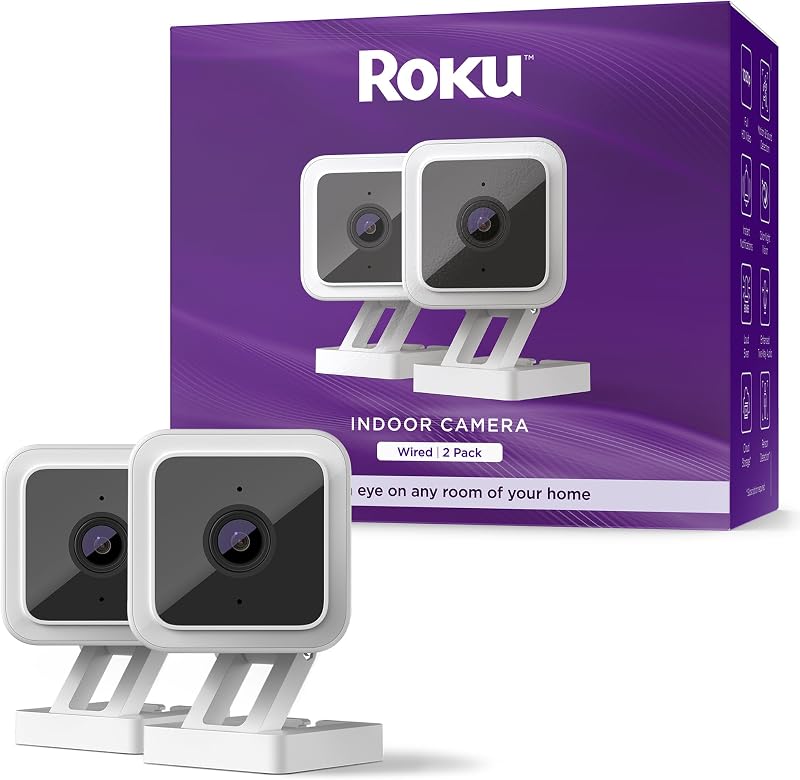
Supplied as a two-camera package, the Roku Indoor Camera 2-pack targets users who already rely on Roku streaming players or connected television displays in their living rooms, editing suites, or hobby spaces. With 1080p high-definition video capture, color night vision bolstered by an internal low-light amplifier, and direct remote-control streaming on connected television screens, the hardware delivers strong visual surveillance across multi-room creator layouts. While it relies on continuous corded electric power and locks advanced object filtering behind an optional recurring service plan, its core utility as an immediate, television-friendly room monitor makes it a compelling functional addition for visual artists, hobbyists, and home-based creative professionals.
Quick Verdict
The Roku Indoor Camera provides a dependable, easily managed dual-camera surveillance package tailored specifically for households and studios that utilize Roku OS displays and streaming hardware. Its integration of direct television playback via remote or voice commands sets it apart from standard mobile-only cameras, allowing video creators and hobbyists to monitor equipment, entrances, and adjacent living quarters with minimal friction while remaining productive at their workstations.
- Instant television monitoring lets creators pull camera feeds directly onto Roku TV screens and streaming players using voice commands or the standard remote control.
- Color night vision backed by a low-light amplifier captures clear 1080p HD visual feeds in dim production rooms and darkened studio corners.
- Dual-camera packaging covers two separate studio angles or rooms out of the box with dedicated power supplies and mounting kits.
- Continuous corded electric power eliminates battery maintenance cycles, though physical placement is restricted to six feet from an electrical outlet.
Roku Indoor Camera Features Explained
Television and Voice Ecosystem Integration
The defining capability of the Roku Indoor Camera for home studio setups is its native compatibility with Roku streaming devices and Roku TV displays. While most compact surveillance units require users to unlock a smartphone, navigate a third-party application, and hold a handheld display, this system allows visual monitoring directly through television hardware. Using a Roku remote or voice input through Roku Voice, Google Assistant, or Alexa, users can instantly bring up a live 1080p feed on their primary or secondary television monitors. For video editors rendering long timelines or streamers broadcasting from a closed studio, checking a hallway or an adjacent gear storage area requires nothing more than a quick click of a remote control.
Beyond remote integration, the companion Roku Smart Home mobile application provides remote oversight when creators step away from their workstations. The mobile application delivers real-time notifications, facilitates configuration adjustments, and acts as a central control panel for multi-camera setups. This dual-access structure ensures that whether you are actively sitting in front of a secondary client review monitor or walking around a production set, visual access to your studio entrance and high-value gear remains immediately accessible.
Color Night Vision and Optical Clarity
Visual fidelity is essential when monitoring equipment racks, 3D printing beds, or studio access doors in dimly lit environments. The Roku Indoor Camera captures footage in 1080p HD resolution using an efficient MP4 video capture format. Rather than relying entirely on standard black-and-white infrared night vision that obscures crucial details, this unit features a specialized low-light amplifier. The optical amplifier captures twice as much light as traditional baseline sensors, enabling full color night vision in dark hallways, unlit editing suites, and shadowy workshops.
A broad 120-degree field of view ensures that placing a single camera in the corner of a room covers wide studio spaces without significant edge distortion. In comparison to alternative compact desktop cameras such as the camera wyze cam og, the optical tuning here is geared toward high-contrast indoor visibility. Creators working under moody accent lighting or operating background render rigs overnight can clearly differentiate cables, equipment indicators, and moving subjects without needing to flood the space with artificial overhead illumination.
Motion, Sound, and Smoke Alarm Detection
Effective studio monitoring depends on accurate alert filtering so creative professionals are not disrupted by false notifications. The Roku wired indoor camera motion detection system incorporates rapid-response motion and acoustic sensors that transmit alert flags to your mobile device within seconds of an event. To minimize disruptions caused by moving acoustic curtains, spinning desk fans, or computer monitor flickers, the software allows users to designate customized motion detection zones. Restricting active sensing fields solely to door thresholds or equipment drawers prevents notification fatigue during intensive work sessions.
In addition to basic movement tracking, the camera includes an audio monitoring feature programmed to identify smoke and carbon monoxide alarms. If a standard acoustic safety alarm sounds elsewhere in the building, the camera registers the specific tone and issues an emergency notification to the user’s phone. For makers operating high-heat fabrication equipment, laser cutters, or extended rendering workstations unattended, this acoustic detection acts as an extra layer of ambient studio awareness.
Two-Way Audio and Integrated Safety Deterrence
Communication between isolated production rooms and general living spaces is streamlined via the camera’s built-in two-way audio system. Creators wearing monitoring headphones can utilize the mobile app to converse with visitors at the studio door, direct couriers dropping off camera gear, or speak to family members without leaving their desks. The audio channel maintains clear vocal pickup, serving as a functional internal intercom between separated work areas and common household zones.
When physical deterrence is required, the camera features an integrated 80 dB siren. Controllable directly through the mobile interface, the siren can be manually triggered to deter unauthorized intruders around sensitive production gear or dissuade domestic pets from approaching delicate cabling, lighting stands, and desktop hardware. Having an active acoustic deterrent built directly into the housing provides peace of mind when studio spaces are left unattended during travel or off-site production shoots.
Roku Smart Home Camera Setup and Cloud Tiering
The physical and digital onboarding process for the camera is engineered for straightforward execution. The Roku smart home camera setup workflow provides step-by-step visual instructions, photographs, and video guidance within the mobile application. Connecting the camera to a standard home Wi-Fi network takes only a few minutes, after which the camera can be placed on a desk, bookshelf, or affixed to drywall using the supplied screw-in wall mount kit. With compact physical dimensions measuring 2.1 by 2 by 2.3 inches, the small box form factor blends neatly into minimalist studio aesthetics without drawing undue attention.
Out of the box, the hardware includes a 90-day subscription trial, offered as three months of the Roku Smart Home subscription when enrolling in the single camera monthly plan. The subscription unlocks advanced server-side features, including a 14-day rolling cloud storage archive for recorded video clips and intelligent smart detection that automatically distinguishes between people, pets, and delivery packages. When examining studio surveillance options like the tp-link tapo c120 security camera, understanding these software storage tiers is vital, as operating the Roku camera without an ongoing subscription restricts long-term historical video clip archiving.
Specs
| Attribute | Detail |
|---|---|
| Video Resolution | 1080p Full HD |
| Video Format | MP4 |
| Field of View | 120 Degrees |
| Night Vision | Color Night Vision with Low-Light Amplifier and Infrared Source |
| Audio System | Two-Way Audio with Built-in 80 dB Siren |
| Sensors & Detection | Motion Sensor, Sound Detection, Smoke & CO Alarm Sound Alerts |
| Power Type | Corded Electric (Includes USB Cable and Power Adaptor) |
| Connectivity Protocol | Wi-Fi (Indoor Security Antenna Location) |
| Dimensions & Form Factor | 2.1 x 2 x 2.3 Inches; Box Form Factor; White |
| Mounting Method | Screw-in Wall Mount Kit Included |
| Smart Integrations | Roku Voice, Roku TV / Player, Amazon Alexa, Google Assistant |
| Package Quantity | 2-Pack (Two Cameras Included) |
Figures quoted from the product listing. Nothing here was measured.
Roku Indoor Camera Pros and Cons
Pros
- Instant video streaming on Roku TV displays
- Color night vision with low-light amplifier
- Two cameras included in one package
- Built-in 80dB siren and smoke alarm listening
- Customizable motion and sound detection zones
Cons
- Six-foot power cord limits outlet placement
- Requires recurring subscription for cloud clip history
- Indoor usage only with no weatherproofing specified
Best Use Cases
- Monitoring unattended 3D printers, laser engravers, and long render workstations from an adjacent room via a quick glance at your Roku TV screen.
- Supervising studio entryways and hallway thresholds to screen arriving clients or delivery couriers without interrupting audio recording sessions.
- Keeping an eye on domestic pets in common living areas while editing footage in an isolated sound-treated production suite.
- Serving as a two-way desktop intercom to communicate with family members or team members across different rooms in a multi-level home workspace.
Before You Buy
Prospective buyers must evaluate the power and placement requirements of the Roku Indoor Camera before setting up their space. Unlike wire-free battery cameras such as the ring spotlight cam plus, battery | home or business security with hd video, two-way talk, color nigh, this unit is powered by corded electricity and must be plugged into a standard electrical outlet within six feet using the included USB charging cable and power adaptor. Additionally, the camera is designed specifically for indoor operation in areas such as hallways, living rooms, and study rooms; the manufacturer listing does not specify weatherproofing or an outdoor IP rating. Those seeking exterior perimeter monitoring should consider dedicated outdoor options like the myq smart outdoor wired camera instead of installing this hardware in exposed areas.
It is also critical to understand the cloud storage and software subscription ecosystem associated with this bundle. The two-pack listing comes with two cameras, two USB cables, power adaptors, a screw-in mounting kit, and a 90-day subscription credit applied when signing up for the monthly single camera plan. While real-time live viewing, standard motion alerts, and two-way audio function independently, the 14-day video history and intelligent categorization for people, pets, and packages depend on an active subscription. Furthermore, the product listing does not specify onboard local microSD card storage capacity, making cloud connectivity the primary pathway for archived clip retrieval.
Bottom Line
Evaluating whether the Roku Indoor Camera 2-pack fits your workflow comes down to how closely your environment aligns with the Roku software ecosystem. For solo creators, streamers, and remote workers who already utilize Roku TVs or streaming sticks across their workspaces, the ability to summon a crisp 1080p feed with a single remote press is exceptionally convenient. The hardware eliminates the hassle of tracking down a mobile device during production sessions while offering robust color night vision, responsive detection zones, and useful acoustic alarm monitoring.
When considering if the Roku Indoor Camera is worth it, buyers should factor in the physical restriction of a six-foot cord and the ongoing subscription model for long-term clip archives. If you primarily require reliable, real-time indoor monitoring across two distinct workspace zones and value direct television integration over complex standalone camera networks, this compact two-pack represents a streamlined, highly functional utility for your creative studio.
FAQ
How does television integration work with the Roku Indoor Camera?
The camera connects directly to your home Wi-Fi network and interfaces with any Roku TV or Roku streaming player connected to your account. You can summon the live 1080p camera feed on your television screen by pressing the voice button on your Roku remote and speaking a simple command, or by selecting the camera through the on-screen Roku Smart Home interface.
Can the camera be mounted to a wall or ceiling?
Yes. The camera features a box form factor that can rest flat on any desk, shelf, or tabletop, but the package also includes a dedicated screw-in mounting kit. This hardware allows you to securely attach the base to drywall, wooden studio beams, or walls to achieve your preferred 120-degree viewing angle.
Does the Roku Indoor Camera operate without a paid subscription?
Yes, the fundamental monitoring capabilities do not require an active subscription. You can access the live 1080p video feed, receive immediate motion and sound alert notifications, speak through two-way audio, and stream feeds to your Roku TV for free. However, recorded 14-day cloud video history and AI smart detection for persons, pets, and packages require maintaining a Roku Smart Home subscription following the initial 90-day promotional period.
How does the color night vision feature operate in dark rooms?
Rather than switching immediately to monochromatic black-and-white infrared imaging when ambient light drops, the camera utilizes an internal low-light amplifier. This optical sensor captures twice as much available light as standard sensors, maintaining a full-color visual image in dimly lit studios, editing suites, and hallways.
Can the camera monitor for safety hazards like smoke alarms?
Yes. The camera’s acoustic detection system is calibrated to recognize the specific frequency and pattern of standard smoke and carbon monoxide detector alarms. If an alarm sounds in the vicinity of the camera, it will instantly generate an emergency notification to the Roku Smart Home app on your smartphone.