As Amazon Associates, we earn from qualifying purchases. This means we may receive a small commission at no extra cost to you if you click through and make a purchase.

Content creators, streamers, and smart-studio hobbyists often run into connectivity dead zones when setting up gear away from the primary router. Whether you are attempting to run smart key lights in a garage workshop, power a background stream monitor in a basement edit suite, or connect a secondary utility PC in an outbuilding, dead spots interrupt production. The Aimery Netboost Pro is designed to resolve these perimeter signal dropouts by capturing an existing wireless transmission and repeating it across areas suffering from weak reception. For video creators who rely on reliable local connections to trigger studio automation and monitor peripheral devices, finding an uncomplicated bridge between a distant gateway and peripheral hardware is a routine hurdle that this dedicated hardware aims to address in our Aimery Netboost Pro review.
Our verdict on this compact networking accessory is straightforward: it serves as an entry-level, utility-focused signal repeater best suited for low-bandwidth auxiliary hardware rather than heavy production workflows. Operating exclusively on the legacy 2.4GHz spectrum with an operational ceiling of 300Mbps, this netboost pro wifi extender is not built to ingest multiple streams of uncompressed 4K video or manage large cloud backups. However, for extending control signals to smart plugs, remote studio lighting bars, telemetry devices, and basic utility web browsing in peripheral studio zones, it offers an accessible, plug-and-play solution provided your expectations align with its hardware specifications.
Quick Verdict
The Aimery Netboost Pro is a lightweight, single-band 2.4GHz range extender engineered to expand basic wireless coverage up to a manufacturer-specified footprint, making it a functional patch for non-critical studio peripherals.
- Delivers up to 300Mbps data transfer speeds across standard 802.11n 2.4GHz connections.
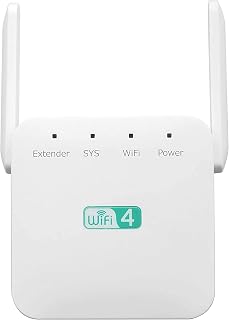
- Features dual high-gain external antennas designed for 360-degree broadcast spread.
- Includes a built-in RJ45 Ethernet port supporting both Repeater Mode and Access Point (AP) mode.
- Operates with universal router compatibility across legacy and modern Wi-Fi transmission standards.
Aimery Netboost Pro Features Explained
2.4 GHz Band and Throughput Ceiling
The core networking engine inside this unit relies on single-band 2.4GHz transmission using the 802.11n protocol, delivering a maximum theoretical throughput of 300 megabits per second. In the context of creative work, the 2.4GHz frequency is known for superior obstacle penetration compared to higher frequency bands, allowing it to travel through drywall, studio acoustic panels, and standard interior framing more effectively than 5GHz or 6GHz signals. This makes the unit practical for sending signals across extended distances where line-of-sight is obstructed by studio equipment, storage racks, or walls.
However, creators must understand the limitations of the WiFi Boost Pro 300Mbps performance ceiling. Because this 300Mbps figure represents theoretical maximum link rate under laboratory conditions, real-world data speeds will be lower due to wireless overhead, ambient interference from other electronics, and distance. High-resolution multi-camera livestreams and massive raw B-roll directory transfers to a Network Attached Storage system require broader bandwidth pipelines. The 2.4GHz 300Mbps throughput of this unit is therefore tailored for control data, MIDI over Wi-Fi, background audio feeds, and smart home lighting integrations rather than post-production data pipelines.
Dual External Antennas and Physical Coverage
To capture and rebroadcast weak router signals, the unit incorporates two high-gain external antennas mounted on the perimeter of the chassis. These antennas can be angled manually to adjust radiation patterns, facilitating up to 360 degrees of signal distribution. For studio layouts that span odd angles, such as an L-shaped basement or an adjacent detached garage workspace, orienting external antennas helps locate the optimal path of least resistance through physical obstacles.
When assessing the WiFi Boost Pro range coverage, prospective buyers will find two distinct figures in the product specifications. The technical specifications table lists a reliable reach of 2,800 square feet, whereas promotional bullet descriptions mention coverage reaching up to 7,998 square feet. In practical creative environments filled with metal C-stands, lighting diffusers, and electronic gear, the 2,800 square foot rating provides a more grounded reference point for real-world signal distribution. Creators should position the extender halfway between their primary access point and their studio gear to ensure the dual antennas receive adequate signal strength to amplify.
Dual Modes and Wired RJ45 Connectivity
Flexibility in deployment is achieved through software toggling between Repeater Mode and Access Point mode, augmented by a physical RJ45 connector. In Aimery WD-R611U repeater mode, the device receives your primary router’s wireless signal over the air and re-transmits it outward, creating an extended access zone under existing or secondary network credentials. This mode requires no long cable runs, making it convenient when setting up a temporary streaming or recording desk in an unfinished space.
Conversely, utilizing the integrated WiFi Boost Pro Ethernet port allows you to run a long Ethernet cable from your main router directly into the device to operate it in Access Point mode. This converts a wired backhaul directly into a clean 2.4GHz wireless field, eliminating the throughput degradation inherent to over-the-air repeating. Alternatively, when deployed in repeater mode, the RJ45 port functions as an output jack, enabling you to plug in a stationary studio device—such as an older capture rig, hardware audio interface, or desktop PC without a built-in wireless card—directly into the local network. While dedicated performance installations might look toward professional gear like the ubiquiti u7 pro for enterprise-level deployments, this single-port setup handles basic hardware connectivity without requiring driver installations.
Setup Procedure and Credential Management
The Aimery Netboost Pro setup process is designed to be completed via a standard web browser on a smartphone, tablet, or laptop. Users plug the 3.2-ounce white wall-plug module into a standard electrical outlet, connect to its default broadcast identifier, and navigate to the local management console. The device comes configured with the default administrative password set to admin, which allows immediate access to the internal network configuration menus where you select your host network and input its security key.
A crucial technical caveat noted in the listing instructions pertains to security passphrase formatting: the administrative interface cannot accept quotation marks within the network password string. Creators with complex Wi-Fi passphrases that utilize inverted commas or quotation symbols will need to adjust their primary router credentials or select an alternative character set before this extender will authenticate properly. Once configured, the settings are stored internally, enabling you to relocate the unit between different studio wall outlets without repeating the complete setup sequence.
Network Safety and Router Compatibility
Compatibility across standard consumer networking gear is broad, with the hardware engineered to interface seamlessly with routers operating under 802.11b, 802.11g, 802.11n, 802.11a, and 802.11ac standards. This means that whether you run an older ISP-supplied combo modem or a high-end tri-band system, the extender can communicate with the 2.4GHz broadcasting channel without requiring specialized matching hardware. For creators using higher-capacity setups like the google nest wifi pro 6e as their base router, the Netboost Pro will simply latch onto the 2.4GHz backward-compatible band while ignoring 5GHz and 6GHz channels.
The device also integrates standardized wireless encryption protocols to ensure safe network access. This onboard security protects your expanded local network from unauthorized external access, preventing unapproved devices from stealing bandwidth or intercepting data packets moving across the extended perimeter. For creators working with proprietary project files or streaming intellectual property over home networks, maintaining foundational encryption across perimeter repeaters is an essential requirement.
Specs
| Attribute | Detail |
|---|---|
| Brand | Aimery |
| Model Number | WD-R611U |
| Data Transfer Rate | 300 megabits_per_second |
| Frequency Bands Supported | 2.4 GHz |
| Wireless Communication Standard | 802.11n (Compatible with 802.11b/g/n/a/ac routers) |
| Hardware Interface | RJ45 Ethernet Port |
| Coverage Range | 2800 square feet (Listing notes up to 7998 sq ft) |
| Item Weight | 3.2 ounces |
| Color | White |
| Warranty | 1 year |
Figures quoted from the product listing. Nothing here was measured.
Aimery Netboost Pro Pros and Cons
Pros
- Dual adjustable external antennas
- Physical RJ45 Ethernet port included
- Repeater and Access Point modes
- Penetrates walls using 2.4GHz band
- Lightweight compact plug-in form factor
Cons
- Single-band 2.4GHz with no 5GHz support
- Capped at 300Mbps maximum theoretical throughput
- Password setup rejects quotation mark characters
Best Use Cases
- Providing stable wireless network commands to smart lighting, LED light tubes, and smart plugs situated in remote studio corners.
- Connecting a legacy desktop editing PC or studio audio recorder lacking native Wi-Fi via the built-in RJ45 Ethernet port.
- Expanding basic internet connectivity into detached garages, basement workshops, or patio streaming sets where high-frequency bands fail to penetrate.
- Operating dedicated telemetry and low-bitrate webcam feeds that run strictly on the 2.4GHz Wi-Fi spectrum.
- Acting as an inexpensive temporary Access Point when linked directly to a long wired Ethernet drop from the primary studio switch.
Before You Buy
Before purchasing the Aimery Netboost Pro, evaluate the specific networking demands of your creative hardware. Because this device is strictly a single-band 2.4GHz 802.11n unit, it does not support 5GHz or 6GHz wireless frequencies. If your production workflow requires streaming uncompressed multi-source 4K camera feeds, low-latency cloud editing, or multi-gigabyte video uploads to client portals, this extender will become an immediate bottleneck. For heavy creator workloads requiring advanced management and higher throughput, complete ecosystem routers like the ubiquiti unifi express 7 represent a more appropriate tier of equipment.
Additionally, note the physical and technical parameters provided in the manufacturer specifications. The unit arrives as a single white plug-in adapter weighing 3.2 ounces with two adjustable external antennas and an initial admin password. The listing specifies a 1-year warranty for hardware defects. However, the listing does not specify whether an Ethernet patch cable is included in the packaging, nor does it detail specific gigabit transmission capabilities for the RJ45 port, which typically operates at 10/100Mbps speeds on 300Mbps 802.11n hardware. Buyers should also verify that their primary network security passphrase avoids quotation mark characters to prevent configuration issues.
Bottom Line
Determining whether the WiFi Boost Pro is worth it comes down to matching the hardware with the right operational scale. As an affordable, dedicated utility amplifier, the Aimery Netboost Pro succeeds at pushing a 2.4GHz network footprint across physical boundaries that stifle higher frequencies. It provides an immediate fix for intermittent dropouts on smart home appliances, video monitoring tablets, and secondary studio control decks without requiring professional networking installation.
For demanding content creators who rely on sustained data transfer rates for high-resolution video production, this unit is not intended as a substitute for a high-performance tri-band mesh system or commercial access points. When deployed strictly as a range booster for low-bandwidth auxiliary gear, background monitoring, and utility studio peripherals, the WD-R611U provides reliable, simple functionality within the boundaries of its 300Mbps specification.
FAQ
Does the Aimery Netboost Pro support 5 GHz Wi-Fi networks?
No, the Aimery Netboost Pro operates exclusively on the 2.4GHz frequency band with 802.11n wireless technology. It can connect to host routers that broadcast dual-band or tri-band signals (such as 802.11ac routers), but it will only communicate with and extend the router’s 2.4GHz wireless channel.
How do you access the configuration settings during setup?
You access setup by plugging the extender into an electrical outlet, connecting your phone or computer to the unit’s default wireless signal, and entering the configuration IP address in your internet browser. The default administrative password is set to admin, allowing you to log in and select your studio’s primary Wi-Fi network.
Can the Ethernet port handle gigabit transfer speeds?
The listing does not specify a gigabit rating for the RJ45 port. Given the hardware’s 300Mbps 802.11n operational ceiling, the physical Ethernet jack is standard-bandwidth hardware intended for utility network linking rather than high-speed gigabit data transfers.
What is the real coverage area of the Netboost Pro WiFi extender?
The technical specifications table lists the range at 2,800 square feet, while marketing text mentions potential coverage reaching up to 7,998 square feet. In real-world environments with interior walls, doors, and studio gear, the 2,800 square foot benchmark represents the more reliable operational expectation.
Can you use special characters in the network password?
The manufacturer explicitly notes that quotation mark special symbols cannot be used in the network password when configuring the extender. Standard alphanumeric characters and unsupported punctuation must be audited on your host network credentials before initiating the setup process.