As Amazon Associates, we earn from qualifying purchases. This means we may receive a small commission at no extra cost to you if you click through and make a purchase.

Digital creators and video editors frequently balance multi-screen setups while battling wrist fatigue during marathon production days. A heavy mouse bound by a stiff cord disrupts creative flow, while basic office peripherals lack the tracking precision required for frame-accurate timeline cuts or subtle pen-tool adjustments. Finding a pointer that marries agile handling with versatile wireless switching often forces creators toward expensive, flashy gaming mice weighed down by intrusive software. The Attack Shark X8 SE addresses this challenge by pairing an ultra-lightweight symmetrical shell with modern optical tracking and tri-mode connectivity built to unify desktop, laptop, and tablet setups.
In this Attack Shark X8 SE review, we evaluate how this agile pointer emphasizes practical ergonomics and zero-friction configuration over decorative gimmicks. Combining a balanced optical sensor, resilient mechanical switches, and a browser-based cloud utility in a sub-60-gram body, it removes the physical drag that slows down intensive creative work. For vloggers needing a swift tool for mobile editing kits and artists switching between multiple machines, it strikes a compelling balance between speed and daily flexibility.
Quick Verdict
The Attack Shark X8 SE stands out as an agile, highly adaptable wireless pointer that combines dependable optical precision with instantaneous hardware toggling across three connection modes. With its lightweight symmetrical profile, zero-install web driver interface, and crisp mechanical switches, it provides exceptional desktop utility for creative workstations without burdening host systems with cumbersome local software.
- Featherweight symmetrical chassis designed to minimize wrist strain and hand fatigue throughout marathon editing sessions.
- Versatile tri-mode connectivity supporting 2.4GHz wireless, Bluetooth, and wired USB-C with an underside toggle switch.
- Dependable PixArt PAW3311 optical tracking paired with a Broadcom MCU for smooth sensitivity adjustments up to 25,000 DPI.
- Browser-driven cloud configuration platform that eliminates the need to install intrusive third-party software packages.
Attack Shark X8 SE Features Explained
Tri-Mode Connectivity and Multi-Device Flexibility
Modern creative workflows rarely stay confined to a single tower. Editors routinely bounce between a primary editing rig, a portable laptop for client reviews, and a tablet for freehand sketching. The Attack Shark X8 SE tri-mode system addresses this multi-device lifestyle with low-latency 2.4GHz wireless, Bluetooth, and wired USB-C connectivity. An underside physical switch allows instant toggling between systems, eliminating the need to swap receiver dongles across machines.
Powering these wireless connections is a built-in 500mAh rechargeable battery built for extended production sessions. When paired with streamlined peripherals like the Attack Shark V8, dependable wireless endurance keeps your creative workspace free of clutter. When the battery eventually needs a boost, the USB-C cable provides simultaneous charging and full cursor operation so work never stalls.
PixArt PAW3311 Sensor and Broadcom MCU Performance
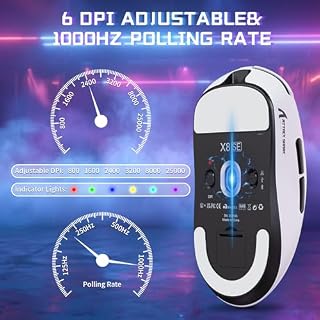
Precise tracking is indispensable when scrubbing complex timelines or masking high-resolution graphics. The Attack Shark X8 SE PAW3311 optical sensor pairs with a Broadcom BK52820 MCU chip to deliver immediate, zero-latency feedback. Supporting a broad sensitivity span from 100 up to 25,000 DPI, it ensures cursor movement remains predictable and linear whether sweeping across dual 4K monitors or performing fine retouching.
The internal Broadcom controller also supports four selectable polling rates: 125Hz, 250Hz, 500Hz, and 1000Hz. While competitive gamers favor 1000Hz for millisecond precision, creators can comfortably choose 250Hz or 500Hz for daily editing tasks. Moderating the polling rate helps extend Attack Shark X8 SE battery life throughout long production weeks while preserving smooth, consistent cursor response without stutter.
Lightweight Ergonomics and Symmetrical Chassis Build
Repetitive strain is an ongoing hazard for editors who click and drag for hours. The Attack Shark X8 SE weight profile places it squarely among the lightest productivity-capable pointers available. The listing cites an ultra-lightweight 55±3g specification alongside a 59g mention in the title. In practice, keeping mass under 60 grams dramatically reduces the muscular effort needed to maneuver across wide desk surfaces.
The mouse features an updated symmetrical chassis derived from the popular X3 mold, scaled up into a medium-to-large shape for improved palm contact. This universal contour supports palm, claw, and fingertip grips with ease. Crafted from durable white plastic with a clean modern finish, it coordinates naturally with minimalist studio gear like the Attack Shark X65 HE while resisting chassis flex under pressure.
Huano Micro Switches and TTC Scroll Wheel Encoder
Positive click feedback is essential when executing split-second timeline edits or keyframe tweaks. The Attack Shark X8 SE incorporates authentic Huano micro switches rated for 80 million clicks beneath its primary buttons. These switches provide a snappy, tactile actuation with immediate rebound, preventing miss-clicks and eliminating the double-clicking issues that often plague standard office mice over time.
The central scroll wheel utilizes a dedicated TTC encoder designed for tactile precision. Instead of spinning loosely and overshooting target frames, the TTC wheel provides distinct, notched steps. When scrolling through sound effect libraries or zooming timeline tracks, this stepped tactile resistance gives creators consistent, frame-accurate mechanical control.
Web-Based Cloud Driver and Configuration Utilities
Traditional peripheral software often drags down system performance with background services and required account sign-ins. The Attack Shark X8 SE cloud driver resolves this by operating directly through a web browser. The open-source driver identifies your operating system automatically, allowing you to configure settings immediately without downloading or installing any local executable files.
Compatible with Windows 11, Mac OS 14 Sonoma, and Ubuntu Linux, the web interface lets you remap all five buttons, customize DPI intervals, and adjust polling rates. All modifications save straight to the mouse’s onboard memory, so your preferences stay intact when switching workstations or pairing with companion devices like the Attack Shark R85.
Specs
| Attribute | Detail |
|---|---|
| Brand | ATTACK SHARK |
| Model Name | Attack Shark X8 SE |
| Sensor Model | PixArt PAW3311 |
| MCU Chip | Broadcom BK52820 |
| Sensitivity Range | 100 to 25,000 DPI |
| Polling Rates | 125Hz, 250Hz, 500Hz, 1000Hz |
| Switches | Huano micro switch (80 million clicks) |
| Scroll Wheel Encoder | TTC encoder |
| Connectivity | 2.4GHz Wireless, Bluetooth, USB-C Wired |
| Button Quantity | 5 |
Figures quoted from the product listing. Nothing here was measured.
Attack Shark X8 SE Pros and Cons
Pros
- 55g ultra-lightweight symmetrical chassis
- Tri-mode wireless with 2.4G and Bluetooth
- Browser-based cloud driver without software install
- Crisp Huano switches rated for 80M clicks
- PixArt PAW3311 sensor reaching 25,000 DPI
Cons
- Listing cites conflicting 55g and 59g weights
- Limited to 5 programmable buttons
- High polling rates reduce battery life
Best Use Cases
- Fast-paced video and audio editing suites where a featherweight build and stepped TTC scroll wheel facilitate precise timeline scrubbing across extensive multi-track projects.
- Mobile creator workstations that require smooth toggling between an editing laptop and a production tablet over Bluetooth without packing redundant cables.
- Strict enterprise or institutional creative environments where IT restrictions prevent installing third-party peripheral software, making the browser-accessible cloud driver invaluable.
- Digital painting, vector illustration, and fine photo retouching workflows that demand granular sensitivity adjustments from 100 to 25,000 DPI coupled with crisp Huano switch actuation.
- Clean, minimalist studio desks aiming to minimize physical cord clutter while maintaining a sleek white aesthetic and dependable tri-mode wireless flexibility.
Before You Buy
Before deciding on this pointer, reviewing the Attack Shark X8 SE specs regarding weight and dimensions is worthwhile. The listing contains a minor discrepancy, stating 59g in the title while specifying 55±3g in the feature bullets. Regardless, the mouse is exceptionally light, which may require an adjustment period if you are accustomed to heavy office peripherals. Additionally, while the medium-to-large symmetrical body offers broader palm support than compact models, users with very large hands who prefer an aggressive high palm arch may find the profile relatively low.
System compatibility covers Windows 11, Mac OS 14 Sonoma, Ubuntu 24.04 Noble Numbat, and mobile platforms. However, the listing does not specify whether extra PTFE feet, grip tapes, or a braided charging cable come in the box. Furthermore, the mouse features 5 programmable buttons in total, which covers standard timeline needs but may feel minimal if you rely on extensive multi-button thumb clusters for complex editing macros.
Bottom Line
So, is the Attack Shark X8 SE worth it for creators and multi-device workers? If you prioritize lightweight handling, seamless wireless transitions, and clean software setup, the mouse delivers excellent value. Pairing the capable PixArt PAW3311 sensor with durable Huano switches and a convenient web driver, it eliminates the bloat and wrist strain that commonly hamper daily editing sessions.
While creators who need elaborate macro thumb grids may look toward specialized tools, the Attack Shark X8 SE for productivity offers an impressive balance of speed, comfort, and versatile connectivity. Alongside alternatives like the Attack Shark X8 Ultra, this model stands out as an efficient, reliable daily driver for creators seeking to optimize their desk workflow.
FAQ
How does the Attack Shark X8 SE cloud driver work without software installation?
The Attack Shark X8 SE cloud driver operates through a standard web browser using native web-USB protocols. Once the mouse is connected, opening the web utility automatically detects your device, letting you adjust DPI, remap buttons, and tune polling rates with settings saved directly to onboard memory.
What is the official Attack Shark X8 SE weight?
The listing mentions both 59g in the title and 55±3g in the feature bullets. In practice, the mouse weighs under 60 grams, placing it firmly in the ultra-lightweight tier to help reduce wrist fatigue during long editing days.
Can I switch the Attack Shark X8 SE between multiple computers quickly?
Yes, the Attack Shark X8 SE tri-mode connectivity lets you move between 2.4GHz wireless, Bluetooth, and wired USB-C connections. A dedicated switch on the bottom allows instant toggling between a primary workstation and a secondary laptop or tablet.
What is the expected Attack Shark X8 SE battery life during regular work?
The mouse features a 500mAh rechargeable battery built for extended work sessions. Battery endurance depends on the active connection mode and polling rate; choosing 250Hz or 500Hz extends battery life considerably compared to running a continuous 1000Hz polling rate.
Which optical sensor powers the Attack Shark X8 SE?
The mouse is equipped with the PixArt PAW3311 optical sensor and a Broadcom BK52820 MCU chip. This combo offers smooth tracking from 100 to 25,000 DPI with four adjustable polling rates up to 1000Hz.