As Amazon Associates, we earn from qualifying purchases. This means we may receive a small commission at no extra cost to you if you click through and make a purchase.
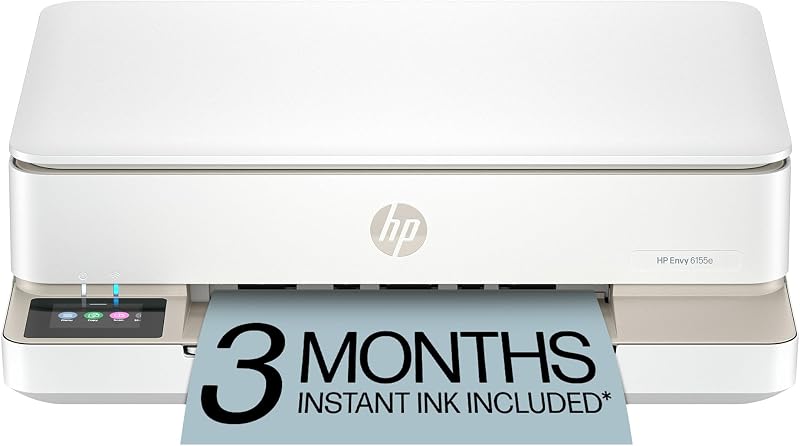
Managing physical media in a modern creative workspace requires balancing desk real estate with dependable color accuracy and document versatility. Independent creators, visual artists, and remote professionals frequently need to produce client invoices, borderless reference prints, project schedules, and portfolio drafts without housing a massive commercial machine. The HP Envy 6155e is positioned specifically for this hybrid lifestyle, combining color printing, copying, and flatbed scanning in a sleek Portobello chassis designed to slot neatly into home studios.
For creators evaluating an hp envy all in one printer for day-to-day production, our verdict is that this unit excels at clean visual output and seamless wireless convenience rather than raw commercial speed. With built-in P3 color reproduction for accurate screen-to-print transitions and automated two-sided duplex printing, it addresses the core administrative and proofing needs of small-scale studios. However, its modest print speeds and strict cartridge chip requirements mean it is tailored for deliberate, low-to-medium volume output rather than massive batch runs.
Quick Verdict
The HP Envy 6155e serves as an accessible, capable multifunction hub for home-based creatives who prioritize true-to-screen color fidelity, borderless photo printing, and smart layout formatting over industrial output speeds.
- P3 color reproduction ensures borderless photos and graphics match monitor displays closely.
- Integrated HP AI cleans up web pages and documents to eliminate formatting waste.
- Self-healing dual-band Wi-Fi keeps mobile and desktop devices consistently connected.
- Output speeds of 10 ppm black and 7 ppm color favor quality over rapid batch volume.
HP Envy 6155e Features Explained
True-to-Screen P3 Color Reproduction
Color consistency between digital monitors and physical proofs is a notorious pain point for visual artists and photographers. The hp envy 6155e true to screen P3 technology expands the printable color gamut beyond standard sRGB profiles, allowing color documents and photos to appear just as vibrant on physical paper as they do on modern wide-gamut displays. For creators who produce mockups, mood boards, or borderless prints, this color fidelity minimizes the frustrating trial-and-error cycle of adjusting brightness and saturation before getting an accurate hard copy.
When assessing the hp envy 6155e photo quality, the four-cartridge ink system (black, cyan, magenta, and yellow) works in tandem with the thermal inkjet architecture to render smooth tonal gradations. Using the hp envy 6155e for photo printing allows creators to produce borderless imagery directly from mobile devices or design suites. While dedicated high-volume photo studios might explore continuous-supply alternatives like the hp smart tank 6001 wireless all-in-one printer, this Envy model delivers refined detail for home-based image proofing.
HP AI Precision Formatting
Printing research materials, reference articles, and online client briefs often results in wasted pages filled with unnecessary ads, broken sidebars, and chaotic line breaks. The HP Envy 6155e incorporates HP AI formatting designed to analyze web pages and emails prior to printing. The system automatically strips away unwanted clutter, reorganizing text and imagery into clean, cohesive layouts so that only the necessary information reaches the page.
This intelligent layout processing directly supports a streamlined hp envy 6155e creative workflow by conserving both paper and ink. Instead of manually copying text into a separate document or adjusting browser print margins, creators can execute quick web prints knowing the content will format cleanly on standard plain paper or presentation sheets.
Reliable Dual-Band Wireless Connectivity
In an active creative studio, a printer rarely sits tethered directly to a single desktop workstation. The hp envy 6155e wireless all in one setup utilizes dual-band Wi-Fi engineered to detect and resolve network dropouts automatically. By actively monitoring the connection and resetting when interference occurs, the printer reduces the communication errors that commonly interrupt multi-page print queues or high-resolution photo transmissions.
This wireless stability pairs directly with the HP App, enabling seamless interactions across iOS and Android smartphones, tablets, laptops, and PCs. Users can initiate flatbed scans, send mobile faxes, monitor ink levels, or launch print jobs from anywhere on the local network. For users who juggle work across laptops and handheld devices, this frictionless connection makes handling administrative paperwork and creative proofs effortless.
Intuitive 2.4-Inch Color Touchscreen and Navigation
Hardware controls on multifunction printers are often confusing, relying on cryptic numeric codes or non-backlit buttons. The HP Envy 6155e eliminates this friction with an integrated 2.4-inch color touchscreen display. The interface provides clear, graphical menus for selecting copy quantities up to 99 copies per run, initiating color or black-and-white copies, and checking current printer status without opening a computer application.
The hp envy 6155e setup process is guided step-by-step through this touchscreen and the companion HP App. From unboxing to connecting to local dual-band Wi-Fi, the visual prompts ensure smooth onboarding. The single flatbed scanner lid opens easily for digitizing physical sketches, contracts, and receipts directly to connected cloud folders or local drives.
Automated Duplex Printing and Media Versatility
Paper management is central to keeping any creative workspace organized and sustainable. With hp envy 6155e duplex printing, the unit automatically prints on both sides of a sheet without requiring manual page flipping. This capability cuts paper consumption in half for multi-page scripts, client contracts, and design briefs, while keeping the overall document profile neat and professional.
The front-loading input tray accommodates up to 100 sheets of plain paper, while also supporting envelopes and printable labels. Print speeds run up to 10 pages per minute (ppm) for black documents and 7 ppm for color documents. While enterprise environments that need rapid volume might turn to a heavy-duty unit like the hp officejet 9025 all-in-one printer, the Envy 6155e balances moderate pace with high visual fidelity for everyday home studio tasks.
Specs
| Specification | Detail |
|---|---|
| Printer Type | Color Inkjet |
| Functions | Print, Scan, Copy, Mobile Fax |
| Print Speeds | Up to 10 ppm black, up to 7 ppm color |
| Color Gamut Support | True-to-Screen P3 Technology |
| Two-Sided Printing | Automatic Duplex |
| Input Capacity | 100-sheet input tray |
| Display | 2.4-inch color touchscreen |
| Scanner Type | Flatbed scanner |
| Dimensions and Weight | 14.21″D x 17.05″W x 5.35″H; 11.3 pounds |
| Connectivity and OS | Self-healing dual-band Wi-Fi; PC, Laptops, Smartphones (iOS controller supported) |
Figures quoted from the product listing. Nothing here was measured.
HP Envy 6155e Pros and Cons
Pros
- P3 color tech for vibrant true-to-screen prints
- Automatic two-sided duplex printing saves paper
- Self-healing dual-band Wi-Fi maintains reliable connections
- HP AI formatting removes web clutter automatically
- Compact footprint built with 60% recycled plastic
Cons
- Modest print speeds at 10 ppm black and 7 ppm color
- Requires cartridges with genuine HP chips
- Single 100-sheet paper input tray
Best Use Cases
- Printing borderless photo proofs and visual mood boards where P3 wide color gamut fidelity is essential.
- Generating clean, two-sided client proposals, scripts, and invoices using automated duplex functionality.
- Scanning physical sketches, hand-drawn concept art, and signed contracts via the integrated flatbed scanner.
- Executing clutter-free web article and recipe prints with built-in HP AI layout optimization.
- Managing everyday home office tasks and homework assignments from mobile phones or tablets via dual-band Wi-Fi.
Before You Buy
Before integrating the HP Envy 6155e into your home workspace, it is critical to understand its cartridge ecosystem and firmware policies. This printer is engineered to operate exclusively with cartridges featuring genuine HP chips or circuitry. The hardware actively blocks third-party or refilled cartridges that use non-HP chips, and periodic firmware updates delivered via your internet connection will maintain the effectiveness of these dynamic security measures. Shoppers who prefer using generic remanufactured cartridges should factor this policy into their ongoing supply planning.
Regarding bundles and service integration, the unit includes a 3-month trial of the hp envy 6155e instant ink service upon HP+ activation, which delivers ink automatically before cartridges run dry, transitioning to a standard monthly fee thereafter unless cancelled. HP+ activation also provides the option to extend the standard one-year limited hardware warranty up to two years. Buyers should note that the listing does not specify the inclusion of a USB cable, nor does it include an automatic document feeder (ADF) for multi-page batch scanning, meaning all scanning and copying must be done page-by-page on the flatbed glass.
Bottom Line
Deciding whether the hp envy 6155e is worth it comes down to matching your production volume with the machine’s intended strengths. It is not built for high-speed batch printing or corporate document processing, and its strict chip verification locks users into the official cartridge pipeline. However, for digital creators, photographers, and hybrid workers who demand true-to-screen P3 color accuracy, borderless photo capabilities, and hassle-free wireless operation in an attractive Portobello chassis made from 60% recycled plastic, it hits an impressive sweet spot.
By pairing intuitive touchscreen navigation with HP AI layout tools and automated duplex printing, the HP Envy 6155e streamlines creative administration and light graphic production. It stands as a capable, well-rounded home studio printer that reliably translates digital visual concepts onto the physical page.
FAQ
Does the HP Envy 6155e support borderless photo printing?
Yes, the HP Envy 6155e supports borderless photo printing, making it well-suited for producing photo prints, visual mood boards, and creative graphics without white borders.
What are the print speeds of the HP Envy 6155e?
The HP Envy 6155e delivers print speeds of up to 10 pages per minute (ppm) for black-and-white documents and up to 7 ppm for color documents.
Can I use third-party ink cartridges with the HP Envy 6155e?
No, this printer is intended to work only with cartridges that possess genuine HP chips or circuitry. Cartridges with non-HP chips will be blocked by dynamic security measures maintained through regular firmware updates.
What media types and sizes does the input tray support?
The single 100-sheet input tray supports plain paper, envelopes, and labels. While the listing does not specify custom heavyweight cardstock limits, it is designed for standard home document and photo printing media.
How does HP AI formatting work on this printer?
HP AI analyzes web pages and emails before they print, automatically removing unwanted clutter like advertisements and awkward breaks so your documents print cleanly without wasting ink or paper.