As Amazon Associates, we earn from qualifying purchases. This means we may receive a small commission at no extra cost to you if you click through and make a purchase.

Content creators, video editors, and hobbyists often manage studio spaces filled with expensive cameras, audio interfaces, and editing rigs. Protecting these valuable investments without installing cumbersome, industrial surveillance systems calls for compact, flexible monitoring gear that can watch over workbenches and gear lockers. Many shoppers searching for a blink outdoor pan tilt camera wonder if the motorized Blink Mini Pan-Tilt can serve as an exterior perimeter watcher while also securing indoor studio bays. For creative professionals, having complete visibility across wide production rooms or multi-angle editing suites directly from a phone solves the constant anxiety of leaving gear unattended.
While using a swiveling camera to track studio doors or exterior perimeter gates sounds convenient, the manufacturer clearly designates this device as an indoor plug-in smart security camera. Researching the official specifications reveals a capable interior monitoring tool with motorized panning and remote controls, but deploying it in outdoor weather creates serious operational risks. If your workflow requires dynamic coverage across gear benches, podcast sets, or studio entrances, this camera delivers essential visibility as long as you respect the strict indoor boundaries set by its physical design.
Quick Verdict
The Blink Mini Pan-Tilt is an agile indoor security camera that pairs physical rotation with intuitive app controls, making the blink mini pan tilt for studio workspaces an effective visual monitor. However, shoppers seeking weather-resistant exterior tracking must look elsewhere, as this device lacks outdoor environmental sealing.
- Motorized 350-degree pan and 125-degree tilt mechanics provide complete room visibility from a single plug-in location.
- Crisp 1080p HD video at up to 30 frames per second and infrared night vision maintain clear feeds day and night.
- Flexible storage supports cloud recording with a subscription or local saving via an optional Sync Module 2 and USB drive.
- Indoor-only construction prevents exterior deployment due to unsealed joints and an exposed micro-USB power port.
Blink Mini Pan-Tilt Features Explained
Motorized Mechanics and Complete Rotational Coverage
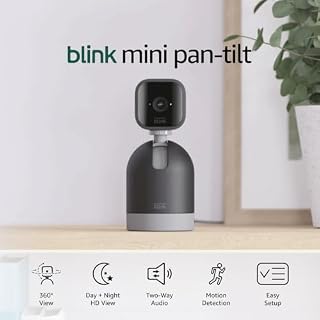
The centerpiece of this camera system is the motorized mount attached beneath the compact camera body. Offering a mechanical pan range of 350 degrees alongside a tilt range of 125 degrees, the mount eliminates the blind spots inherent in fixed desktop cameras. When paired with the lens’s 110-degree diagonal field of view, this motorized movement provides comprehensive blink mini pan tilt 360 coverage across studio floors, editing bays, or workshop tables. Users pan and tilt the view directly inside the Blink Home Monitor app, allowing quick sweeps of equipment racks, doorways, and workbench surfaces without moving the hardware.
For creators managing busy spaces, this rotational agility reduces the need for multiple cameras. The pan-tilt mount measures 66 by 66 by 99.2 millimeters and weighs 246 grams, providing a sturdy, weighted foundation for the 48-gram camera module. This stable footprint prevents physical wobble while the motorized base traverses its 350-degree path, keeping frame transitions smooth as you monitor different studio zones.
Video Quality and Infrared Night Vision
Visual clarity is crucial when checking on valuable gear or verifying unexpected studio activity. The camera records in 1080p HD resolution at up to 30 frames per second during daylight hours. This 30 fps frame rate delivers fluid motion rendering, ensuring that quick movements around workbenches or entry points are recorded without the severe stutter typical of lower-framerate security sensors. An optional blue LED indicator on the front provides clear visual confirmation when the feed is active, though it can be turned off in settings if discreet monitoring is preferred.
When studio lights are turned off, the camera automatically switches to infrared HD night vision. This night-vision mode illuminates dark interiors without projecting visible light that could disrupt scheduled time-lapse captures or disturb studio pets. The automated transition between daytime color and nighttime infrared ensures reliable surveillance across overnight rendering sessions and weekend studio downtime.
Two-Way Audio and Live Communication Workflows
Surveillance is more effective when you can hear what is happening in your creative space. The hardware incorporates a built-in microphone and speaker that support two-way audio recording and real-time talk through the mobile app. Studio owners can speak directly to assistants, instruct delivery drivers dropping off fragile lenses, or warn intruders away from gear lockers. This hands-free audio channel operates over your Wi-Fi link, functioning smoothly during daily operations.
Audio monitoring also provides valuable diagnostic reassurance for makers running unattended hardware. You can check for unusual sounds from running 3D printers, CNC tools, or workstation fans. Furthermore, users with an active Blink Subscription Plan can stream live video and audio continuously for up to 90 minutes, making it easy to keep an eye on active studio tasks from a secondary screen.
Storage Architectures: Cloud Convenience vs. Local Redundancy
Clip storage accommodates both cloud-focused users and those who demand localized control. A 30-day free trial of the Blink Subscription Plan is included, allowing automatic cloud backup of motion-activated video clips. Cloud storage simplifies clip sharing and remote playback, ensuring that footage remains accessible even if the physical camera is disconnected or damaged.
Creators who prefer avoiding monthly fees or who keep production spaces offline can choose the blink mini pan tilt local storage route. By pairing the camera with a Sync Module 2 and inserting a USB flash drive (both sold separately), recorded clips save directly to your own storage media. This hybrid setup lets you choose between instant cloud access and secure, subscription-free local archives.
Alexa Integration and Studio Automation
Modern production studios frequently rely on voice assistants and smart displays to control lighting and manage workstation presets. Taking advantage of the blink mini pan tilt alexa integration allows creators to view live feeds hands-free on an Echo Show. You can check on 3D print progress or monitor the studio door without stepping away from an active editing timeline or camera setup.
Beyond live display streaming, Alexa integration allows motion alerts to trigger smart routines, such as turning on accent lighting when movement is detected after hours. The two-way talk feature also functions through compatible Echo devices, turning your smart speaker into an intercom linked directly to your studio space.
Specs
| Attribute | Detail |
|---|---|
| Camera Resolution | 1080p HD video (day) and infrared HD night vision (dark) |
| Frame Rate | Up to 30 frames per second |
| Field of View | 110° diagonal |
| Pan and Tilt Range | 350° pan range, 125° tilt range |
| Mount Dimensions | 66 x 66 x 99.2 mm |
| Camera Dimensions | 50 x 49 x 36 mm |
| Weight | Pan-Tilt Mount: 246 g (8.7 oz); Blink Mini: 48 g (1.7 oz) |
| Power Source | 5VDC, 1A via USB Micro type B connector |
| Wireless Connectivity | 2.4 GHz 802.11g/n (minimum 2 Mbps upload required; no ad-hoc or paywall support) |
| Platform Compatibility | iOS 17, Android 10, Fire OS 8 only |
Figures quoted from the product listing. Nothing here was measured.
Blink Mini Pan-Tilt Pros and Cons
Pros
- Motorized 350-degree pan and 125-degree tilt
- Crisp 1080p HD video at 30 fps
- Infrared night vision for zero-light monitoring
- Optional local clip storage via Sync Module 2
- Hands-free viewing with Amazon Alexa integration
Cons
- No weatherproofing for outdoor deployment
- Requires continuous wired micro-USB wall power
- Local storage accessories sold separately
- Incompatible with 5 GHz Wi-Fi networks
Best Use Cases
- Monitoring gear closets, production racks, and editing workstations across wide-angle indoor creative spaces.
- Keeping an interactive eye on active 3D printers, laser cutters, or unattended rendering hardware from a mobile app.
- Supervising studio entrance doors and reception desks with remote voice greetings via two-way audio.
- Checking overnight security across open-plan offices and craft workshops using automated infrared night vision.
Before You Buy
Before purchasing, it is critical to address environmental suitability. Although searchers often look for a blink outdoor pan tilt camera or consider setting up a blink pan tilt mount outdoor, this camera is strictly rated for indoor use. The listing provides no water or dust resistance rating, and its exposed motorized base, unsealed speaker housing, and micro-USB port will degrade quickly if exposed to moisture, rain, or dust. Makers questioning can blink mini pan tilt go outside should consider weather-sealed alternatives like the wyse solar cam pan for exposed perimeter monitoring.
For creators seeking Blink ecosystem integration outdoors, choosing a dedicated blink outdoor camera 2k wireless smart security camera 2k video resolution enhanced audio up to two year battery design provides proper weatherproofing. Furthermore, reviewing the official blink mini pan tilt specs highlights key operational limits: the camera requires continuous 5VDC, 1A power via its included micro-USB adapter, connects only to 2.4 GHz 802.11g/n networks with at least 2 Mbps upload speed, and requires a smartphone running iOS 17, Android 10, or Fire OS 8. Local video storage also requires buying a Sync Module 2 and USB drive separately.
Bottom Line
When asking is blink mini pan tilt worth it for a creative workstation, the answer depends entirely on where you place it. The Blink Mini Pan-Tilt is an effective, user-friendly indoor camera that eliminates blind spots across production desks, gear lockers, and studio doors. Its 350-degree pan, 125-degree tilt, crisp 1080p HD video, and Alexa compatibility make it an excellent tool for monitoring indoor spaces.
However, it cannot function as an exterior sentry. Using this unsealed, plug-in unit outdoors risks immediate weather damage. If you keep it strictly inside a powered, Wi-Fi-connected studio space, it provides reliable motorized monitoring and great everyday peace of mind.
FAQ
Can the Blink Mini Pan-Tilt camera be used outdoors?
No, the Blink Mini Pan-Tilt is built strictly for indoor use. The manufacturer listing specifies no waterproof or weatherproofing certification. Exposing the rotating motor, open micro-USB power port, or microphone vents to rain, humidity, or dust can cause electrical failures. For outdoor perimeter surveillance, choose certified weatherproof cameras or examine indoor stationary models like the eufy security camera c31 for covered, dry interior spaces.
Does the camera require a monthly subscription?
A monthly subscription is not required for real-time monitoring. You can watch live video, use two-way audio, and receive motion alerts through the Blink Home Monitor app without paying a subscription. To save motion clips, you can either subscribe to the cloud-based Blink Subscription Plan after the 30-day free trial or store clips locally by purchasing a Blink Sync Module 2 and a USB flash drive.
Can you adjust pan and tilt using Alexa voice commands?
While Alexa lets you stream live feeds to an Echo Show, receive motion notifications, and talk through the speaker, motorized panning and tilting are controlled manually in the Blink Home Monitor app. Voice commands cannot currently reposition the motorized mount to specific angles.
What are the power requirements for this camera?
The camera requires continuous AC power using the included 5VDC, 1A power adapter and micro-USB cable. It contains no rechargeable battery, so it must stay plugged into a standard wall outlet or extension cord to function.
What are the smartphone and Wi-Fi requirements?
The initial blink pan tilt camera setup requires a smartphone running iOS 17, Android 10, or Fire OS 8. The camera connects exclusively to 2.4 GHz 802.11g/n Wi-Fi networks with at least 2 Mbps upload speed, and it does not support 5 GHz channels or networks that require web browser login portals.