As Amazon Associates, we earn from qualifying purchases. This means we may receive a small commission at no extra cost to you if you click through and make a purchase.

Video creators, podcasters, and home studio enthusiasts regularly battle overhead room lighting that either flickers on camera, casts harsh shadows, or cannot be fine-tuned during production. Standard wall toggles fail to provide the nuanced ambient control required to balance background practicals against key lights, while many modern smart switches demand electrical updates that converted studio spaces lack. The Lutron Caseta Wireless Dimmer addresses these lighting hurdles by delivering smooth, reliable illumination management directly into existing electrical gang boxes without running extra wiring.
A close evaluation of the product specifications, electrical ratings, and creator workflows indicates that this dual-switch pack is a standout solution for home production environments. Although unlocking voice automation, smartphone scheduling, and remote integration requires an external Lutron Smart Hub, the rock-solid line-voltage dimming and proven hardware design establish a dependable foundation for any content workspace.
Quick Verdict
The Lutron Caseta wireless dimmer switch offers consistent line-voltage control and versatile smart integration, making it a dependable choice for creators refining their set lighting without modifying domestic wiring. As explored in our dedicated lutron caseta dimmer review, Lutron hardware delivers exceptional reliability across varied home and studio environments.
- Operates without a neutral wire for simple retrofitting in residential studios.
- Controls up to 150 watts of dimmable LED or 600 watts of incandescent bulbs.
- Pairs with leading voice assistants and smart hubs for hands-free workflow routines.
- Requires an external Lutron Smart Hub to access wireless and app functionality.
Lutron Caseta Wireless Dimmer Features Explained
No Neutral Wire Installation for Production Spaces
Creators frequently establish production sets in converted bedrooms, older apartments, or basement workspaces where electrical switch boxes lack neutral conductors. Standard smart toggles often rely on a neutral line to power internal Wi-Fi radios continuously, creating headaches for creators who do not want to hire an electrician. The lutron caseta no neutral wire architecture resolves this barrier by utilizing power-scavenging line-voltage circuitry that functions on standard two-wire branch circuits.
This design makes replacing an old wall toggle with a capable studio controller a quick and clean process. Because the dimmer fits into standard residential gang boxes without needing supplemental wiring runs, setting up ambient set lighting becomes an approachable project. The switch operates cleanly without emitting electrical line hum or causing fixture buzz, protecting both video and audio recording tracks from unwanted interference.
Smart Platform and Voice Assistant Integration
Managing studio equipment during filming requires frictionless operation so you can concentrate on presenting, audio monitoring, and composition. When connected to the required Lutron Smart Hub (L-BDG2-WH), the switch interfaces with Amazon Alexa, Apple Home, Google Assistant, and Sonos systems. This broad interoperability lets creators activate complex lighting scenes using voice prompts or bind overhead dimming directly into pre-roll recording sequences.
Through the free Lutron smartphone application, creators can establish tailored automated schedules or utilize the Smart Away feature to randomize illumination during location shoots. Whether you need your studio to illuminate gradually before a scheduled live stream or dim ambient practicals to a specific percentage, the Lutron ecosystem manages tasks reliably without burdening your home Wi-Fi network.
Original Four-Button Interface and Dimming Control
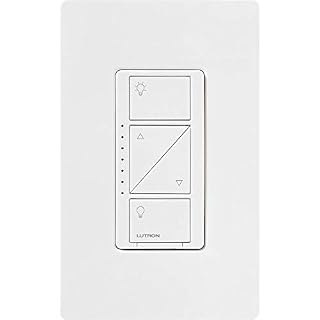
The original Caseta switch faceplate features a clean, functional four-button layout that provides physical on, off, brighten, and dim adjustments. In contrast to touch-capacitive dimmers that can be unpredictable when trying to dial in precise values between camera takes, tactile push buttons provide immediate physical response. This allows creators to dial back practical lighting incrementally until achieving the ideal lighting balance against foreground softboxes.
With four operating positions, the physical switch allows users to dial in predictable illumination levels across the supported brightness spectrum. Creators comparing modern rocker designs against this original interface, such as the lutron caseta diva smart dimmer switch, often find that dedicated raise and lower push buttons offer unmatched precision for repeatable studio scene calibration.
Bulb Capacity and Load Management
Studio practicals and overhead tracks often utilize diverse bulb technologies, ranging from high-efficiency modern LEDs to legacy incandescent bulbs chosen for specific warmth and rendering. The lutron caseta dimmer specs support up to 150 watts of dimmable LED or dimmable CFL fixtures, alongside up to 600 watts of incandescent or halogen sources on standard 120-volt lines. Operating with a 1.25-amp current rating, a single dimmer can easily regulate multiple ceiling cans or pendant fixtures simultaneously.
Controlling multiple sockets through one wall switch simplifies studio operations and saves you from purchasing individual smart bulbs for every ceiling fixture. This hardwired approach prevents individual bulb disconnects and maintains uniform dimming across the entire room. However, the listing explicitly notes that this hardware is not rated for low-voltage applications, meaning it should not be paired with 12-volt landscape or track lighting transformers.
Flexible 3-Way Control and Pico Remote Integration
In larger creator spaces or shared studio rooms, light switches are often placed inconveniently far from the primary shooting desk. Establishing a lutron caseta 3-way setup does not demand cutting into finished drywall or running traveler cables through wall framing. Instead, the dimmer interfaces wirelessly with Lutron Pico remotes, such as model PJ2-3BRL-GWH-L01, enabling comprehensive lighting adjustments from anywhere across the room.
By pairing a Pico unit with an optional wall-mount bracket (PJ2-WALL-WH-L01), you can mount a switch station directly to your production desk, camera cart, or entry doorway. As detailed in our assessment of the pico switch lutron, this wireless flexibility allows creators to turn lights on, off, or fine-tune brightness directly from the host chair without disrupting recording takes. The lutron caseta pico remote control pairing delivers full-featured multi-location capability without electrical complications.
Specs
Reviewing technical specifications ensures the switch matches your studio electrical system and load requirements. The table below outlines key mechanical and electrical attributes provided in the official product data.
| Attribute | Detail |
|---|---|
| Operation Mode | Smart Switch |
| Operating Voltage | 120 Volts |
| Current Rating | 1.25 Amps |
| Maximum Load (LED / CFL) | 150 Watts |
| Maximum Load (Incandescent / Halogen) | 600 Watts |
| Contact Type | Normally Closed |
| Connector Type | Hard Wired |
| Circuit Type | 1-Way (Multi-way via Pico wireless remote) |
| Number of Positions | 4 |
| Operating Temperature Range | 32 °F to 104 °F |
Figures quoted from the product listing. Nothing here was measured.
Lutron Caseta Wireless Dimmer Pros and Cons
Pros
- No neutral wire required for installation
- Supports up to 150W LED and 600W incandescent
- Broad smart platform integration via Lutron hub
- Tactile four-button brightness adjustment interface
- Effortless wireless three-way setup with Pico remotes
Cons
- Lutron Smart Hub required for wireless features
- Wall plates sold separately
- Not rated for low-voltage track or landscape lighting
Best Use Cases
- Dialing down overhead ambient lights in home studios to achieve balanced lighting ratios on camera.
- Upgrading older residential spaces and apartments that lack neutral wiring in wall switch boxes without rewiring.
- Automating studio workflows with voice commands using Amazon Alexa, Google Assistant, or Apple Home before recording sessions.
- Positioning secondary remote lighting controls right at a creator editing desk using a wireless Pico remote.
- Managing multiple recessed ceiling fixtures from a single wall switch to eliminate individual smart bulb disconnects.
Before You Buy
Before moving forward with this two-pack, take time to inspect your studio fixtures and wiring to verify lutron caseta smart dimmer compatibility. This unit is built strictly for 120-volt line-voltage fixtures and will not work with low-voltage lighting systems like 12-volt track setups or landscape transformers. While the absence of a neutral wire makes installation very accessible, your connected LED fixtures must be officially dimmable to prevent camera-visible flickering or light humming. If your workspace relies on non-dimmable ballasts or fluorescent ceiling tubes, choosing an alternative like the lutron claro smart switch 2 pack is recommended for simple on/off switching.
Hardware packaging details are equally important to keep in mind. The listing includes two white dimmer switches, but coordinating wall plates are not provided and must be purchased separately. Furthermore, the wireless app control, automated scheduling, and smart assistant integrations detailed in this caseta wireless light switch review require an external Lutron Smart Hub (L-BDG2-WH). If you plan to set up a multi-way configuration, mechanical traveler switches will not work; you must separately acquire a wireless Pico remote and the corresponding wall bracket.
Bottom Line
Determining whether is lutron caseta worth it for your recording workspace comes down to your need for reliable, repeatable lighting performance. In dedicated home studios and creator spaces where lighting consistency directly impacts video quality, the Lutron Caseta wireless dimmer switch offers unmatched stability and electrical flexibility. Its ability to deliver smooth dimming without neutral wiring removes common installation barriers, while tactile physical buttons provide swift, direct control.
While factoring in the extra investment for a Lutron Smart Hub, wall plates, and optional Pico remotes is necessary, the overall reliability makes it a worthwhile investment. For creators seeking dependable, flicker-free overhead practicals and smooth smart automation, this dual-switch pack provides a solid, professional lighting foundation.
FAQ
Does the Lutron Caseta wireless dimmer switch require a neutral wire?
No, this dimmer switch operates without a neutral wire. It is engineered to work on standard two-wire line-voltage circuits, making it compatible with older electrical boxes found in many residential homes, apartments, and converted studio spaces.
Can I use this Lutron Caseta for studio lighting without purchasing the smart hub?
Yes, the switch operates immediately as a conventional manual wall dimmer once hardwired. However, to access wireless app controls, scene scheduling, away modes, and voice assistant commands via Alexa or Google Assistant, you must connect the switch to a Lutron Smart Hub (L-BDG2-WH).
How does a 3-way setup work with this switch?
This dimmer cannot be wired to an existing mechanical 3-way toggle switch. Instead, you convert your secondary switch location into a wireless station by installing a Pico remote control using a PJ2-WALL-WH-L01 wall bracket, creating seamless multi-location control without pulling new traveler wires.
What types of bulbs can be controlled by this dimmer?
The switch supports up to 150 watts of dimmable LED or dimmable CFL bulbs, or up to 600 watts of incandescent or halogen bulbs. It is not compatible with low-voltage lighting systems such as 12-volt landscape fixtures or track lighting with transformers.
Are coordinating wall plates included in this package?
No, the package includes two white Lutron Caseta smart dimmer switches, but matching decorative wall plates are sold separately. You will need to supply your own wall plates to complete the installation.