As Amazon Associates, we earn from qualifying purchases. This means we may receive a small commission at no extra cost to you if you click through and make a purchase.

Creators upgrading from basic webcams frequently encounter frustrating technical bottlenecks when attempting to route mirrorless bodies, camcorders, or gaming hardware into desktop broadcast environments. Achieving a clean, uncompressed video signal requires a dependable bridge between HDMI outputs and computer ingestion software, without adding excessive heat, interface clutter, or audio drift. The Mwin Cam Link 4K provides a direct hardware solution for vloggers, livestreamers, and hybrid professionals seeking reliable camera link 4k performance from a lightweight, travel-friendly dongle.
After evaluating its hardware capabilities, software integration, and input profiles, this capture accessory functions as an accessible, driver-free ingestion device. It simplifies multi-source desktop workflows by handling modern capture resolutions up to 4K30 and high frame rates up to 1080p120, making high-end production feeds manageable for everyday creators working in home broadcast studios.
Quick Verdict
The Mwin Cam Link 4K delivers a practical, driver-free ingest pipeline for streamers wanting clean DSLR feeds without dealing with internal capture cards or bulky breakout boxes.
- Driver-free USB 3.0 operation enables immediate integration into major streaming software suites.
- Flexible resolution support includes 4K at 30 frames per second, 1440p at 60 fps, and smooth 1080p up to 120 fps.
- Compact 0.07 kg form factor makes desktop cable management easy and travels seamlessly in any camera bag.
- Direct compatibility across major console platforms, Windows, and Mac systems without external power bricks.
Mwin Cam Link 4K Features Explained
High Frame Rate and 4K Capture Capabilities
When selecting a 4k30 usb capture card, visual fidelity and frame rate flexibility dictate whether a hardware ingest tool fits your specific content creation style. The Mwin Cam Link 4K accommodates maximum input and output signals up to 4K resolution, supporting real-time recording profiles that range from cinematic 4K at 30 frames per second to fluid 1080p at 120 frames per second. It also provides a 1440p capture option at 60 frames per second, catering to creators who produce crisp desktop video or high-action gaming sequences where standard 1080p lacks sufficient detail.
For mirrorless camera users, operating at 4K30 allows you to deliver sharp desktop presentations, uncompressed talking-head videos, or detailed studio demonstrations. Gamers and action cam operators can take advantage of the 1080p120 mode, ensuring rapid movement appears natural on screen without jitter or frame dropping. The hardware allows creators to feed high-resolution signals into their production machines without needing dedicated external scalers, streamlining the pipeline between camera sensors and the final recorded file.
USB 3.0 Bandwidth and Low Latency Processing
Real-time visual monitoring remains critical during live interactions, remote interviews, and fast-paced gaming broadcasts. This unit is built around a USB 3.0 high-speed transfer interface, designed to provide steady throughput and minimize pipeline delay. In terms of mwin cam link 4k latency, the hardware bus transports incoming video packets rapidly enough for real-time previews in monitoring software, reducing the uncomfortable synchronization gap between camera movement and live audio feeds.
Operating over high-speed USB 3.0 ensures the capture device avoids the packet compression artifacts and stutter common to older USB 2.0 capture adapters. Because audio and video travel across the same interface without requiring a secondary power feed, you avoid the ground loop hums and sync drift that often plague complex multi-cable capture setups. Streamers can comfortably frame their shot, react to chat in real time, and monitor their preview window without experiencing disorienting video lag.
Driverless Plug and Play HDMI Capture Setup
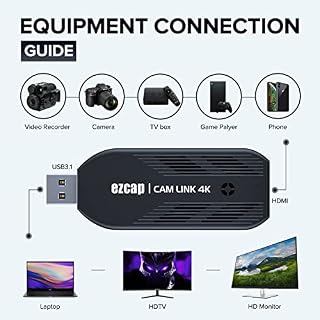
Software installation issues and conflicting peripheral drivers often derail studio workflows. The unit is designed as a genuine plug and play hdmi capture solution, functioning without proprietary software installations or background services. You plug the device into an available USB 3.0 port on your computer, attach an HDMI cable from your camera source, and the host operating system instantly detects the hardware as a standard video capture device.
This universal recognition makes the mwin cam link 4k obs setup straightforward even for beginners. Once connected, open your broadcast suite, add a new video capture device source, select the dongle from the dropdown list, and the live camera feed appears instantly on your canvas. The listing does not specify any companion configuration software, which eliminates bloatware and keeps desktop background resource consumption low during intense live broadcast sessions.
Color Space Processing and RGB Output Profile
Accurate color rendering is crucial when matching a studio camera feed to graphic overlays, product demonstrations, or secondary camera angles. The device supports an RGB primary color video format output up to 1080p30. In desktop production, processing video through an RGB pipeline maintains color separation and clarity, avoiding the chroma subsampling bleed that can blur fine text, interface elements, or skin tones.
While many creators leave their studio setup permanently connected, some maintain auxiliary monitoring setups using dedicated network devices like the tp-link tapo c120 security camera to oversee studio spaces remotely. In contrast, this dedicated capture device focuses solely on delivering pristine RGB primary color signals directly to your broadcast software. This capability ensures your primary production camera looks professional, natural, and accurately graded on stream.
Cross-Platform Console and DSLR Compatibility
Production hardware needs to adapt to diverse equipment setups, from console game capture to dedicated studio cameras. The adapter supports broad hardware compatibility across modern gaming systems including PlayStation 4, PlayStation 5, Xbox, and Nintendo Switch, alongside traditional mirrorless bodies, camcorders, action cameras, and secondary PCs. This versatility makes the mwin cam link 4k dslr capture workflow effortless, whether you are shooting a sit-down tutorial or routing console gameplay into your production hub.
The unit operates reliably across both Windows and macOS operating systems, interfacing cleanly with acquisition suites such as OBS Studio, VLC media player, and Amcap. For multi-camera creators who mix production hardware with wide-angle studio monitoring tools like the tp-link tapo pan/tilt security camera for baby monitor, pet camera w/motion detection, 1080p, 2-way, having a dedicated HDMI ingest dongle simplifies live switching. You can repurpose an existing mirrorless camera into an ultra-high-definition desktop webcam without purchasing proprietary capture cards or platform-locked peripherals.
Specs
| Attribute | Detail |
|---|---|
| Hardware Interface | USB 3.0 |
| Video Capture Resolution | 4K at 30 fps, 1440p at 60 fps, 1080p at 120 fps |
| AV Output Color Format | RGB primary color up to 1080p30 |
| Operating System Support | Windows, Mac |
| Hardware Compatibility | PS4, PS5, Xbox, Nintendo Switch, DSLR, Camcorder, Action Cam, PC |
| Software Compatibility | OBS, VLC, Amcap, Zoom, and standard UVC applications |
| Item Weight | 0.07 kg |
| Power Source | USB bus-powered (no external adapter required) |
| Model Identifier | Cam Link 4K (UPC: 759747549036) |
| Manufacturer | Mwin (MwinElectronicProducts) |
Figures quoted from the product listing. Nothing here was measured.
Mwin Cam Link 4K Pros and Cons
Pros
- Driver-free plug and play operation
- Supports 4K30 and 1080p120 capture profiles
- USB 3.0 low-latency video transfer
- Broad compatibility across consoles and DSLRs
- Lightweight compact 0.07 kg design
Cons
- RGB color format limited to 1080p30
- Listing does not specify included cables
- Lacks dedicated companion configuration software
Best Use Cases
- Upgrading virtual meetings and remote presentations by turning your clean HDMI mirrorless camera into a high-end webcam.
- Broadcasting console gameplay from PlayStation, Xbox, or Nintendo Switch directly into OBS Studio without complex routing.
- Recording high-frame-rate action camera footage at 1080p120 for motion analysis, sports review, or dynamic video editing.
- Capturing clean live video feeds from camcorders for remote event broadcasting, webinars, and educational seminars.
- Serving as an ultra-compact traveling capture dongle for field producers who need reliable video ingest on laptop workstations.
Before You Buy
Before integrating this capture dongle into your setup, verify your camera hardware capabilities. Successful mwin cam link 4k dslr capture requires a camera body capable of outputting a clean HDMI signal without on-screen overlays, grid lines, or autofocus boxes. Furthermore, confirm that your camera supports continuous operation without triggering an automatic standby shutdown, as some consumer cameras power off after several minutes of inactivity unless connected to a dummy battery or external AC adapter.
Check your workstation specifications against the official mwin cam link 4k specs. The listing requires a computer equipped with an authentic USB 3.0 interface and running Windows or Mac operating systems. The listing does not specify whether an HDMI cable or USB extension cord is included in the packaging, so plan on providing your own high-speed HDMI cable matching your camera’s port size, whether standard HDMI, Mini-HDMI, or Micro-HDMI. While home studio hubs might leverage connected smart devices like the tapo home base for network management, this video capture unit requires a direct physical connection to your computer’s high-speed USB bus for reliable video transfer.
Bottom Line
Evaluating whether is mwin cam link 4k worth it comes down to workflow simplicity and functional versatility. For creators wanting to elevate their visual presentation above standard webcams without investing in complex internal capture cards, this unit provides dependable ingestion across multiple resolutions and platforms. It handles standard production tasks cleanly, giving you crisp video capture without the friction of proprietary software or external power bricks.
If you need a reliable, compact hardware link to ingest HDMI feeds from consoles, camcorders, or DSLR cameras into OBS or Zoom, the Mwin Cam Link 4K handles everyday production duties effectively. Its driver-free operation and low-latency transfer make it a practical addition to any modern streaming or recording desk.
FAQ
Does the Mwin Cam Link 4K require proprietary drivers on Windows or Mac?
No, the capture card uses standard USB video class protocols, allowing it to function immediately upon connection without downloading or installing proprietary device drivers on either Windows or Mac computers.
Can I use the Mwin Cam Link 4K for streaming console games?
Yes, the hardware accepts HDMI input signals from modern gaming consoles including PlayStation 4, PlayStation 5, Xbox, and Nintendo Switch, routing the feed directly into broadcast tools like OBS Studio.
What is the maximum capture resolution supported by the device?
The unit supports video capture resolutions up to 4K at 30 frames per second, 1440p at 60 frames per second, and high-frame-rate 1080p at up to 120 frames per second.
Does this capture card require an external power supply?
No, the adapter is entirely bus-powered through its USB 3.0 connection, requiring no external power bricks, wall outlets, or secondary charging cables.
What software applications work with this capture device?
The listing confirms direct compatibility with popular acquisition and streaming software such as OBS Studio, VLC media player, Amcap, and video conferencing applications like Zoom.