As Amazon Associates, we earn from qualifying purchases. This means we may receive a small commission at no extra cost to you if you click through and make a purchase.

Studio creators, custom merchandise fabricators, and dedicated craft hobbyists frequently encounter mechanical limitations when attempting to expand beyond standard sticker and heat-transfer production into rigid substrates. Transitioning between light paper goods and hard, tactile workpieces typically requires a cluttered workspace filled with dedicated plotters, hand chisels, or complex machinery. The Cricut Maker 4 addresses this production bottleneck by consolidating multi-tool cutting, scoring, debossing, and surface carving into a unified desktop format designed to run directly from digital vector files.
For makers prioritizing flexible multi-material handling alongside high-precision finishing, this machine provides an expansive workspace and a dual-carriage drive system engineered to cut up to two times faster than its previous generation. While the machine chassis supports everything from thin films to rigid blanks, maximizing a commercial cricut engraving maker 4 setup requires understanding its tooling requirements, physical footprint, and software parameters.
Quick Verdict
The Cricut Maker 4 stands out as an adaptable centerpiece for creator studios, combining substantial material compatibility with refined pressure and speed control. Its expanded clearance and multi-functional head accommodate both delicate films and dense blanks, delivering professional finishing speeds without requiring manual template adjustments.
- Engineered to process over 300 materials ranging from delicate papers to dense leather and wood.
- Operates up to two times faster than the previous model for rapid batch fabrication.
- Expansive active surface area measuring 270.25 square inches for large-format jobs.
- Directly integrates multi-tool capabilities including cutting, drawing, scoring, debossing, and mechanical engraving.
Cricut Maker 4 Features Explained
Tooling Ecosystem and Mechanical Multi-Processing
Unlike standard craft plotters restricted to light drag blades, the machine features an adaptive tool system engineered to execute distinct structural operations across varied stock. The drive mechanism coordinates cutting, drawing, foiling, scoring, debossing, perforating, and mechanical engraving within a single automated workspace. Creators building intricate product packaging or personalized gifts can score structural folds, draw branding marks, and cut exterior contours without relocating the stock between different standalone devices.
When deploying the Cricut Maker 4 for engraving, the mechanical assembly applies direct, regulated downward force to score clean surface impressions into metals and dense composites. While earlier hardware iterations like the circuit maker 3 machine established automated multi-material handling, this platform refines mechanical rigidity to ensure fine vector strokes remain consistent across dense, unyielding project faces.
Material Handling Across 300+ Substrates
A primary consideration for high-output creator studios is stock flexibility, and the broad spectrum of supported Cricut Maker 4 materials significantly reduces production boundaries. The internal roller mechanism and clearance tolerances allow the machine to process more than 300 distinct materials, encompassing Smart Vinyl, matless iron-on HTV, cardstock, garment textiles, wood sheets, and tooling blanks. Matless feeding capability streamlines high-volume signage and repetitive banner production by bypassing traditional carrier sheets for designated roll media.
For leathercraft and artisan accessories, Cricut Maker 4 leather engraving and debossing provides clean surface detailing on genuine hides and vegetable-tanned blanks. The platform holds dimensional substrates firmly against the carrier carriage, allowing the machine to execute clean decorative marks, monogram fills, and stitch lines across tough fibrous textiles without material lifting or blade drift.
Design Space Integration and Studio Workflow
Digital fabrication depends heavily on software responsiveness, and Cricut Maker 4 Design Space manages the end-to-end transition from raster or vector asset to executed workpiece. The desktop and mobile application connects wirelessly or through physical data connection to guide tool selection, cut sequences, and substrate pressure settings automatically. The software ships with a baseline digital library featuring over 3,000 images and 100 fonts, allowing operators to construct functional jobs immediately upon hardware initialization.
For independent studios scaling their graphic catalog, Cricut offers an optional paid subscription service that unlocks an expanded repository of more than 1.5 million images, 1,000 fonts, and 100,000 pre-designed projects. The bundle package further supplements this setup with 30 bonus digital images deposited directly into the user account during equipment registration, providing foundational cut assets to test alignment and blade calibrations.
Print-Then-Cut Full-Color Merchandise Capabilities
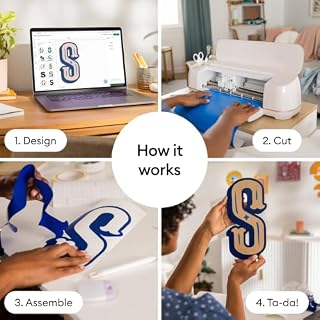
Merchandise production frequently requires vibrant graphic prints matched with complex outline contouring. The machine incorporates an optical sensor system configured to read registration marks produced by standard inkjet printers, enabling accurate Print-Then-Cut sticker, label, and decal manufacturing. Creators print their full-color digital files onto printable vinyl or sticker paper, load the printed substrate into the carriage, and allow the machine to align its cutting paths directly against the printed graphics.
This optical registration eliminates manual centering errors that compromise custom stationery, product labels, and promotional branding runs. By keeping alignment tolerances tight across complex curves, the system ensures vibrant, borderless stickers and promotional apparel transfers remain visually sharp throughout continuous short-run production cycles.
Production Speed and Physical Build
Studio efficiency hinges on turnaround times, and the re-engineered motor assembly delivers processing velocities up to two times faster than previous hardware generations. This speed uplift noticeably shortens production runs for repetitive die-cuts, multi-layered vinyl decals, and bulk cardstock assemblies. Despite its plastic housing composition, the unit maintains substantial structural heft at 9.59 kilograms, anchoring the device against desktop vibrations during rapid diagonal traverses and intense carriage cycles.
The unit provides an active surface area of 270.25 square inches, offering ample lateral space for nesting multiple design components onto single sheets. Measuring 7.1 inches deep, 22.1 inches wide, and 6.2 inches high, the machine requires a dedicated, unobstructed footprint in creator workshops to facilitate unobstructed material passage during forward and reverse carriage feeds.
Specs
| Attribute | Detail |
|---|---|
| Brand | Cricut |
| Model Number | 8002707 |
| Operation Mode | Automatic |
| Housing Material | Plastic |
| Active Surface Area | 270.25 sq in |
| Product Dimensions | 7.1″D x 22.1″W x 6.2″H |
| Item Weight | 9.59 kg (approx. 21.14 lbs) |
| Cut Speed Uplift | Up to 2X faster than previous model |
| Supported Substrates | 300+ materials (leather, wood, vinyl, HTV, cardstock) |
| Software Compatibility | Design Space app (desktop and mobile) |
Figures quoted from the product listing. Nothing here was measured.
Cricut Maker 4 Pros and Cons
Pros
- Cuts up to twice as fast as predecessor
- Supports over 300 craft and commercial materials
- Versatile multi-tool carriage cuts scores and engraves
- Generous 270.25 square inch active surface area
- Includes starter tools materials sampler and digital designs
Cons
- Heavier desktop footprint weighing 9.59 kilograms
- Engraving tip sold separately from base bundle
- Full design library requires optional paid subscription
Best Use Cases
- Fabricating multi-layered custom stickers and die-cut product labels using inkjet Print-Then-Cut workflows.
- Debossing, scoring, and cutting natural leather blanks for customized wallets, tags, and small goods.
- Executing rapid batch production of heat-transfer apparel designs using matless iron-on smart materials.
- Carving precise decorative patterns and typography into thin craft metals and dense packaging media.
- Cutting delicate structural paper crafts, multi-tier greeting cards, and intricate retail event signage.
Before You Buy
Before ordering this digital content bundle, creators must assess the out-of-the-box hardware inclusions against their planned production goals. The retail box provides the machine chassis, a Fine-Point Blade, a Fine Point Pen, a Light Grip Mat, a weeder tool, 30 bonus digital images, and a sampler pack of Smart Vinyl, matless iron-on, cardstock, and transfer tape. However, the listing does not include the dedicated engraving tip, debossing tool, scoring wheels, or perforation blades in this package. Creators aiming specifically for mechanical engraving or heavy leather debossing must purchase those rotary drive housings and tool tips separately, whereas buyers seeking an entry-level vinyl solution could consider options like the cricut explore 4 starter bundle.
Workspace logistics and computational requirements also demand review prior to deployment. Weighing 9.59 kilograms and spanning over 22 inches in width, the unit requires a deep, level workbench with ample front and rear clearance to allow long material mats to travel unimpeded. While the listing notes compatibility with the free Design Space platform and standard inkjet printers, operating the full breadth of the online image catalog requires an optional paid subscription, and the listing does not specify native standalone offline functionality without prior app synchronization. Those evaluating non-contact surface burning instead of physical blade scribing may also weigh mechanical plotters against optical platforms like the laserpecker lp1 pro laser engraver.
Bottom Line
Deciding whether the machine aligns with your studio workflow largely depends on your project diversity. If your daily production alternates between delicate heat transfer vinyl, commercial sticker sheets, dense tooling leather, and rigid wood panels, this hardware bridges the gap with notable speed and structural consistency. The dual-speed enhancement directly benefits small businesses producing repetitive orders where rapid turnaround preserves margins.
When asking is Cricut Maker 4 worth it for dedicated engraving, consider the total tool acquisition required to complete your workflow. The underlying motor, carriage drive, and registration systems handle complex multi-substrate finishing reliably, making this cutting machine a capable investment for creators ready to expand their catalog beyond standard paper and vinyl crafts.
FAQ
Does the Cricut Maker 4 include an engraving tool in the bundle?
The bundle includes a Fine-Point Blade, a Fine Point Pen, a Light Grip Mat, a weeder tool, material samples, and digital images, but the listing does not include a dedicated engraving tool or tip. Engraving tips must be acquired separately to utilize the machine’s mechanical engraving capabilities.
What materials can the Cricut Maker 4 process?
The machine is engineered to work with over 300 materials. Compatible substrates include leather, wood sheets, Smart Vinyl, matless heat transfer vinyl, standard cardstock, sticker papers, and delicate fabrics.
How does the Cricut Maker 4 perform Print-Then-Cut designs?
The system works alongside standard inkjet printers by reading printed optical registration marks on your graphic sheets. Once scanned by the carriage sensor, the machine cuts contours precisely around the printed artwork.
Is a Cricut Access subscription required to run the machine?
A paid Cricut Access subscription is optional and not required to operate the machine. The included Design Space application grants free access to over 3,000 baseline images, 100 fonts, and basic design tools, alongside 30 digital content images bundled with equipment registration.
How fast does the Cricut Maker 4 operate compared to earlier editions?
The machine features an upgraded drive assembly engineered to cut up to two times faster than its previous generation model, significantly accelerating high-volume cutting, drawing, and scoring jobs.
Preparing intricate vector assets for deep engraving often places unexpected demands on your design computer when rendering dense nodes. Reviewing our Graphics Card Verdict ensures your workstation can smoothly handle complex raster-to-vector tracing and multi-layer previews without display stutter. Reliable hardware performance keeps the entire fabrication process efficient from initial digital sketch to final physical engraving.