As Amazon Associates, we earn from qualifying purchases. This means we may receive a small commission at no extra cost to you if you click through and make a purchase.
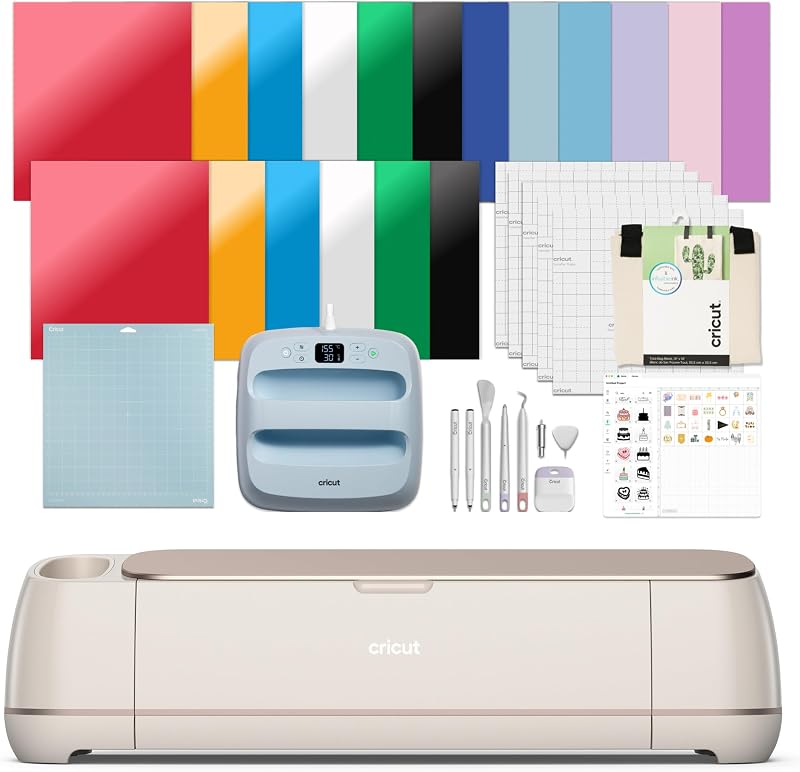
Setting up an efficient maker space requires balancing cutting power, heat pressing capability, and desk space without accumulating mismatched hardware. For creators who frequently produce custom apparel, vinyl decals, greeting cards, and product packaging, ordering standalone tools often creates workflow bottlenecks, cable clutter, and unexpected accessory expenses. The Cricut Maker 4 bundle tackles these workspace headaches directly by combining an automated smart cutting machine with a dedicated 9×9-inch heat press, weeding accessories, and a starter stock of physical and digital materials in a single package.
Our verdict on this hardware package is clear: for crafters and small studio operators eager to hit the ground running with apparel and decal production, this kit eliminates the initial guesswork. The machine delivers substantial cutting speed improvements over previous generations and works across 300+ materials. However, while the package offers immediate utility for iron-on and vinyl projects, creators aiming to immediately tackle dense media like thick tooling leather or balsa wood will still need to purchase specialized blades separately.
Quick Verdict
This comprehensive production bundle delivers an outstanding out-of-the-box experience for creators who want an immediate jumpstart into dual-format cutting and thermal pressing. By packaging the machine with a nine-by-nine inch heat press and essential media, it minimizes startup friction for garment customizers and stationery designers.
- All-in-one setup provides cutting, pressing, and weeding gear in one coordinated box.
- Substantial material versatility supporting over 300 compatible mediums from thin paper to dense wood and leather.
- Up to 2X faster cutting speed compared to the previous generation hardware for faster batching.
- Listing includes conflicting mentions of EasyPress 2 (SE) and EasyPress 3 hardware that buyers should verify.
Cricut Maker 4 Features Explained
Multi-Material Cutting and Tool Versatility
The core appeal of the platform lies in its expansive mechanical capacity. The system handles 300+ different Cricut Maker 4 materials, encompassing delicate tissue paper, bonded fabric, heavy cardstock, vinyl, iron-on HTV, tooling leather, and balsa wood. Beyond basic cutting, the machine carriage accommodates interchangeable tool heads engineered to draw, foil, score, engrave, deboss, and perforate. This multi-tool capability allows a single tabletop unit to function as a creasing station for bespoke retail boxes, an art pen plotter, and a heavy-duty scoring device.
For creators planning to expand into specialized artisanal crafts, exploring dedicated operations like a cricut engraving maker 4 workflow demonstrates how the machine carves into soft metals and acrylic blanks. Although the bundle supplies the primary fine-point blade for everyday vinyl and paper drafting, the underlying mechanical drive provides the downward force necessary to manipulate dense materials once optional blades are acquired.
Cutting Speed and Production Throughput
Production efficiency represents a critical metric when transitioning from occasional hobby crafting to small-batch commercial output. This generation features an upgraded internal drive mechanism delivering a Cricut Maker 4 cutting speed rated up to two times faster than its direct predecessor when processing compatible smart materials without a cutting mat. The automatic feeding system pulls rolls smoothly through the chassis, maintaining positional accuracy across long decorative runs.
When running repetitive jobs, such as dozens of identical vinyl decals or multi-piece wedding stationery suites, the elevated motor speed shortens total run times substantially. The machine operates smoothly across its 144-square-inch active surface area, maintaining clean corner cuts and consistent depth regulation even during complex vector passes.
Print Then Cut Workflow Integration
Sticker makers, packaging creators, and label designers rely heavily on optical alignment systems to turn printed graphics into finished die-cut products. The Cricut Maker 4 Print Then Cut feature works directly with your standard home inkjet printer. You print full-color graphics embedded with registration sensor marks onto sticker paper or printable vinyl, then feed the sheet into the cutting machine.
Internal optical sensors scan the printed corner lines to calibrate the blade alignment precisely around the contours of your graphics. This process eliminates manual scissor trimming and allows studios to manufacture custom die-cut sticker sheets, vibrant brand seals, and product tags with commercial edge accuracy.
Integrated Heat Press Hardware
Heat transfer vinyl and sublimation work require uniform heat and stable pressure that household irons cannot consistently provide. This Cricut Maker 4 heat press bundle includes a 9×9-inch EasyPress unit accompanied by a matching safety base and heat-resistant pressing mat. The square ceramic-coated plate provides edge-to-edge heat distribution, eliminating cold spots that cause heat-transfer film to peel over time.
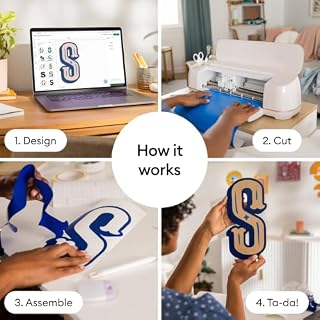
While legacy cutters like the cricut air 2 required users to source independent pressing equipment, having a matched press alongside the cutting unit standardizes the finishing workflow. Creators can draft an intricate iron-on design on Smart Iron-On material, weed the design using the bundled hand tools, and press it directly onto the included blank canvas tote bag without pausing to improvise pressing surfaces.
Design Space Ecosystem and Digital Libraries
Hardware utility depends entirely on software accessibility, especially for users questioning if the Cricut Maker 4 for beginners presents an overwhelming learning curve. The hardware connects to Cricut Design Space, a cloud-enabled layout application compatible with desktop and mobile devices. The free tier of the software provides essential layout tools, 100+ standard typography fonts, and over 3,000 baseline stock graphics, alongside 30 digital images included specifically with this package.
Users who require massive ready-to-cut image libraries can optionally enroll in the Cricut Access monthly subscription, though the core software remains fully functional for uploading external SVG vectors and PNG designs without extra fees. Setup instructions are delivered via an interactive online onboarding sequence that guides new owners through an initial practice cut to verify blade depth and mechanical tracking before starting actual project materials.
Specs
| Attribute | Detail |
|---|---|
| Brand | Cricut |
| Model Number | 8002748 |
| Chassis Color | Seashell |
| Housing Material | Plastic |
| Active Surface Area | 144 square inches |
| Operation Mode | Automatic |
| Compatible Materials | 300+ (leather, wood, vinyl, iron-on HTV, cardstock) |
| Bundled Heat Press | 9×9 inch EasyPress (listing notes EasyPress 2 SE / EasyPress 3) |
| Bundled Mats & Tools | LightGrip Machine Mat, Pressing Mat, Tools, 2 Fine Point Pens |
| UPC / GTIN | 093573195686 / 20093573195680 |
Figures quoted from the product listing. Nothing here was measured.
Cricut Maker 4 Pros and Cons
Pros
- Cuts over 300 compatible materials
- Up to 2X faster cutting speed
- Includes 9×9 inch heat press and mat
- Full-color Print Then Cut inkjet integration
- Comes with essential weeding tools and vinyl
Cons
- Listing has conflicting heat press model details
- Specialty blades for leather and wood sold separately
Best Use Cases
- Boutique apparel creators who require an all-in-one system to cut complex heat-transfer vinyl and press finished designs onto garments.
- Independent sticker artists who want to print full-color graphics on an inkjet printer and execute automated contour die-cutting.
- Stationery makers crafting intricate greeting cards, party decor, and folded product packaging out of medium-weight cardstock.
- Mixed-media hobbyists upgrading from compact desktop cutters like the cricut joy xtra bundle to access broader 12-inch cutting widths and heavy material capabilities.
- Event decorators fabricating large-format vinyl signage, window decals, and customized promotional goods using smart materials.
Before You Buy
Before purchasing this package, buyers should carefully review the exact hardware specifications in the listing, as there is a clear naming discrepancy regarding the bundled heat press. The listing text mentions both the Cricut EasyPress 2 (SE) and the Cricut EasyPress 3 in different descriptive bullet points. While both units feature a 9×9-inch heating plate suitable for tote bags and apparel, the EasyPress 3 includes Bluetooth connectivity for the Cricut Heat mobile app, whereas the EasyPress 2 relies entirely on manual onboard digital controls. The listing does not clarify whether this specific box ships with the connected model or the standard edition.
Furthermore, buyers comparing this setup against a lighter machine such as the cricut air 4 or a simpler cricut explore 4 starter bundle should evaluate which tool heads they truly need. The Cricut Maker 4 bundle includes only the standard Fine-Point Blade, two pens, weeding tools, a LightGrip mat, transfer tape, sample cardstock, and vinyl. Specialized tooling required for wood slicing, leather debossing, rotary fabric trimming, and metal engraving are sold separately. Creators solely seeking basic vinyl cutting and iron-on transfers may find that a simpler starter kit meets their needs without paying for heavy-duty motor systems they will not utilize.
Bottom Line
When evaluating whether the Cricut Maker 4 bundle represents a smart investment, consider your immediate studio production demands. As a complete creative ecosystem, it effectively merges two primary fabrication steps—precision automated cutting and flat-bed thermal pressing—into an organized, ready-to-run setup. The machine’s rapid cut speeds, broad 300+ material tolerance, and sharp registration handling make it an undeniable workhorse for expanding craft studios.
If you intend to launch an apparel side-hustle, produce polished merchandise, or craft multi-layered stationery, this bundle saves you the time and friction of curating third-party presses and accessories individually. Just keep in mind that unlocking its densest material capabilities will require adding specialized blades to your studio toolkit over time.
FAQ
Is the Cricut Maker 4 suitable for beginners?
Yes, the Cricut Maker 4 is designed to accommodate beginners through guided online setup instructions and an automated test cut procedure. Cricut Design Space simplifies the process of sizing, layering, and sending cut paths to the machine, making basic vinyl and cardstock projects accessible even without prior graphic design experience.
What materials can the Cricut Maker 4 cut straight out of the box?
Right out of the box, the machine includes a Fine-Point Blade that cuts standard adhesive vinyl, iron-on heat transfer vinyl, light-to-medium cardstock, paper, and printable sticker sheets. Slicing through dense materials like balsa wood, chipboard, or thick tooling leather requires optional blades such as the Knife Blade or Deep-Point Blade, which are not included in this bundle.
Does the bundle include an inkjet printer for print-then-cut projects?
No, the bundle does not include a printer. The Print Then Cut feature relies on your own external inkjet printer to print the colored artwork and registration lines before you load the material into the cutting machine for automated contour slicing.
Which heat press model is included in this bundle?
The product listing contains contradictory text, referencing both the Cricut EasyPress 2 (SE) and the Cricut EasyPress 3 (9×9) within different sections of the listing. Both versions provide a nine-by-nine inch ceramic-coated heat plate and operate across standard garment pressing temperatures, but the listing does not definitively specify which revision arrives in the box.
Do I need to pay for a subscription to use the machine?
No, a paid subscription is not mandatory to operate the hardware. The companion software, Cricut Design Space, is completely free to download and includes essential editing tools, 100+ fonts, and over 3,000 standard images. The bundle also provides 30 digital images with purchase. An optional paid Cricut Access subscription is available for creators who want an expanded library of licensed artwork and commercial graphics.