As Amazon Associates, we earn from qualifying purchases. This means we may receive a small commission at no extra cost to you if you click through and make a purchase.

Managing high-performance desktop computers, rendering nodes, and headless workstations from a distance is one of the most frustrating bottlenecks in creative studio production. Video editors running overnight exports, streamers balancing dedicated broadcast systems, and home lab hobbyists routinely encounter a familiar problem: when an operating system crashes, freezes on a blue screen, or drops network connectivity, software-based remote tools become completely unresponsive. Applications like Parsec or remote desktop clients require an active host operating system and working drivers to function. When the host OS fails, creative professionals are left with no choice but to physically visit the machine to press the power switch, interrupting production momentum and causing prolonged downtime.
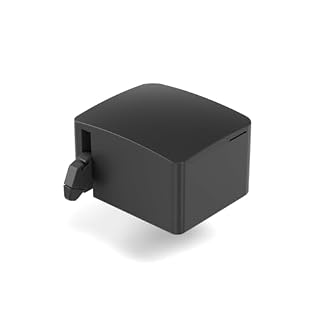
The GL.iNet Comet Pro solves this dilemma by providing an out-of-band hardware Keyboard, Video, and Mouse (KVM) platform paired with mechanical power control. Rather than relying on host software, this standalone device interfaces directly with your computer’s physical display output, USB inputs, and chassis power button via an included Fingerbot accessory. Equipped with dual-band Wi-Fi 6 connectivity, 4K video passthrough at 30 frames per second, and an integrated 2.22-inch touchscreen, the unit gives creators comprehensive hardware control over remote computers. Our assessment shows it is a practical, reliable option for remote rigs where maintaining consistent uptime and BIOS-level access is non-negotiable.
Quick Verdict
The GL.iNet Comet Pro delivers true out-of-band hardware management in a compact form factor designed for creative studios and headless PC environments. By combining dual-band Wi-Fi 6 flexibility with direct hardware input control and mechanical Fingerbot power switching, it eliminates the need to physically walk over to frozen machines. The integrated 2.22-inch touchscreen simplifies setup and network management, making remote rig administration accessible without deep enterprise IT expertise.
- Hardware-level out-of-band KVM control that functions even during complete operating system freezes.
- Dual-band Wi-Fi 6 and wired connectivity options that eliminate single points of failure.
- Integrated 2.22-inch touchscreen interface for quick network connection and cloud service toggles.
- Physical power management and forced reboot capabilities using the bundled Fingerbot accessory.
GL.iNet Comet Pro Features Explained
Dual-Band Wi-Fi 6 and Hardware KVM Architecture
Enterprise KVM over IP systems often require bulky rack installations and dedicated Ethernet wiring drops, creating setup hurdles for compact studio spaces. The glinet comet pro hardware kvm overcomes these limitations by integrating dual-band Wi-Fi 6 technology alongside traditional wired networking. Supporting both 2.4 GHz and 5 GHz wireless frequency bands, the device allows creators to position secondary render nodes in sound-dampened closets or utility rooms without running long networking cables across floors.
Providing both wireless and wired connectivity options ensures reliable operational redundancy. In studios where wireless interference might occur, falling back to a wired connection prevents unexpected disconnections. Because the Comet Pro acts as a standalone hardware bridge, it functions completely independent of the target machine’s operating system. Users receive full BIOS access, boot menu control, and low-latency input registration just as if they were seated directly in front of the physical workstation.
4K Video Passthrough and Two-Way Audio
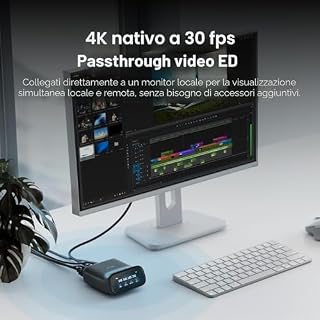
Remote desktop management often suffers from poor image fidelity, obscuring critical visual details on production workstations. With glinet comet pro 4k passthrough, the device captures and transmits 4K video at 30 frames per second utilizing low-latency H.264 video encoding. This configuration sends clear, legible video streams across your network without interrupting or replacing the signal going to your local studio monitor, ensuring on-site displays continue functioning normally.
Complementing the 4K video stream is integrated two-way audio support, an uncommon feature in standard remote management hardware. This audio channel allows operators to hear host system audio alerts and playback while transmitting voice input back across the link. For creative teams coordinating remote editing tasks, monitoring live audio meters, or conducting voice calls during setup sessions, this synchronized two-way communication channel provides a seamless interactive workspace.
Touchscreen Setup and On-Device Controls
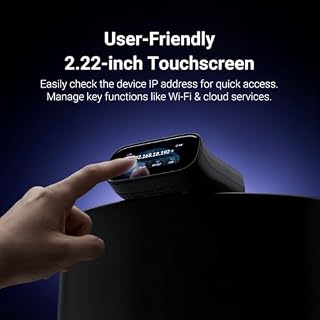
Configuring network hardware in busy studio environments can be tedious when it demands command-line tools or specialized discovery utilities. The glinet comet pro touchscreen setup addresses this frustration by incorporating a 2.22-inch display directly on the front panel. The intuitive graphical interface allows users to check device status, review assigned IP addresses, and configure wireless connections without needing a separate computer or complex terminal commands.
Beyond initial Wi-Fi configuration, the touchscreen serves as a quick control hub for vital daily functions. Creators can easily enable or disable cloud management services, review active connection states, and verify operational status with a quick glance. This on-device visibility accelerates troubleshooting, letting you immediately confirm whether network connectivity is stable without digging through web configuration menus or diagnostic logs.
Remote Power Control and Instant Crash Recovery
While traditional KVM hardware handles video and input redirection, it cannot restart a system that has completely powered off or crashed into an unresponsive state. The glinet fingerbot pc power control accessory solves this problem through physical mechanical actuation. By positioning the Fingerbot over the host chassis power switch, users can execute true physical button presses remotely, turning on machines from a complete shutdown state where software Wake-on-LAN packets frequently fail.
This physical control is indispensable for recovering from catastrophic operating system crashes or kernel panics. Using the glinet comet pro remote power control features, administrators can execute a forced reboot by holding down the mechanical switch remotely. This hard-reset capability ensures that frozen digital signage, render rigs, or streaming machines can be restored to working order instantly without requiring on-site staff intervention.
Workflow Integration for Remote Studios
Integrating this device into a production setup optimizes the overall glinet comet pro workflow by separating noisy hardware from primary creative spaces. Heavy workstations and rendering boxes can reside in remote utility areas, keeping your editing desk quiet and cool. Creators can launch extensive render jobs, step away to brew fresh espresso on a ninja luxe cafe signature series coffee machine, and monitor export status smoothly over the network.
Deploying the glinet comet pro for remote studio tasks also provides crucial reliability for live-streaming and broadcast rigs. If a dedicated graphics or playback computer stalls mid-production, the hardware KVM lets operators intervene immediately through a remote browser window. Combined with Wi-Fi 6 wireless mobility, it transforms isolated machines into responsive, accessible production nodes across your entire studio footprint.
Specs
Reviewing the official glinet comet pro specs provides a clear overview of the hardware capabilities and connection protocols supported by this out-of-band management system.
| Attribute | Detail |
|---|---|
| Product Model | Comet Pro (GL-RM10) |
| Brand | GL.iNet |
| Connectivity Protocols | Dual-Band Wi-Fi 6 (2.4 GHz and 5 GHz) and Wired |
| Video Passthrough | 4K at 30 FPS via H.264 encoding |
| Audio Support | Two-way audio communication |
| Built-in Display | 2.22-inch touchscreen interface |
| Control Methods | Remote management and on-device touch |
| Power Management | Remote power on, cold boot, and forced reboot via Fingerbot |
| Compatible Devices | PCs, laptops, desktops, industrial PCs, digital signage, kiosks |
| Package Quantity | 1 Count (1 Item) |
Figures quoted from the product listing. Nothing here was measured.
GL.iNet Comet Pro Pros and Cons
Pros
- Dual-band Wi-Fi 6 and wired connectivity
- Hardware-level out-of-band BIOS access
- 4K at 30 FPS video passthrough
- Two-way audio communication support
- Remote physical power control via Fingerbot
- Built-in 2.22-inch touchscreen interface
Cons
- Video passthrough capped at 30 frames per second
- Listing does not specify included cable types
- Fingerbot requires physical clearance on chassis
Best Use Cases
- Remote video editing setups running dedicated rendering nodes that require hardware BIOS access when export software freezes.
- Dedicated live-streaming workstations housed in soundproof equipment closets to eliminate background fan noise from recording audio.
- Commercial digital signage and public kiosks requiring 24/7 uptime and instant mechanical reboot recovery without technician dispatches.
- Home lab servers and testing environments needing flexible dual-band Wi-Fi connectivity and out-of-band cold boot control.
Before You Buy
Before purchasing, buyers should evaluate their display and framerate requirements carefully. The GL.iNet Comet Pro captures video at 4K resolution capped at 30 frames per second using H.264 compression. While 30 FPS is perfectly suited for managing operating systems, troubleshooting BIOS menus, and supervising render timelines, it is not designed for fast-paced gaming or high-framerate video playback. Additionally, while the listing confirms broad compatibility across desktop PCs, laptops, industrial computers, and kiosks, the listing does not specify exact port counts, included cable lengths, or internal storage specifications.
Prospective users should also plan their physical installation space around the computer chassis power button. The package includes the GL-RM10 unit along with the mechanical Fingerbot power controller, but the listing does not specify whether extra mounting brackets or specialty adhesives are included for non-standard cases. If you are outfitting an off-site studio building, pairing hardware KVM access with physical security monitoring like a ring wired pro bundle will help safeguard your physical premises while maintaining full remote administrative control over your computing rigs.
Bottom Line
In concluding our gl-rm10 kvm review, the GL.iNet Comet Pro stands out as an innovative out-of-band management tool that brings enterprise-level rig control to independent creators and IT hobbyists. By integrating dual-band Wi-Fi 6 networking, 4K video passthrough at 30 frames per second, and an accessible 2.22-inch touchscreen, it successfully demystifies hardware KVM deployment and eliminates unnecessary cable clutter in studio workspaces.
When deciding whether is glinet comet pro worth it, consider the cost of unexpected rig downtime on your production schedule. For users running headless render nodes, streaming machines, or remote servers that must stay online around the clock, the combination of BIOS-level control and mechanical Fingerbot power toggling makes this device an exceptionally smart investment for modern creative workflows.
FAQ
How does the GL.iNet Comet Pro handle remote access during an operating system crash?
Because the device functions as an external hardware KVM, it captures video directly from the computer’s display output and transmits keystrokes as a hardware USB device. This allows it to remain fully operational even when the host operating system freezes completely, giving you full visual feedback and the ability to trigger a reboot.
Can the GL.iNet Comet Pro connect over Wi-Fi instead of Ethernet?
Yes, the Comet Pro includes dual-band Wi-Fi 6 supporting both 2.4 GHz and 5 GHz frequency bands. This wireless capability allows users to position remote rigs in closets or separate studio rooms without running Ethernet cabling, while wired connectivity remains available to prevent single points of failure.
What video resolution does the GL-RM10 support?
The GL-RM10 provides 4K video passthrough at 30 frames per second using H.264 video compression. It streams clear, low-latency video across your network while preserving local monitor output so physical displays remain uninterrupted.
How does the Fingerbot power on a computer from a complete shutdown?
The included Fingerbot is a physical actuator that attaches to the host computer chassis and presses the physical power button on command. Because it physically depresses the hardware switch, it can boot a computer from a completely powered-off state or force a hard restart without relying on Wake-on-LAN network packets.
What settings can be managed on the built-in 2.22-inch touchscreen?
The 2.22-inch built-in touchscreen features an intuitive interface that allows users to view device status, connect to 2.4 GHz or 5 GHz Wi-Fi networks, and easily enable or disable cloud management services directly from the device without needing technical terminal commands.
Which computer types are compatible with the GL.iNet Comet Pro?
According to the listing specifications, the device is compatible with desktop PCs, laptops, industrial PCs, digital signage setups, and kiosks.