As Amazon Associates, we earn from qualifying purchases. This means we may receive a small commission at no extra cost to you if you click through and make a purchase.

Running a creative workspace, design studio, or high-output production office creates relentless document and imaging demands. When daily operations require generating client design proofs, contracts, shipping labels, and promotional material, standard desktop printers quickly show their limitations. Content creators and studio operators often deal with constant paper reloading, sluggish flatbed scanning, and erratic wireless dropouts that break creative momentum. Choosing the right hardware requires understanding how the hp officejet 9025 all-in-one printer specs and dual-capacity feeding system handle heavy daily throughput without constant user intervention.
For independent creators and micro-teams requiring dependable output, the HP OfficeJet Pro 9025 provides an efficient multi-function hub that combines print, copy, scan, and fax capabilities into a single networked unit. With its 500-sheet total paper capacity divided across two independent trays and an accelerated document feeder, this machine eliminates the routine bottlenecks common to creative office production. While photo enthusiasts seeking casual image processing might lean toward consumer models like the hp envy all in one printer, this heavy-duty inkjet focuses squarely on business-tier workflow automation and robust paper management.
Quick Verdict
The HP OfficeJet Pro 9025 serves as an exceptional workhorse for creators who produce continuous paper documentation and need fast, automated digitizing. Its dual-tray structure and high-velocity scanning mechanism drastically reduce manual upkeep, making it an ideal anchor for print-heavy studio environments.
- Dual 250-sheet input trays allow a full 500-sheet paper ream capacity across standard and specialty media.
- Single-pass automatic document feeder scans up to twice as fast as previous 9010 series models.
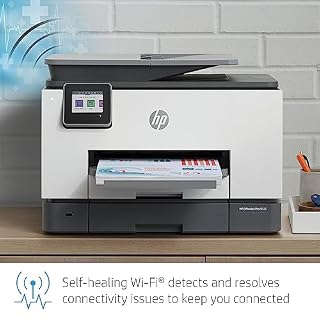
- Self-healing Wi-Fi and voice control compatibility keep creative studio devices connected without manual network resets.
- Broad print media support accommodates everything from regular document paper to envelopes, transparencies, and thick card stock.
HP OfficeJet Pro 9025 Features Explained
Dual Paper Trays and Studio Paper Handling
The standout physical advantage of this machine is the integration of the hp officejet 9025 dual paper trays. Housing two separate 250-sheet input cassettes gives the unit a combined 500-sheet capacity, which equals an entire ream of standard office paper. For busy creative studios, this eliminates the constant interruption of opening paper drawers during large proof runs or multi-page administrative jobs. Creators can designate one tray for high-volume letter-size printing while reserving the secondary tray for legal documents up to 8.5 by 14 inches.
Beyond pure volume, the hp officejet pro 9025 paper handling accommodates multiple project workflows simultaneously. Instead of removing everyday copy paper each time a project calls for labels or marketing materials, studio members can leave distinct media types staged in separate cassettes. Compared to single-tray designs such as the epson workforce pro wf-4834 wireless all-in-one printer, having dual dedicated feeds reduces paper swap wear, prevents feed roller errors, and keeps studio production moving without manual configuration steps.
Single-Pass Document Feeder and Accelerated Scanning Speed
Document digitizing is often a tedious bottleneck in client-facing businesses, but the hp officejet pro 9025 scanning speed shifts that dynamic significantly. The unit features a sheetfed scanner with a single-pass automatic document feeder that scans both sides of a page simultaneously. This hardware design allows the 9025 to scan up to two times faster than the HP OfficeJet Pro 9010 series, making short work of multi-page agreements, production sketches, and archival project sheets.
In addition to the automatic feeder, the flatbed portion incorporates an easy slide-off glass bed. The bezel-free glass design enables documents to slide directly off the platen without catching on a raised plastic rim, reducing the risk of tearing delicate artwork or historical studio documents. With a scanning and optical engine capable of up to 1200 x 1200 resolution and black-and-white copy speeds reaching up to 24 pages per minute, high-speed document intake remains sharp, legible, and mechanically smooth.
Workflow Automation with Smart Tasks
Software and operational ergonomics play an equal role in studio efficiency, anchored here by hp officejet 9025 smart tasks. Accessed directly through the color LCD touchscreen, Smart Tasks allows creators to program customized, one-touch automation recipes. Instead of manually scanning a sheet, opening an image editor, renaming the file, and uploading it to cloud storage, a single tap can automatically digitize the sheet, extract searchable text, and sync it directly to chosen cloud services or studio email accounts.
This automated pathway proves invaluable for freelance vloggers and digital artists tracking project expenses, physical invoices, and licensing agreements. The intuitive display gives immediate control over copy settings, fax transmissions, and job queues without forcing the operator to sit down at a dedicated workstation. Voice control integrations via Amazon Alexa and Vera expand this flexibility further, allowing busy makers to trigger print tasks across the studio completely hands-free.
Self-Healing Wi-Fi and Secure Studio Connectivity
Network reliability is critical in multi-device production setups, and the hp officejet 9025 wireless setup is engineered to prevent intermittent connection failures. Built-in self-healing Wi-Fi constantly monitors network integrity across dual-band channels; when a signal degradation or network drop is detected, the printer automatically initiates a reset to re-establish connection without requiring human troubleshooting. This ensures that laptops, desktop PCs, and smartphones scattered throughout the studio maintain a seamless link to the print queue.
Security is integrated at the hardware and firmware level to prevent unauthorized access across shared studio networks. The device protects sensitive project files, client contact information, and internal documents through embedded encryption and administrative access barriers. Wireless printing from mobile devices remains straightforward, enabling visiting clients or team members to send deliverables directly to the output tray without intricate network provisioning.
Versatile Print Media and Card Stock Printing
Creative studios frequently output materials beyond standard letter documents, making hp officejet pro 9025 card stock printing a core operational asset. The internal inkjet path is engineered to handle an extensive spectrum of print media, including card stock, high-resolution paper, glossy photo paper, labels, envelopes, plain paper, and transparencies. This broad substrate compatibility turns the printer into an on-demand prototyping station for product packaging mockups, branded business collateral, and promotional mailings.
The thermal inkjet system deposits ink at an engine resolution of up to 1200 x 1200, ensuring clean typographic edges and rich graphic reproduction across color prints. Whether generating promotional flyers on high-resolution presentation paper or printing heavy mailing envelopes for client merch shipments, the paper feed path guides thicker stocks without the severe mechanical curling or banding common to lightweight consumer printers.
Specs
| Feature | Specification |
|---|---|
| Printer Technology | Color Inkjet |
| Physical Dimensions | 12.53 inches D x 17.2 inches W x 15.6 inches H |
| Paper Capacity | 2 Trays (500 sheets total; 250 sheets per tray) |
| Maximum Media Size | 8.5 x 14 inches |
| Engine Resolution | Up to 1200 x 1200 dpi |
| Scanner Mechanism | Sheetfed with Single-Pass Automatic Document Feeder |
| Maximum Black Copy Speed | Up to 24 pages per minute |
| Maximum Copies Per Run | Up to 24 copies |
| Voice and Smart Integration | Amazon Alexa, Vera, Voice Control |
| Hardware Display | Color LCD Touchscreen |
Figures quoted from the product listing. Nothing here was measured.
HP OfficeJet Pro 9025 Pros and Cons
Pros
- Dual 250-sheet trays hold 500 sheets total
- Scans up to twice as fast as 9010 series
- Single-pass document feeder handles two-sided pages
- Self-healing Wi-Fi maintains reliable wireless connectivity
- Supports card stock, labels, transparencies, and photo paper
Cons
- Physical height exceeds 15 inches on desktop surfaces
- Copy runs capped at 24 copies per cycle
- Listing does not specify included physical interface cables
Best Use Cases
- Commercial design studios producing high-volume runs of client proposals, packaging inserts, and heavy card stock proofs.
- Content creation teams digitizing multi-page storyboard revisions and physical contracts via the high-speed single-pass document feeder.
- Home offices that require standard plain paper and specialized mailing envelopes loaded simultaneously across dual input cassettes.
- Independent businesses seeking to automate receipt logging and document cloud archival through programmed LCD Smart Tasks shortcuts.
Before You Buy
Before integrating this all-in-one printer into your workspace, evaluate its physical footprint against your available studio furniture. Measuring 12.53 inches deep, 17.2 inches wide, and 15.6 inches high, the unit demands a dedicated, stable tabletop rather than a cramped bookshelf corner. While it connects seamlessly with laptops, desktop PCs, and smartphones via self-healing Wi-Fi, the listing does not specify whether physical USB or ethernet data cables are included in the packaging, so plan accordingly if your studio relies on hardwired network runs.
Consumable management also requires foresight. The product listing highlights HP Instant Ink compatibility, which allows automated cartridge delivery schedules based on usage. However, the listing does not specify the exact page yield of the starter ink cartridges provided in the box. Creators comparing this cartridge-based thermal inkjet against continuous fluid reservoirs like the hp smart tank 6001 wireless all-in-one printer should carefully assess their monthly printing volume and replenishment cadence before committing.
Bottom Line
Evaluating whether the investment is hp officejet pro 9025 worth it comes down to your studio’s operational volume and paper handling demands. With its dual 250-sheet paper trays, rapid single-pass scanning, and reliable self-healing wireless stack, this machine eliminates the administrative drag that slows down busy creative operations. It delivers commercial-grade reliability within a manageable desktop footprint, making routine multi-page output effortless.
For high-output creators, implementing the hp officejet pro 9025 for home studio operations bridges the gap between basic desktop convenience and professional office throughput. If your everyday tasks require juggling mixed paper types, scanning double-sided documentation at high velocity, and maintaining uninterrupted wireless connectivity across multiple studio workstations, this all-in-one printer represents a powerful, productivity-first solution.
FAQ
What are the primary hp officejet 9025 all-in-one printer specs for paper capacity?
The printer features two distinct 250-sheet paper trays, providing a total input capacity of 500 sheets of paper. It supports media sizes up to 8.5 by 14 inches and accommodates a diverse range of materials including card stock, envelopes, glossy photo paper, transparencies, and standard plain paper.
How do the hp officejet 9025 dual paper trays improve everyday workflow?
The dual paper trays allow users to keep an entire 500-sheet ream of paper loaded to prevent frequent refills, or to store two separate media types at the same time. Creators can stage regular copy paper in one tray and heavy card stock, labels, or photo paper in the other, eliminating the need to manually unload trays between different print tasks.
Why is the hp officejet pro 9025 scanning speed faster than previous series models?
The printer utilizes a sheetfed scanner equipped with a single-pass automatic document feeder that captures both sides of a page simultaneously. This engineering configuration allows it to scan documents up to two times faster than the HP OfficeJet Pro 9010 series, while the slide-off glass bed makes manual flatbed scanning significantly quicker.
Does the HP OfficeJet Pro 9025 support heavy card stock and specialty photo paper?
Yes, the internal paper path is designed to process card stock, high-resolution paper, glossy photo paper, labels, transparencies, and envelopes. Its 1200 x 1200 engine resolution ensures crisp graphics, deep text lines, and vibrant color output across various specialty media weights.
How does the hp officejet 9025 wireless setup maintain connection stability?
The printer incorporates self-healing Wi-Fi technology that actively monitors network signals and automatically resolves connection faults without requiring user intervention. It supports seamless connections across laptops, PCs, and smartphones, and includes voice control compatibility with Amazon Alexa and Vera.