As Amazon Associates, we earn from qualifying purchases. This means we may receive a small commission at no extra cost to you if you click through and make a purchase.

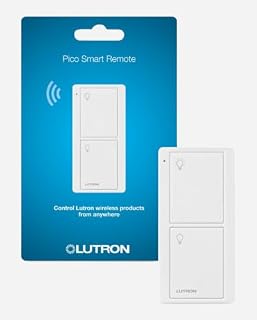
Studio spaces, editing bays, and creator workshops often suffer from rigid electrical wiring. Overhead fixtures, background practicals, and primary room lights frequently remain tethered to an inconvenient physical wall switch located far from your camera rig, audio desk, or workbench. Halting a recording session or crawling out from behind an editing console just to toggle ambient room lights introduces constant friction into creative work. Running new in-wall electrical copper through drywall to establish a traditional three-way switch setup requires drywall demolition, electrical permits, and substantial contractor labor. The Lutron Pico Remote eliminates these headaches by decoupling the tactile wall switch from structural wiring, providing video producers, podcasters, and hobbyists with instant, tactile control over their fixtures right where production occurs.
Serving as a dedicated wireless caseta lighting control device, this switch bypasses crowded home wireless frequencies and complicated software interfaces. When integrated with compatible in-wall hardware, a lutron pico switch provides the reliable physical response needed during fast-paced studio shoots and long production sessions. While adjusting brightness levels requires separate dimming models or companion controls, this 2-button device masters the basics of instant, zero-latency toggling with remarkable battery endurance. For creators looking to streamline their physical studio environment without pulling cable, it offers an exceptionally practical lighting workflow upgrade.
Quick Verdict
The Lutron Pico Remote is an indispensable physical trigger for anyone managing creative workspaces powered by the Caseta ecosystem. It delivers instantaneous, rock-solid switching without demanding network bandwidth or smartphone dependency.
- Instant wireless control over Caseta in-wall smart switches without cutting holes or running wires
- Rock-solid Clear Connect RF technology avoids interference from studio wireless mics and Wi-Fi networks
- Versatile deployment as a handheld controller, tabletop console switch, or flush-mounted wall plate
- Included battery delivers an exceptional 10-year operating life for maintenance-free production
Lutron Pico Remote Features Explained
Lutron Pico 2-Button Switch Mechanics
The core layout of this unit relies on a clean, push-button actuator configured for straightforward on-and-off operation. Designed with two clear button positions, the top pad activates power while the bottom pad cuts it completely. This tactile touch switch mechanism provides an immediate physical click, allowing creators to operate lights blindly while keeping eyes fixed on a monitor, teleprompter, or camera viewfinder. Unlike smart home touchscreens or voice commands that require vocal prompts or app navigation, a physical button press introduces zero lag into a shooting schedule.
Inside the switch architecture, the system operates as a 2-way circuit rated for 1.5 amps at 3 volts, featuring a normally closed contact type. When linked to an existing installation such as a lutron caseta dimmer, the 2-button Pico acts as an instantaneous master toggle. For hobbyists running production sets where practical lights must turn on or off together between scene setups, this dedicated push-button control simplifies daily lighting adjustments without requiring menu diving.
Clear Connect RF Pico Remote Performance
Modern creator studios are saturated with wireless radio signals. High-bandwidth Wi-Fi routers, wireless HDMI transmitters, Bluetooth audio interfaces, wireless lavalier microphones, and smart studio monitors battle constantly for spectrum on crowded 2.4 GHz and 5 GHz bands. Standard smart home accessories that depend on Wi-Fi or Bluetooth frequently drop offline, introduce command buffering, or suffer from latency spikes during live recording sessions. The clear connect rf pico remote completely circumvents this issue by operating on Lutron’s proprietary Clear Connect RF technology, a dedicated frequency engineered specifically for automated lighting hardware.
This dedicated radio frequency protocol ensures that every button press connects with the intended switch without interference from nearby streaming gear or computer peripherals. Whether you position the remote on an overhead boom, beside an audio mixer, or across a large basement workshop, communication remains instant and dependable. The listing notes that the remote controls Caseta in-wall smart switches from anywhere within the home, making it equally dependable when walking into a studio facility or shutting down workspace lights from a vehicle upon arrival.
Lutron Pico Wall Mount and Tabletop Versatility
Physical mounting flexibility is where the device shines for studio layouts and production spaces. The unit functions straight out of the box as an ultra-compact handheld remote control that slips easily into a pocket or rests on an equipment cart. However, video producers and podcasters often demand fixed switch locations near production stations. The lutron pico wall mount capability allows the switch to mount directly to any flat surface—including studio drywall, acoustic panels, sound booths, desk legs, and wooden shelving—without needing an electrical gang box or copper wires behind the wall.
To mount the unit flush onto a wall surface, creators can utilize the PICO-WBX-ADAPT mounting bracket, which allows the switch to fit perfectly behind a standard Claro wall plate such as the CW 1 WH. When mounted beside existing hardware or alongside a lutron caseta wireless dimmer switch, it presents the identical visual appearance and physical feel of an expensive hardwired multi-way switch. For editing suites and live-streaming desks, the remote can also be mounted on a tabletop pedestal (model L-PED1 WH), placing tactile room lighting control within arm’s reach of your keyboard, stream controller, or mixer.
Ten-Year Battery Operation
Battery maintenance is one of the most frustrating aspects of managing studio automation hardware. Rechargeable remotes and smart battery pucks that require charging every few weeks invariably run out of power right in the middle of a critical shoot or streaming schedule. The Lutron Pico remote solves this operational risk by offering a manufacturer-rated 10-year battery life, with the required 3-volt battery included directly in the packaging.
Because the device uses an ultra-low-power standby mode and transmits short RF pulses only upon a physical button press, energy draw is exceptionally minimal. Creators can attach the switch to a wall, slip it into an audio rack, or secure it to a lighting C-stand without worrying about power replacement for years. This set-it-and-forget-it reliability ensures that studio infrastructure stays transparent, allowing you to concentrate fully on production rather than gadget upkeep.
Multi-Light Control and Ecosystem Integration
Production studios often rely on multiple light fixtures across different zones to create depth, separation, and mood. Toggling three or four separate wall switches around a studio room before every take wastes time and disrupts workflow. The listing highlights that this remote can turn on and off multiple lights with the touch of a single button. By linking a single Pico remote to multiple Caseta in-wall switches, creators can trigger an entire studio lighting configuration simultaneously.
This capability makes it easy to tie background practicals, overhead room fill, and secondary workspace fixtures into a unified group. If you already utilize a lutron claro smart switch 2 pack in your workspace, pairing a Pico remote allows you to control those separate circuits in unison. You can keep your primary work lighting active while editing, and kill the entire studio bank with one tap when stepping out to review footage.
Specs
| Attribute | Detail |
|---|---|
| Operation Mode | ON-OFF |
| Operating Voltage | 3 Volts |
| Current Rating | 1.5 A |
| Switch / Actuator Type | Touch Switch / Push Button |
| Circuit / Terminal Type | 2-way / Button |
| Contact Type | Normally Closed |
| Number of Positions | 2 |
| Connectivity Protocol | Clear Connect RF |
| Operating Temperature Range | 32 °F to 104 °F |
| Mounting Compatibility | Handheld, Tabletop Pedestal (L-PED1 WH), Wall Bracket (PICO-WBX-ADAPT) |
| Included Equipment | (1) Pico Remote Control, Battery Included |
Figures quoted from the product listing. Nothing here was measured.
Lutron Pico Remote Pros and Cons
Pros
- Reliable Clear Connect RF prevents network interference
- Exceptional 10-year battery life with battery included
- Mounts anywhere without cutting drywall or pulling wires
- Controls multiple Caseta switches from one button
- Clean tactile 2-button operation for fast toggling
- Versatile handheld, tabletop, or wall plate deployment
Cons
- Wall bracket and tabletop pedestal sold separately
- Offers binary on-off switching without dimming controls
- Requires compatible Lutron Caseta in-wall hardware
Best Use Cases
- Mounting a physical lighting trigger directly beneath an editing desk or streaming rig using tabletop accessories.
- Adding a cable-free two-way wall switch beside a sound isolation booth or green screen studio entrance without drywall modifications.
- Controlling a grouped bank of multiple Caseta in-wall switches simultaneously with a single button press during video shoots.
- Keeping a mobile handheld controller within reach on production carts to toggle workspace practicals between video takes.
- Activating workshop or studio safety illumination from a vehicle upon arrival using long-range Clear Connect RF.
Before You Buy
Before purchasing this specific lutron caseta pico remote, understand its compatibility requirements and accessory ecosystem. The remote does not connect directly to non-Caseta Wi-Fi bulbs or standard mechanical switches; it functions strictly as a controller for Lutron Caseta in-wall smart switches. If your workspace is outfitted with different hardware brands, this remote will not communicate with them. Furthermore, while the remote pairs effortlessly with dimming-capable switches to toggle power, this particular 2-button model provides binary on-and-off functions only; the listing does not include dimming adjustment rockers or scene-recall buttons on this hardware variant.
Additionally, take note of what is and is not included in the retail box. The package contains exactly one Pico remote control with its operating battery pre-installed. All coordinating installation accessories—such as the PICO-WBX-ADAPT wall mount bracket, standard CW-1-WH wall plates, and the L-PED1-WH tabletop pedestal—are sold separately. Operating limits should also be observed: the switch is rated for temperatures between 32 °F and 104 °F, meaning unheated outdoor gear sheds or non-climate-controlled storage barns in severe winter climates fall outside the supported operating profile.
Bottom Line
The Lutron Pico Remote is an exceptional problem-solver for creators, vloggers, and makers who want absolute authority over their studio lighting without undertaking messy remodeling projects. By providing instant tactile switching over the proprietary Clear Connect RF band, it eliminates radio interference issues and smartphone app delays that disrupt creative momentum.
If you already run Lutron Caseta hardware in your home or studio, asking whether is lutron pico worth it comes down to workflow convenience. Having the freedom to place a clean, professional wall switch or tabletop trigger exactly where your production equipment sits makes this durable, 10-year battery remote one of the smartest ergonomic additions you can make to your creative workspace.
FAQ
How does the lutron pico remote setup work with Caseta switches?
The lutron pico remote setup communicates directly with Lutron Caseta in-wall smart switches using Clear Connect RF technology. Once paired according to standard Caseta procedures, pressing the top button sends an instant wireless signal to toggle your lights on, while the bottom button toggles them off, eliminating the need to interact with a phone screen or physical high-voltage wiring.
Can you use the lutron pico for studio lighting without a bridge?
The listing specifies that the remote controls Caseta in-wall smart switches wirelessly from anywhere within the home. Because the Pico remote communicates directly with compatible Caseta switches over RF signals, basic pairing allows direct control over the physical in-wall switch. However, coordinating accessories like mounting brackets and pedestals are sold separately, and specific hub requirements for advanced app-based automations depend on your broader smart system configuration.
What mounting hardware is needed for a lutron pico wall mount installation?
To mount the remote flush against a drywall or wooden surface, you will need the Lutron PICO-WBX-ADAPT wall bracket along with a standard decorator-style wall plate such as the CW 1 WH. These accessories, which are sold separately, allow the remote to mount directly over any flat surface without requiring an electrical backbox or cutting holes into your studio walls.
Does this 2-button switch support light dimming?
No, this specific model features a 2-button touch switch configuration designed exclusively for ON-OFF operation modes. While it can toggle dimming-capable Caseta switches on and off, it does not possess dedicated brightness raise, lower, or preset favorite buttons found on other specialized Pico configurations.
What makes Clear Connect RF different from standard Wi-Fi smart switches?
Lutron’s Clear Connect RF technology uses a proprietary wireless frequency band that operates independently of standard home Wi-Fi and Bluetooth networks. This prevents the switch from experiencing signal congestion, dropped packets, or radio interference, which are common issues in studios equipped with wireless audio receivers, video transmitters, and streaming devices.