As Amazon Associates, we earn from qualifying purchases. This means we may receive a small commission at no extra cost to you if you click through and make a purchase.

Content creators, video editors, and audio engineers frequently house thousands of dollars worth of cameras, lenses, computing rigs, and microphones inside home workstations. Leaving sensitive electronics, client hard drives, and sound stages unmonitored during off-hours creates unnecessary risk, especially when working out of shared living areas, basement setups, or garage conversions. The Samsung SmartThings Cam aims to resolve this vulnerability by offering dedicated indoor monitoring designed to oversee active production spaces without forcing users into proprietary base stations or cumbersome wiring layouts.
For independent creators balancing production deadlines and facility safety, this device provides a streamlined window into active studio spaces. With standalone Wi-Fi connectivity, HDR image balancing under mixed studio lights, and intelligent person filtering, it eliminates the false alarms typical of basic sensors while integrating cleanly into an automated creator workspace.
Quick Verdict
The Samsung SmartThings Cam delivers a competent, hub-free monitoring experience tailored for hobbyists and professionals who want immediate visual confirmation of their workspaces. Its wide perspective covers entire soundstages or editing bays from a single corner, while responsive motion categorizing keeps notification pings relevant during long filming sessions.
- Direct Wi-Fi operation eliminates the need for a separate hardware bridge
- Expansive 145-degree diagonal field of view minimizes camera blind spots
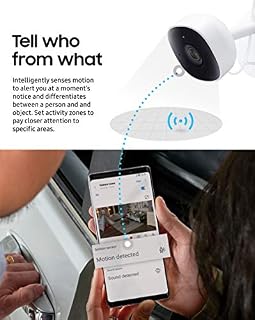
- Intelligent person detection filters out background motion like drafty acoustic panels or pets
- Built-in two-way audio enables direct communication into the production room
Samsung SmartThings Cam Features Explained
Wide-Angle 145-Degree HDR Video and Night Vision
Studio environments present unique optical challenges, often featuring extreme dynamic range caused by intense key lights, glowing computer monitors, and dark acoustic foam corners. The unit records in 1080p HD with HDR processing, allowing it to balance harsh studio lighting spills against shadowed gear racks. Its 145-degree diagonal field of view ensures that a single camera placed in the corner of a studio room captures the perimeter door, equipment shelves, and workstation desk simultaneously.
When the studio goes dark after a shoot, built-in IR LED night vision activates automatically to illuminate the frame. This infrared support maintains continuous visual tracking over valuable production equipment overnight, providing clean monochrome feeds without requiring ambient lighting or leaving studio lamps turned on.
Intelligent Motion and Audio Filtering
Standard indoor cameras often bombard users with errant alerts triggered by shifting HVAC vents, curtains, or moving shadows. This unit employs onboard processing designed to distinguish between human movement and inanimate objects. This advanced motion detection ensures that notifications sent to your smartphone or tablet represent genuine activity, such as an unauthorized visitor entering the control room, rather than minor atmospheric shifts in the room.
Beyond optical movement, the hardware includes audio detection that triggers alerts upon sensing unexpected sounds. When paired with smart locks like the ultraloq bolt fingerprint on a studio door, creators can instantly verify whether studio audio activity matches authorized room entry, keeping security checks rapid and actionable.
SmartThings Multi View Monitoring and Screen Casting
Creators working across multiple rooms—such as a dedicated sound booth, a video staging area, and an editing bay—require immediate situational awareness. Through the companion app, the multi-view feature enables users to view up to four camera streams simultaneously. The dashboard allows seamless toggling between portrait and landscape orientations, offering a condensed multi-panel surveillance wall directly on a mobile phone or tablet.
For editors who keep a secondary display or television mounted above their mixing console, the feed can route straight to a compatible Samsung TV screen. This lets you inspect entryways or exterior gear drop-off points without taking your hands off the editing keyboard or breaking focus during production tasks.
Hubless Wi-Fi Architecture and Network Flexibility
Setting up security in a home workspace should not require re-architecting your entire network closet. Unlike older smart platform accessories that mandated proprietary bridge hardware, this camera functions directly over standard Wi-Fi. You simply plug it into wall power, pair it to your existing local wireless network via the app, and stream encrypted footage immediately without purchasing extra hardware.
While a SmartThings Hub is completely optional, users who already maintain an automated studio setup can link the camera into that central ecosystem. This allows the camera to act as a trigger, switching on work lights or notifying personal devices when activity occurs in off-limit gear closets.
Cloud Archiving and Communication Security
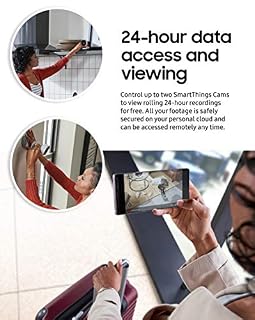
Recorded security footage is only as dependable as the pipeline carrying it. This camera utilizes two-way protection enhanced encryption to protect video streams and event logs against interception, ensuring that private studio rehearsals or proprietary client projects remain secure. The system stores captured event clips on a personal cloud account accessible exclusively through authenticated user devices.
Out of the box, the product includes rolling 24-hour cloud storage for recorded motion clips without requiring a paid tier. For production houses needing longer retention periods to audit weekly deliveries or multi-day gear rentals, Samsung provides an optional SmartThings Video Premium Plan upgrade path.
Specs
| Attribute | Detail |
|---|---|
| Video Resolution | 1080p HD with HDR |
| Field of View | 145-degree diagonal |
| Night Vision | Built-in IR LED |
| Audio System | Two-way audio (microphone and speaker) |
| Connectivity Protocol | Wi-Fi (Wireless) |
| Hub Requirement | None (SmartThings Hub optional) |
| Form Factor | Bullet |
| Enclosure Material | Plastic |
| Color Option | Black/White |
| Mounting Type | Stick Up |
| Weather Rating | IP54 / Not Water Resistant (Indoor Use) |
| Sensors and Alerts | Audio and Intelligent Motion Detection (Person vs. Object) |
Figures quoted from the product listing. Nothing here was measured.
Samsung SmartThings Cam Pros and Cons
Pros
- Hub-free direct Wi-Fi connectivity
- Wide 145-degree field of view
- Intelligent person-versus-object motion detection
- HDR video balancing under studio lights
- Free 24-hour rolling cloud storage
- Supports multi-view streaming up to four cameras
Cons
- Restricted strictly to indoor use
- No onboard microSD local storage specified
- Extended recording history requires paid plan
Best Use Cases
- Monitoring expensive desktop editing bays, camera shelves, and hard drive archives in a dedicated home studio.
- Checking delivery personnel or studio visitors via two-way audio without leaving the sound recording desk.
- Keeping continuous watch over multi-angle workspaces using multi-view quad-streaming on a secondary tablet.
- Verifying nighttime facility integrity through automated infrared capture across dark rehearsal spaces.
- Supplementing automated entry setups alongside a smart deadbolt like the yale assure lock 2 zwave for complete access tracking.
Before You Buy
Prospective buyers should note the environmental limitations of this model. The chassis is rated IP54 and designated strictly for indoor use; the manufacturer explicitly categorizes the device as not water resistant. If your production workflow extends outdoors or requires monitoring detached gear sheds subject to heavy rain, an outdoor-rated alternative like the camera wyze cam og is better suited to withstand exterior moisture exposure.
Additionally, while cloud recording operates without a recurring fee for the first rolling 24-hour cycle, the listing does not specify onboard local storage options such as a microSD card slot. Production professionals who demand local redundant backups or continuous multi-week offline archival will need to rely entirely on cloud access, or opt into the premium cloud subscription plan for extended video clip history.
Bottom Line
The Samsung SmartThings Cam proves itself as an effective, low-friction monitoring tool for creators who need to safeguard studio hardware. Its blend of high dynamic range optics, ultrawide coverage, and reliable person detection provides peace of mind while keeping unnecessary mobile notifications to an absolute minimum.
If you want clear workspace visibility that operates independently of bulky hub equipment yet easily ties into a broader smart home network, this camera provides a dependable, high-clarity monitoring anchor for your production space.
FAQ
Does the Samsung SmartThings Cam require a dedicated SmartThings Hub?
No, a SmartThings Hub is not required. The camera connects directly to your home Wi-Fi network, allowing full remote streaming and motion alerts via the SmartThings mobile app. A hub is strictly optional for users wishing to integrate the camera into broader smart home automation routines.
Can I monitor the camera video feed on a television?
Yes, the camera can connect directly to compatible Samsung televisions, allowing you to cast and view your live surveillance feed on a large screen while working or editing.
How does the camera prevent false motion alerts?
The device uses intelligent motion detection algorithms that analyze detected shapes to distinguish human beings from general objects. This significantly cuts down on false security pings caused by pets, shadows, or background equipment movement.
How much video cloud storage is included?
The camera comes with free rolling 24-hour cloud storage for recorded motion clips. Users who require access to footage beyond that 24-hour window can choose to upgrade to the optional SmartThings Video Premium Plan.
Can I view more than one camera at a time?
Yes, the SmartThings app supports a multi-view layout that allows you to display feeds from up to four cameras simultaneously in either portrait or landscape orientation.