As Amazon Associates, we earn from qualifying purchases. This means we may receive a small commission at no extra cost to you if you click through and make a purchase.

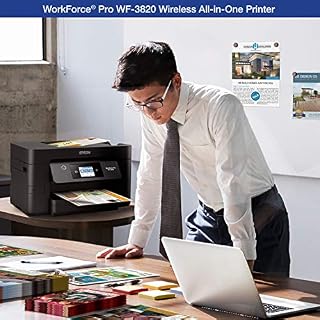
Managing production schedules, project briefs, client agreements, and physical packaging proofs requires an output engine that never stalls during high-volume production days. For creative agencies, small studios, and independent digital creators, desktop real estate is limited, making oversized commercial copiers impractical. The Epson WorkForce Pro WF-3820 is engineered specifically to tackle this balance, combining high-resolution inkjet precision with the rapid mechanical cadence typically demanded in corporate environments. By uniting a flatbed scanner, automated document feeder, and an active internal print architecture within a compact desktop footprint, it delivers an integrated document hub tailored for agile workspaces.
Our comprehensive evaluation reveals that this all-in-one desktop tool stands out as a dependable workhorse for text documents, mixed visual graphics, and daily office paperwork. While it relies entirely on proprietary ink cartridges rather than high-capacity bulk reservoirs, the inclusion of instant-dry pigment inks and rapid heat-free print firing makes the epson wf-3820 printer an effective asset for high-demand administration. For creators seeking crisp administrative physical prints, client-ready proposals, and seamless digitizing workflows without unnecessary equipment delays, the unit offers a focused, performance-driven solution.
Quick Verdict
The Epson WorkForce Pro WF-3820 delivers impressive productivity for document-heavy workspaces, utilizing sophisticated printhead tech to output clean, smear-free text and rich visual diagrams at business-class velocities.
- PrecisionCore Heat-Free Technology provides rapid print speeds of 21 ISO ppm for black and 11 ISO ppm for color.
- DURABrite Ultra pigment inks produce sharp text and graphics that resist moisture and smudging instantly.
- Robust paper handling features include a 250-sheet front cassette and an integrated 35-page automatic document feeder.
- Operation is strictly limited to genuine Epson ink cartridges, which must be factored into ongoing supply planning.
Epson WorkForce Pro WF-3820 Features Explained
PrecisionCore Heat-Free Printhead and Output Speeds
At the center of this machine is the proprietary epson wf-3820 precisioncore architecture, which sets it apart from traditional thermal inkjet designs. Thermal systems rely on electric heating elements to boil ink and generate vapor bubbles that push droplets through nozzles, a physical process that requires warm-up time before the first sheet can feed. In contrast, this heat-free piezoelectric design applies mechanical pressure directly to fluid reservoirs, firing droplets instantly without thermal lag. This allows the printer to achieve a fast first-page-out cadence and maintain steady epson wf-3820 print speed ratings of up to 21 ISO pages per minute for monochrome jobs and 11 ISO pages per minute for full-color tasks.
For independent studios that frequently print short multi-page proposals, shipping manifests, or run-of-show schedules, rapid first-page processing is far more valuable than nominal top speed. The dual-processor arrangement coordinates processing tasks smoothly, ensuring that heavy vector graphics and dense PDF layouts render cleanly. Teams with even higher volume requirements might explore the Epson WorkForce Pro WF-4834 wireless all-in-one printer for expanded paper reserves, but the baseline engine here handles steady studio throughput reliably.
DURABrite Ultra Pigment Ink Formulation
Inkjet hardware often struggles when handling heavy text documents due to dye-based inks bleeding into porous fibers or smearing under highlighters. The epson wf-3820 pigment ink approach resolves this completely by deploying DURABrite Ultra all-pigment sets across all color channels. Pigment particles remain suspended on the surface of plain paper fibers rather than absorbing deeply into the sheet, yielding exceptionally sharp character edges, deep black density, and crisp fine lines that closely mimic laser output.
Because the ink dries almost instantaneously upon contact with the page, printed materials can be handled, stacked, signed, or highlighted immediately without risk of smearing or ink transfer. For professionals producing formal contracts, client portfolios, or parcel slips that may encounter moisture during shipping, this durability provides essential peace of mind. The printhead achieves a high native resolution of 4800 x 2400 dots per inch, rendering subtle gradients, charts, and brand assets with uniform tonal quality on standard plain paper stock.
Paper Capacity and Automated Duplex Printing
Workflow interruptions to refill input trays break creative concentration and stall administrative momentum. The unit features an internal paper tray with a generous 250-sheet capacity, accommodating an entire standard ream half-pack at once. This internal drawer protects clean paper stock from dust, studio debris, and accidental liquid spills while preserving a neat footprint on crowded work surfaces. By housing the main paper supply internally, the printer prevents paper curling that often occurs in open, rear-fed sheet loaders.
Productivity is further augmented by integrated epson wf-3820 duplex printing, which flips sheets automatically without requiring manual intervention or page re-feeding. Running double-sided output cuts paper consumption in half, reducing physical archiving volume for long script revisions, financial reports, and reference documents. While high-volume refill systems like the Epson EcoTank all-in-one printer offer different approaches to consumables, the robust automated mechanical duplexing inside this unit streamlines dense administrative jobs effectively.
Document Capture and Scanner Workflow
A studio all-in-one must handle digital ingestion just as proficiently as physical output. The epson wf-3820 scanner workflow combines a flatbed glass platen with a top-mounted 35-page automatic document feeder (ADF). The flatbed accommodates bound books, sensitive receipts, thick media proofs, and delicate artwork that cannot safely travel through a sheet-fed mechanism. The integrated ADF processes multi-page documentation batches sequentially, allowing operators to digitize lengthy production packets or legal agreements hands-free.
On the processing side, black-and-white copying speeds reach up to 40 pages per minute, making quick work of administrative duplications during tight project deadlines. Digitized documents can be directed seamlessly across the local studio network or pushed straight to connected workstations. Whether archiving project receipts or assembling digital client deliverables, the scanning framework eliminates administrative friction and speeds up paperless organization.
Interface and Mobile Connectivity
Navigating device preferences and print queues is simplified via a centered 2.7-inch color LCD touchscreen. The graphical menu interface provides intuitive access to ink level monitoring, network diagnostic tools, copy settings, and direct scan destinations without demanding complex button combinations. The display tilts upward slightly to offer clear viewing angles whether the unit sits on an elevated credenza or beneath a standing desk.
Wireless integration allows the device to communicate directly with laptops, editing rigs, and mobile devices across modern wireless networks. Built-in smartphone compatibility and application controls let team members trigger print runs directly from field tablets or mobile phones right from the studio floor. While extensive corporate operations might opt for expansive business-tank hubs such as the Epson EcoTank ET-4958 wireless all-in-one color supertank printer, the agile mobile controls here provide complete setup convenience for modern desktop creators.
Specs
| Attribute | Detail |
|---|---|
| Printer Type | Color Inkjet All-In-One |
| Printhead Technology | PrecisionCore Heat-Free Technology |
| Maximum Print Resolution | 4800 x 2400 dpi |
| ISO Print Speed | 21 ppm black, 11 ppm color |
| Maximum Copy Speed | Up to 40 ppm (black and white) |
| Automatic Document Feeder | 35-page capacity |
| Paper Input Capacity | 250 sheets plain paper (1 tray) |
| Duplex Printing | Automatic 2-sided printing |
| Display Interface | 2.7-inch color LCD touchscreen |
| Dimensions and Weight | 16.7″D x 17.1″W x 9.8″H; 19.4 lbs |
Figures quoted from the product listing. Nothing here was measured.
Epson WorkForce Pro WF-3820 Pros and Cons
Pros
- Fast 21 ppm black print speed
- DURABrite Ultra instant-dry pigment inks
- High 4800 x 2400 print resolution
- Generous 250-sheet input paper tray
- 35-page automatic document feeder
- Reliable PrecisionCore Heat-Free Technology
Cons
- Exclusively accepts genuine Epson cartridges
- Single paper tray limits media switching
- Substantial 19.4-pound physical footprint
Best Use Cases
- Small production studios needing sharp, moisture-resistant project briefs, invoices, and physical shot lists printed quickly.
- Home offices that require high-speed automated double-sided document output without occupying excessive desk surface area.
- Administrative desks handling recurring multi-page digitization via the integrated 35-sheet automatic document feeder.
- Independent creators seeking clean graphical mockups and crisp typography on standard plain paper stock.
Before You Buy
Prospective buyers evaluating the epson workforce pro wf-3820 specs must account for manufacturer supply policies and media feeding mechanics. The listing explicitly states that this machine is engineered exclusively to operate with Epson Genuine Cartridges. Third-party inks, remanufactured cartridges, and unauthorized refill systems can trigger error prompts or cause hardware damage that is not covered under the limited warranty. If your operating workflow relies heavily on budget generic consumables, this strict cartridge validation system requires careful operational planning.
Additionally, physical configuration choices warrant close attention before deployment. The printer incorporates a single 250-sheet bottom paper cassette designed specifically for plain paper media; the listing does not specify dedicated secondary multipurpose bypass slots or separate photo paper trays. Weighing 19.4 pounds and measuring 16.7 inches deep by 17.1 inches wide, it demands a sturdy, dedicated tabletop shelf. For buyers questioning is epson wf-3820 worth it, the answer hinges on whether your daily needs emphasize rapid document speeds and smear-resistant pigment output over multi-tray media flexibility.
Bottom Line
The unit fulfills its intended mission as an agile, business-class desktop peripheral. By combining PrecisionCore firing velocity, durable DURABrite Ultra pigment formulations, and an intuitive touchscreen controller, it eliminates the sluggishness often associated with standard inkjet peripherals. The inclusion of automatic two-sided printing and a 35-page ADF ensures that multi-sheet administration runs smoothly with minimal user supervision.
While the single paper cassette limits on-the-fly media switching and the mandatory genuine cartridge requirement dictates your ink supply path, its mechanical reliability is undeniable. For busy home studios, freelancers, and small workgroups seeking an efficient epson wf-3820 for home office duties, this all-in-one delivers dependable speed, exceptional text legibility, and refined daily workflow performance.
FAQ
Does the Epson WorkForce Pro WF-3820 support automatic double-sided printing?
Yes, the printer features built-in automatic two-sided printing. The internal duplexing mechanism flips plain paper sheets automatically without requiring you to manually turn or re-insert pages, significantly reducing paper waste and manual effort on long documents.
What type of ink does the Epson WF-3820 use?
This printer uses DURABrite Ultra instant-dry pigment inks across all color channels. Pigment ink rests on top of paper fibers rather than penetrating deeply, ensuring that text and graphics remain crisp, resist water droplets, and do not smear when highlighted.
Can I use third-party or remanufactured ink cartridges with this printer?
No, the listing specifies that the printing system is designed exclusively to work with Epson Genuine Cartridges. The printer checks for authentic microchips, and using non-genuine ink supplies could cause damage that is not covered under the manufacturer’s limited warranty.
How does the scanner workflow function on this machine?
The unit includes both a flatbed platen for delicate single sheets or bound books and a 35-page automatic document feeder for multi-page stacks. You can direct scanned files over the local wireless network or copy documents at speeds up to 40 pages per minute.
What paper types and input capacities are supported?
The primary input cassette accommodates up to 250 sheets of plain paper, protecting the stack internally from dust and curling. The listing specifies plain paper as the primary print media and notes a single tray configuration for paper handling.