As Amazon Associates, we earn from qualifying purchases. This means we may receive a small commission at no extra cost to you if you click through and make a purchase.

Creative studios, vloggers, and independent digital media creators frequently encounter severe operational friction when physical paperwork collides with rapid digital production. Whether organizing filming permits, compiling talent release agreements, printing content planning storyboards, or managing administrative contracts, sluggish single-sheet printing and manual flatbed scanning drain productive hours. The epson workforce pro wf-4834 wireless all-in-one printer targets this exact bottleneck by bringing commercial-tier paper handling, rapid output, and automated dual-sided digitizing into home production offices.
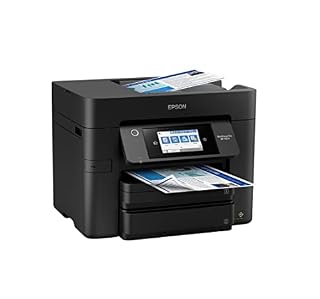
The Epson WorkForce Pro WF-4834 proves to be a dedicated workhorse peripheral engineered for volume, delivering swift first-page execution and comprehensive duplexing that keeps administrative tasks from derailing creative schedules. If your studio routinely generates multi-page script packets or processes incoming signed release forms, its dual-tray paper reserve and automatic document feeder provide exceptional workflow autonomy without demanding constant manual intervention.
Quick Verdict
The Epson WorkForce Pro WF-4834 serves as a rugged, high-throughput command station for creators needing serious office utility, balancing brisk document delivery with comprehensive auto-duplex digitizing.
- Fast PrecisionCore engine yielding 25 black and 12 color ISO pages per minute with quick first-page emergence.
- Robust 500-sheet paper capacity split across two 250-sheet front cassettes to minimize refill cycles.
- 50-sheet auto document feeder offering complete double-sided scanning, copying, and printing workflows.
- Modern connectivity featuring Bluetooth Low Energy mobile onboarding, Wi-Fi Direct, and wired Ethernet.
Epson WorkForce Pro WF-4834 Features Explained
PrecisionCore Heat-Free Engine and Print Speed
At the core of the machine sits proprietary PrecisionCore Heat-Free Technology, a printing mechanism engineered to fire micro-droplets without requiring warm-up cycles. Unlike conventional thermal units that must preheat an internal heating element, this piezoelectric architecture discharges ink instantly upon receiving a job. In an in-depth epson wf-4834 precisioncore review perspective, this translates directly to reduced latency between sending a print job from your editing workstation and holding the final page in your hand. The epson wf-4834 print speed reaches an impressive 25 ISO pages per minute for monochrome text and 12 ISO pages per minute for color graphics, ensuring lengthy client invoices, creative briefs, or production call sheets finish rapidly.
Because the print head operates without thermal stress, the unit demonstrates prolonged mechanical reliability during heavy print runs while keeping operational energy consumption low. For hybrid creators who switch between editing video timelines and outputting administrative paperwork, avoiding mechanical pauses makes a noticeable cumulative difference. Those considering a compact alternative like the epson wf-3820 printer will notice that the WF-4834 offers higher volume headroom and a distinct mechanical advantage in print throughput.
Workforce Pro WF-4834 Auto Duplex Scanning and ADF Capacity
Digital media production generates substantial physical documentation, from signed location contracts to gear rental receipts. The workforce pro wf-4834 auto duplex scanning system utilizes an integrated 50-sheet Auto Document Feeder paired with a flatbed scanner to automate digitization. Instead of manually flipping every page of a vendor contract on a flatbed glass, the ADF pulls dual-sided sheets through in continuous succession, capturing both sides of the document in a single automated sweep.
This multi-page ingestion couples with Epson ScanSmart software, which provides direct tools to preview, reorder, crop, and route digitized documents straight into cloud drives, network folders, or email attachments. The scanner subsystem accommodates both flatbed placement for delicate, non-standard items and continuous sheetfed scanning for thick document stacks. For creators who need to archive legal documents quickly before moving to shooting or editing, this duplex automation eliminates tedious document prep work.
Dual-Tray Paper Capacity and Studio Management
Paper replenishment is one of the most frustrating interruptions in a busy production workflow. The epson wf-4834 paper capacity addresses this with a massive 500-sheet total volume distributed across two independent 250-sheet cassettes. This two-drawer configuration allows studio workers to load a full ream of plain paper at once, ensuring uninterrupted printing across weeks of intensive office work.
Having two distinct trays also grants flexible media distribution. While the hardware specifications designate plain paper media, keeping two separate paper trays active means you can designate one tray for everyday drafting and scripts while maintaining standard business letterhead or invoicing sheets in the other. In contrast to devices like the hp officejet 9025 all-in-one printer, the WF-4834 integrates its 500-sheet payload cleanly within a square desktop profile that integrates neatly into studio shelving or credenzas.
DURABrite Ultra Pigment Inks and Print Durability
Content creators often need output that endures handling on set, in outdoor production environments, or through mail transit. This machine utilizes DURABrite Ultra pigment-based inks, specifically engineered with insoluble resin-coated particles that anchor firmly to plain paper fibers. The compatible cartridge set, labeled as epson 822 ink wf-4834 supplies, yields crisp typography and vibrant graphics that dry instantly upon leaving the output tray.
Because the pigment formulation resists water smudging and highlighter bleed, production schedules and crew call sheets can be marked up immediately with highlighters without blurring crucial instructions. Black text output remains razor-sharp with clean edges, preventing the feathering often seen with dye-based consumer printers. While high-volume creators might also evaluate supertank hardware such as the epson ecotank et-4958 wireless all-in-one color supertank printer for bottle-filled economics, the pigment formulation in the WF-4834 offers immediate smudge resistance tailored for business-grade deliverables.
Touchscreen Control, Smart Panel App, and Wireless Setup
Navigating printer operations should never require deciphering cryptic error codes or navigating tiny monochrome screens. The WF-4834 incorporates a sizable 4.3-inch color touchscreen display that sits prominently on the front control panel. The capacitive interface provides responsive touch feedback, presenting large icons for copying, scanning, faxing, and hardware maintenance, alongside a 999-copy batch setting capacity for multi-copy distributions.
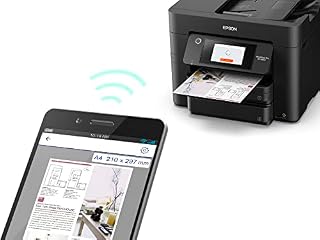
The wf-4834 wireless setup is streamlined through Bluetooth Low Energy integration, allowing users to pair a smartphone or tablet directly through the Epson Smart Panel app. This app lets you monitor consumable statuses, initiate high-resolution scans, execute clean print jobs from iOS or PC devices, and perform routine firmware updates straight from your pocket. The unit also includes Wi-Fi Direct and standard Ethernet networking, ensuring stable connectivity across local area studio networks.
Specs
| Attribute | Detail |
|---|---|
| Printer Type | Inkjet |
| Print Speed | 25 ISO ppm Black, 12 ISO ppm Color |
| Maximum Copy Speed | 16 ppm Black and White |
| Paper Capacity | 500 sheets total via two 250-sheet trays |
| Auto Document Feeder | 50-sheet capacity |
| Duplex Capabilities | Auto 2-sided print, copy, scan, and fax |
| Display Screen | 4.3-inch color LCD touchscreen |
| Compatible Ink | Epson 822 ink cartridges |
| Physical Dimensions | 15.3 inches deep by 16.7 inches wide by 13 inches high |
| Item Weight | 26.2 pounds |
| Connectivity | Wi-Fi, Wi-Fi Direct, Ethernet, Bluetooth Low Energy |
Figures quoted from the product listing. Nothing here was measured.
Epson WorkForce Pro WF-4834 Pros and Cons
Pros
- Fast print speeds up to 25 black ppm
- Generous 500-sheet dual tray paper capacity
- Full auto duplex printing copying and scanning
- 50-sheet automatic document feeder
- Large 4.3-inch color touchscreen interface
Cons
- Substantial desktop footprint and 26-pound weight
- Cartridge-based ink system rather than refillable tanks
- Plain paper designated without specialty photo support
Best Use Cases
- Multi-page script and production call sheet distribution for video teams needing fast double-sided document output.
- Archiving signed talent releases and location agreements using the 50-sheet duplex automatic document feeder.
- Home office administrative management requiring dedicated 500-sheet paper trays for high-volume contract printing.
- Studio management tasks that demand smudge-resistant pigment ink prints for field clipboards and outdoor shoots.
Before You Buy
When evaluating the epson wf-4834 specs for a creative workspace, physical room and weight are key factors to verify in advance. The unit weighs 26.2 pounds and measures 15.3 inches deep, 16.7 inches wide, and 13 inches tall, requiring a sturdy desk, credenza, or dedicated equipment table rather than a flimsy shelf. In terms of operating systems and hardware compatibility, the listing specifies support for PC, iOS, and mobile devices utilizing the Epson Smart Panel application, alongside secure data erase protocols for office privacy.
Potential buyers should also note the media constraints and package particulars provided by the manufacturer. The specifications explicitly list plain paper as the supported print media, meaning specialized fine-art heavy cardstocks, glossy photo mediums, or vinyl craft materials are not detailed as supported media in the official listing. Furthermore, the listing does not specify whether full standard-yield ink cartridges or starter cartridges are included inside the retail packaging, so budgeting for a fresh set of epson 822 ink cartridges alongside your initial hardware purchase is prudent.
Bottom Line
For video producers, creative freelancers, and studio managers asking is epson workforce pro wf-4834 worth it, the answer depends entirely on your daily document volume. If your workflow requires churning through reams of production packets, duplexing large legal releases, and keeping administrative friction to an absolute minimum, this all-in-one delivers the rapid page throughput and 500-sheet stamina needed to run an efficient enterprise.
Deploying the epson wf-4834 for home office operations provides enterprise-level reliability via its PrecisionCore engine, dependable wireless options, and hands-off 50-sheet ADF scanning. While those wanting continuous refillable tanks might investigate solutions like the hp smart tank 6001 wireless all-in-one printer, creators prioritizing raw document pace, dual-tray capacity, and smudge-proof pigment prints will find the WF-4834 a highly capable production partner.
FAQ
Does the Epson WorkForce Pro WF-4834 support automatic two-sided scanning?
Yes, the unit includes complete duplex functionality across printing, copying, scanning, and faxing, powered by a 50-sheet Auto Document Feeder that digitizes double-sided paperwork automatically without requiring manual sheet inversion.
What ink cartridges are compatible with the WF-4834?
The printer utilizes Epson 822 ink cartridges, which contain DURABrite Ultra pigment-based inks engineered for crisp typography, accurate dot placement, and rapid-drying, smudge-resistant plain paper output.
How does the dual-tray paper feeder operate on this machine?
The WF-4834 provides a total capacity of 500 sheets split between two 250-sheet front cassettes, enabling you to store an entire ream of plain paper inside the machine or organize multiple paper types for varied print jobs.
How do you connect the WF-4834 to a wireless network?
The printer supports setup using Bluetooth Low Energy paired with the Epson Smart Panel mobile application, alongside standard Wi-Fi, Wi-Fi Direct, and hardwired Ethernet connections for local office networks.
Can the Epson WorkForce Pro WF-4834 print on glossy photo paper?
The manufacturer listing explicitly designates plain paper as the supported print media, and the listing does not specify compatibility with glossy photo paper, specialty art papers, or heavy cardstocks.