As Amazon Associates, we earn from qualifying purchases. This means we may receive a small commission at no extra cost to you if you click through and make a purchase.
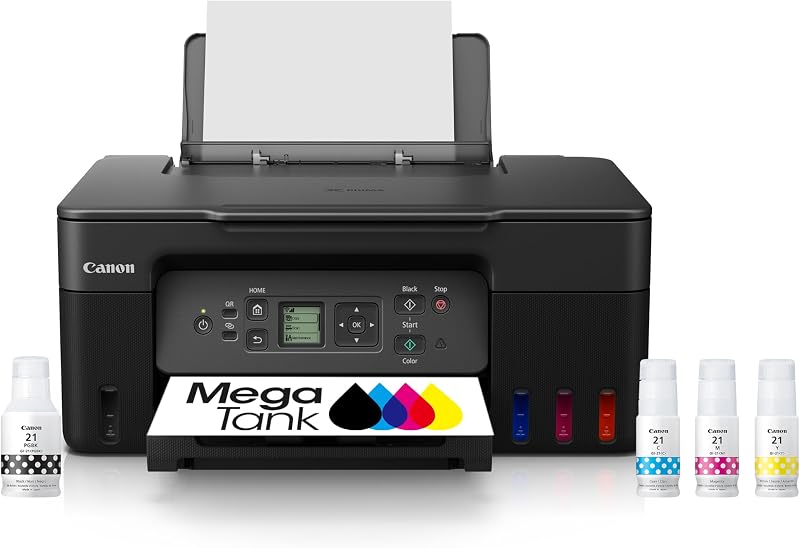
Creators, vloggers, and home studio hobbyists often find that routine document and visual asset printing stalls under the burden of recurring ink cartridge replacements. Between proofing storyboard sequences, producing custom packaging labels, printing vibrant photo references, and managing daily business invoices, standard desktop printers generate ongoing operational friction. The Canon MegaTank G3270 enters this creative workspace as an all-in-one color inkjet printer engineered specifically to eliminate cartridge anxiety through high-capacity refillable reservoirs. By prioritizing raw ink volume and broad media compatibility, this model aims to provide visual artists and independent makers with a reliable, continuous printing solution capable of keeping pace with demanding production schedules.
Our Canon G3270 review evaluates how this continuous ink tank printer balances creator demands against hardware limitations. While the lack of automatic duplexing requires manual intervention for two-sided documents, its massive ink yield and versatile borderless handling make it a strong candidate for image-focused studios.
Quick Verdict
The Canon MegaTank G3270 is a dependable, high-yield all-in-one printer designed for creative entrepreneurs and hobbyists who generate high volumes of visual assets and color drafts. By offering up to 6,000 black-and-white pages or 7,700 color pages from a single set of ink bottles, it drastically reduces recurring supply hassles while maintaining reliable flatbed scanning and crisp borderless media rendering.
- Massive bottle-fed ink capacity delivering high-yield color and monochrome production
- Reliable borderless photo and card stock media handling for studio craft projects
- Integrated flatbed scanner and standalone copier paired with an intuitive 1.35-inch LCD
- Single-sided printing engine requiring manual intervention for double-sided documents
Canon MegaTank G3270 Features Explained
MegaTank Ink Reservoirs and Page Yield
At the core of the Canon MegaTank G3270 is its integrated continuous ink tank architecture, which fundamentally transforms how creators manage consumable supplies. Rather than relying on small ink cartridges that run dry during critical photo runs, this system utilizes high-volume reservoirs built directly into the front chassis. The product listing specifies that the printer includes up to two years of ink in the box, yielding up to 6,000 black-and-white pages or up to 7,700 color pages from a single ink set. This substantial Canon MegaTank ink capacity frees independent creators from constantly monitoring supply levels or pausing creative sessions for replacements.
For home studios producing multi-page graphic layouts, lookbooks, or full-color concept art, the visual ink windows on the front panel provide instant confirmation of remaining fluid. The refillable bottle system ensures clean transfers into designated color-coded chambers without spills or pressurized leaks. This continuous supply architecture makes high-volume color draft printing practical for daily studio workflows, whereas traditional cartridge models frequently force artists to ration color usage.
Borderless Media Handling and Paper Flexibility
Visual creators, sticker makers, and craft enthusiasts depend heavily on flexible media intake, and the Canon 3270 crafting printer profile accommodates a broad assortment of paper stocks. The internal print engine supports Canon G3270 borderless printing across multiple standard dimensions, allowing photo proofs, promotional postcards, and borderless art prints to emerge without unwanted white borders. The hardware handles card stock, envelopes, glossy photo paper, high-resolution paper, and standard plain sheets with equal stability through its rear feed tray.
When deploying the Canon G3270 for photo printing, the machine deposits color droplets evenly across glossy and high-resolution surfaces, preserving tonal transitions and visual clarity. Creators producing small-batch product packaging, physical mood boards, or promotional sticker sheets can configure custom print settings knowing the feed path accommodates heavier card stock without skewing or jamming. The listing notes that borderless output is integrated natively into the firmware, simplifying the pipeline from digital graphic software to final trimmed product.
Wireless Setup and Mobile App Connectivity
Modern creator environments rarely revolve around a single tethered desktop workstation, making wireless accessibility a core workflow requirement. The Canon MegaTank G3270 wireless setup pairs directly with network-ready infrastructure and connects effortlessly to mobile environments, including iOS controller architectures, smartphones, and tablets. Through manufacturer mobile applications, creators can transmit photo edits, digital illustrations, or administrative invoices straight from a tablet or smartphone without booting a primary editing workstation.
In practical studio applications, having network-ready wireless connectivity allows multiple team members or collaborators to send print jobs to a shared station across the room. Studio members can position the printer on a dedicated utility cart or storage credenza away from desk space, initiating borderless prints or scanning documents via flatbed directly from their handheld devices. For teams comparing multi-machine network environments, examining dedicated office options like the canon 6020 printer can offer context on how different wireless configurations scale across varying workspace demands.
All-in-One Scanning, Copying, and Display Navigation
Beyond serving as an ink-efficient output engine, the Canon G3270 all-in-one printer incorporates a flatbed scanner and standalone copying system capable of managing multi-run reproductions of up to 99 copies per session. The flatbed surface accommodates bound sketchbooks, original watercolor illustrations, texture swatches, and physical receipts, digitizing assets with precise alignment. Black-and-white copying proceeds at speeds up to 11 pages per minute, delivering swift physical duplication for administrative tasks, studio releases, or workshop handouts.
Direct device interaction is guided by a 1.35-inch square LCD display located on the top control panel. This compact screen presents clear operational icons, network status indicators, maintenance prompts, and copy quantity selections, eliminating guesswork during standalone tasks. Users can adjust copy ratios, trigger head-cleaning sequences, or monitor connection health directly from the hardware without relying entirely on external computer software utilities.
Single-Sided Engine and Studio Workflow Realities
Understanding the mechanical boundaries of the Canon MegaTank G3270 is essential for proper studio integration, with its single-sided printing specification representing the primary operational compromise. Unlike enterprise office printers fitted with internal duplexing flipping units, this model requires manual paper re-feeding if a project requires two-sided content. For visual artists printing one-sided art prints, sticker sheets, product packaging inserts, or photo cards, this design limitation remains largely inconsequential.
However, if your daily schedule demands printing comprehensive multi-page client contracts, production scripts, or double-sided workshop booklets, manual duplexing introduces hands-on operational overhead. In studios where high-speed automated two-sided office printing takes precedence over continuous ink tanks, an office-focused model such as the epson wf-3820 printer might serve document production differently. Recognizing how single-sided feeds interact with your primary project types ensures the printer aligns with your production velocity.
Specs
A detailed review of the Canon 3270 printer specs highlights the core performance parameters and hardware characteristics provided in the manufacturer listing data.
| Attribute | Detail |
|---|---|
| Printer Type | Inkjet |
| Printer Output | Color |
| Key Functions | Wireless Print, Copy, Scan |
| Display Screen | 1.35-inch Square LCD |
| Ink Capacity & Yield | Up to 2 years of ink (6,000 black & white / 7,700 color pages) |
| Duplex Mode | Single-sided printing |
| Scanner Type | Flatbed |
| Max Black & White Copy Speed | 11 pages per minute |
| Maximum Copies Per Run | 99 |
| Supported Print Media | Card stock, Envelopes, Glossy photo paper, High-resolution paper, Plain paper |
| Special Features | Borderless Printing, Energy Star, EPEAT Qualified, Network-Ready |
| Dimensions & Weight | 21.9″D x 16.4″W x 10.6″H; 13.2 pounds |
| EU Spare Part Availability | 5 years |
Figures quoted from the product listing. Nothing here was measured.
Canon MegaTank G3270 Pros and Cons
Pros
- Up to two years of ink included
- High-yield yields up to 7,700 color pages
- Clean borderless printing across multiple media types
- Integrated flatbed scanner and standalone copier
- Compact 1.35-inch square LCD display
Cons
- Single-sided printing requires manual paper flipping
- Equipped with only one input tray
- Black-and-white copy speed limited to 11 ppm
Best Use Cases
- Printing high volumes of borderless color photography, mood boards, and visual references for creative production.
- Producing small-batch craft goods, custom greeting cards, and sticker sheets on card stock and glossy photo paper.
- Digitizing hand-drawn sketchbook illustrations, physical receipts, and material textures using the integrated flatbed scanner.
- Fulfilling daily studio administrative paperwork, packaging slips, and single-sided shipping documentation wirelessly from mobile devices.
- Generating up to 99 standalone copies of single-sheet visual handouts or reference guides for studio workshops.
Before You Buy
Before purchasing the Canon MegaTank G3270, verify that its physical footprint and media feed design fit your existing workspace layout. Measuring 21.9 inches deep, 16.4 inches wide, and 10.6 inches high while weighing 13.2 pounds, the unit demands a stable tabletop surface with sufficient overhead and rear clearance for paper loading. The printer relies on a single input tray for media feeding, meaning creators who frequently alternate between plain document paper and glossy photo stock must manually swap sheets between jobs. Furthermore, the unit natively features single-sided printing; if your studio workflow necessitates automated duplexing for dense multi-page documentation, evaluating heavy-duty office alternatives like the hp officejet 9025 all-in-one printer can help benchmark your throughput requirements.
Compatibility across modern digital platforms is streamlined through network-ready wireless connectivity, tablet integration, smartphone pairing, and an iOS controller type, managed through dedicated mobile apps. The manufacturer listing highlights that up to two years of ink bottles are provided in the box, yielding thousands of pages before additional supplies are required. However, the listing does not specify whether a physical USB connection cable is bundled, nor does it detail software discs or specialized paper sample packs. Additionally, creators requiring wide-format drafting, poster production, or architectural prints should note the G3270 is strictly a standard-format desktop unit; exploring dedicated large-format gear like the canon imageprograf tc-21 is advisable if your projects exceed traditional desktop paper boundaries.
Bottom Line
Deciding whether the Canon G3270 is worth it depends on your specific studio volume and the formats you produce each week. For visual artists, photographers, and crafters who consume high volumes of color ink on single-sided sheets, the immense tank capacity and borderless media versatility make it an indispensable creative tool. Eliminating the frustration and recurring expense of miniature ink cartridges allows creators to experiment freely with test prints, packaging iterations, and high-saturation imagery.
However, if your primary workload involves high-speed double-sided contract printing, multi-page booklet assembly, or high-volume document collation, the lack of automatic duplexing and reliance on a single input tray will prove limiting. When aligned with craft production, visual proofing, and low-maintenance studio output, the Canon MegaTank G3270 delivers outstanding long-term utility and reliable printing performance.
FAQ
Does the Canon MegaTank G3270 support automatic double-sided printing?
No, the Canon MegaTank G3270 supports single-sided printing only according to the manufacturer specifications. Users who need double-sided prints must manually re-feed pages into the rear tray after the first side finishes.
How do you complete the Canon MegaTank G3270 wireless setup?
The Canon MegaTank G3270 wireless setup connects through Wi-Fi using the 1.35-inch square LCD screen and manufacturer mobile apps. It is network-ready and compatible with iOS devices, smartphones, and tablets for cable-free printing and scanning.
Can you use the Canon G3270 for photo printing and borderless media?
Yes, the printer is equipped with borderless printing capabilities and supports glossy photo paper, card stock, high-resolution paper, and plain paper, making it suitable for photo proofs, art prints, and creative crafts.
How many pages can the Canon MegaTank G3270 print with included ink?
The listing states that the printer includes up to two years of ink in the box, providing up to 6,000 black-and-white pages or up to 7,700 color pages from a single set of ink bottles.
What are the maximum copy capabilities on the flatbed scanner?
The flatbed scanner allows standalone copying of documents and original artwork at speeds up to 11 pages per minute for black-and-white pages, supporting runs of up to 99 copies at a time.